
No: Odoo is only truly free for a business in two specific cases, the One App Free plan (a single app, hosted by Odoo) and the Community edition, which is open source but which you install, host and maintain yourself. As soon as a business uses two apps on the Odoo-hosted offer, it pays a per-user license: €19.90 per user per month on an annual commitment for the first year, then €24.90.
The confusion comes from Odoo's model. The publisher releases open source software, offers one app with no time limit and provides a trial with no credit card. Each of these doors is genuinely free. None of them covers, with no strings attached, what an SME with 10 to 50 employees expects: quotes, purchasing, inventory, invoicing and accounting in the same database. Here is what each option really gives you, what it costs once you are live, and how to choose. The screens shown are from Odoo 20.
Why do people say Odoo is free?
Because Odoo comes in two editions, released under two different licenses. Odoo's official documentation spells this out on its licenses page:
“Odoo 19 Community Edition is licensed under LGPL version 3 (also called LGPLv3). […] Odoo 19 Enterprise Edition is licensed under Odoo Enterprise Edition License v1.0 […]. This software and associated files (the “Software”) may only be used (executed, modified, executed after modifications) with a valid Odoo Enterprise Subscription for the correct number of users.” (Odoo 19.0 documentation, “Licenses” page)
In practice, Community is free software: you can download it, install it and use it without paying for a license. Enterprise is the commercial edition: it can only be used with a valid subscription, priced on the number of users. The One App Free plan is a special case: it runs on Odoo Online, the hosting managed by Odoo, with the same software as the paid subscriptions, and stays free as long as you use only one app.
On top of that comes the free trial, which gives access to every app for a limited time. So there are three free doors, but three very different logics.
| Option | What is free | What you still pay for |
|---|---|---|
| One App Free | One app, all your users, hosting | As soon as other apps are installed, every user's license |
| Community | The software license | Server, backups, security, migrations; and you give up the apps reserved for Enterprise |
| Free trial | Every app, no credit card | Nothing during the trial, but it ends |
| Standard or Custom | Version upgrades and, on Odoo Online, hosting | A license per user per month |
What does Odoo's One App Free plan really allow?
The One App Free plan gives access to one Odoo app, for as many users as you want, hosted by Odoo. Odoo's pricing page guarantees that this use is free forever, whatever the app's dependencies: if the app you choose needs other apps to work, they come free with it. The example Odoo gives is eCommerce, which depends on Website and Invoicing.
The same page does contain an ambiguity, though. Its FAQ states that the free plan lets you manage several companies and that Studio can be the chosen app, then specifies that installing Studio or adding companies to the database automatically moves you to the Custom plan. If your group has several companies, get Odoo to confirm this point before counting on it being free.
A sales team of eight tracking its opportunities in CRM, a department centralizing its expense reports in Expenses, a business that only wants a showcase website: the single app is enough, and it costs nothing.
The limit fits in one sentence: the plan stays free as long as the database has only one chosen app. To move to the Standard plan, the pricing page says you simply install the additional apps you need. From then on, every user is billed.
Yet an SME with 10 to 50 employees rarely needs just one app. The most common flow, from quote to payment, already involves sales and invoicing, then inventory as soon as there are physical products. A distributor that wants to link its purchase orders to its inventory needs Purchase and Inventory. A manufacturer adds Manufacturing, then Quality. For these businesses, the free plan is an entry point, not the destination.

You, announcing to the executive committee that the ERP will be free, right before the buyer asks for inventory too.
Is Odoo's Community edition a free solution for an SME?
Yes for the license, no for the rest. Community can be downloaded and installed at no cost, but hosting is your job, in-house or through a provider: a server, tested backups, security patches, monitoring, and someone who knows what to do when the database stops responding on a Monday morning.
It also does not include the apps reserved for the Enterprise edition, such as Studio, which lets you adapt screens and documents without writing code.
The least visible cost comes with versions. Odoo's documentation states that each major version is supported for three years, and strongly recommends using a supported version: staying current therefore means regularly migrating the database to a more recent version. On the Enterprise edition, this work is included in the subscription:
“With Odoo Enterprise, upgrading a database to the most recent version of Odoo is free, including any support required to rectify potential discrepancies in the upgraded database.” (Odoo 19.0 documentation, “Upgrade” page)
The documentation presents this free upgrade as a benefit of the Enterprise edition. For a Community database, you therefore need to decide in advance who will handle the migration, and on what budget. The same page also excludes from the upgrade services any modules developed in-house or by third parties that are not covered by a maintenance contract.
Another point to plan for: starting on Community and moving to Enterprise later is not a simple upgrade. Odoo's documentation lists the change of edition among the things an upgrade does not cover, and devotes a separate procedure to it. The edition is therefore best chosen from the start, rather than counting on a seamless switch the day the business grows.
This point carries a lot of weight, because a Community database may be tempted to fill its gaps with third-party modules. Every module you add must then be paid for again at every version change. Odoo's levels of customization, the third-party module trap and the burden of upgrades are covered in detail on our page about custom development, which we invite you to read here: when to adapt Odoo, and when to avoid it.
A concrete example: a 20-person business that installs Community on a rented server saves the license. In exchange, it takes on hosting, security and migrations. The math works mainly if it already has technical Odoo expertise in-house.

You, when the free version of Odoo turns you into the server administrator on a Sunday evening during period-end closing.
Beyond the server, going it alone raises a question of method. The essential steps (scoping, configuration, data migration, testing, go-live) and the real dangers of a do-it-yourself implementation are described in an article you can read here: installing Odoo yourself, and why it is a real challenge.
Does the free trial let you use Odoo without paying?
No. The trial gives access to every app and, as Odoo's sign-up page states, requires no credit card, but it is limited in time. Odoo displays it at the top of the apps home screen, with the number of days remaining.

The trial is therefore not a free-for-life version, contrary to what some answers found online suggest. Its purpose is to check that Odoo covers your flows: a quote turned into an order, a vendor receipt, an invoice, a bank reconciliation. Not to start live operations in the hope of deciding later.
For a business owner, the right question at the end of the trial is not “is it free?” but “how many users, on which plan, and for which apps?”. There are, in fact, real ways to pay less, without a promo code, and a longer trial through a partner. We have gathered them, with official prices, on a page we invite you to read here: the real discounts on Odoo licenses.
How much does Odoo cost once you go beyond the free options?
Odoo offers two paid plans, billed per user. The prices below are those listed on Odoo's pricing page for France in September 2026, excluding taxes.
- Standard: €19.90 per user per month on an annual commitment for the first year, then €24.90. Every app, hosted on Odoo Online.
- Custom: €35.90 per user per month on an annual commitment for the first year, then €44.90. It adds, among other things, Studio, agentic AI, multi-company management, external APIs and a choice of hosting: Odoo Online, Odoo.sh or your own servers. Odoo.sh hosting is not included in this price.
The basic calculation is simple: the number of users, multiplied by the plan's monthly price, multiplied by twelve. Three factors change that total, and they are the ones people forget.
1. Who counts as a user
Odoo bills user accounts. Since September 24, 2026, an employee listed in the Employees app without a user account is also billed; the Light User license, at €7.90 per user per month, covers this case, on quote from an Odoo advisor. Before signing, count the accounts and the employee records, not just the people who log in.
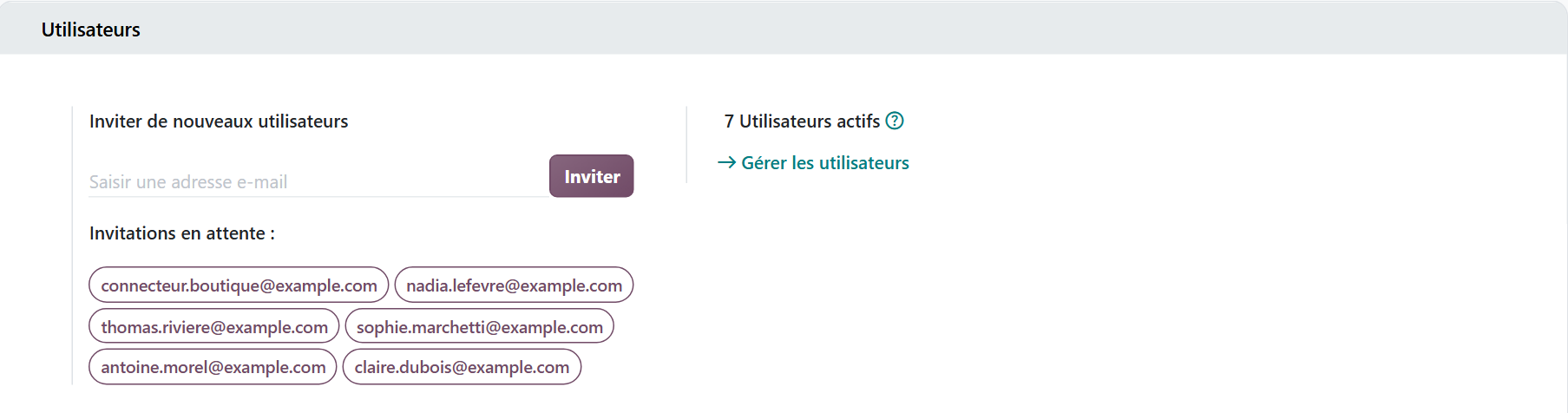
This section gives a first order of magnitude. The “Active Users” counter already includes pending invitations: in this test database, the 7 active users include the 6 invited people who have never logged in. An account that has been created is therefore part of the total, even if it is not in use yet. The “Manage Users” link opens the full list. Employee records without an account do not appear in this counter: they are counted separately, in the Employees app.
2. AI features
Odoo's AI features consume credits purchased separately. A team that uses them every day needs to budget for them, on top of the licenses.
3. The end of the first year
The first-year discount applies for 12 months to the users on the initial order; users added later pay the regular price. At renewal, it disappears: the year 2 budget is calculated at full price. Odoo also raised its prices on September 24, 2026, a reminder that a license price is not set in stone.
Is the license the real cost of Odoo for a business?
No, and that is why the question “free or paid?” is often the wrong one. Whether the license costs zero or €24.90 per user, a large share of a project's budget is decided elsewhere: configuring the flows, migrating data from the old tools, training the teams, adjusting after go-live. Odoo's pricing page says so itself: the implementation service is not included in any of its plans.
A poorly configured free database can cost more than a well-used subscription. Mistakes are paid for in time lost every day: wrong inventory that forces a recount, an invoice redone by hand, a salesperson re-entering quotes in a spreadsheet. These costs appear on no Odoo invoice, and they can weigh more than the license.
Conversely, paying for the license guarantees nothing if nobody configures the tool. The subscription gives you the software, the upgrades and, on Odoo Online, the hosting; it does not decide for you how your orders, purchases and invoices flow.
To estimate the full budget, including licenses, integration and training, and see how to finance it, we have published a page that details the estimate as a percentage of revenue, the difference between the first year and the long term, then loans, leasing and grants. You can read it here: how much an Odoo project costs, and how to finance it.
Which Odoo option should an SME with 10 to 50 employees choose?
The choice depends less on price than on the number of departments to connect and the skills available in-house.
- A single, well-defined need (sales tracking, showcase website, expense reports): the One App Free plan is enough, with no time limit.
- Several departments to connect, no technical team: the Standard plan, hosted by Odoo, upgrades included.
- Need for Studio, several companies in the same database, external APIs or hosting on Odoo.sh or your own servers: the Custom plan.
- In-house technical skills and the will to control everything: Community, budgeting for hosting, security and migrations.
In every case, run the numbers over several years, not just the first: end of the first-year discount, price changes, new users, AI credits. An ERP is kept for a long time, and it is over that period that a free option proves economical or not.
Hors du Commun is an Odoo integrator and partner in Lyon, with more than twenty projects delivered, mostly for businesses with 10 to 50 users. Our specialties: production and quality control, planning, purchasing, sales management and e-invoicing.
- Odoo, official documentation 19.0, “Licenses” page: https://www.odoo.com/documentation/19.0/legal/licenses.html
- Odoo, official documentation 19.0, “Upgrade” page: https://www.odoo.com/documentation/19.0/fr/administration/upgrade.html

Article written by Billy Felicie
Odoo integration expert at Hors du Commun (Lyon). I have been helping SMEs implement their digital tools and optimize their business processes for more than 5 years.