
To submit your invoices to Chorus Pro (the French public sector invoicing portal) from Odoo, you install the French localization module dedicated to Chorus Pro, register the company on the electronic exchange network, then enter the Chorus Pro identifier, 11000201100044, on the public buyer's record. After that, each confirmed invoice is sent from Odoo to Chorus Pro with the “Send” button, along with the executing service, the contract number and the legal commitment, with no re-entry in the portal.
That is the principle. In practice, an invoice addressed to a hospital, a town hall or a ministry does not forgive approximation: one misplaced identifier and it never leaves for Chorus Pro; one missing mandatory reference and it cannot be passed on to the buyer. This article walks through the configuration as described in Odoo's official documentation, shows the relevant Odoo 20 screens, and reviews what the September 2026 reform changes for public sector suppliers.
What do you need to submit invoices to Chorus Pro from Odoo?
Chorus Pro is the invoicing portal of the public sector. Every invoice addressed to the State, a local authority, a public health institution or another public body ends up there. Odoo's documentation presents it as follows:
“The Chorus Pro portal, managed by the AIFE (Agence pour l'Informatique financière de l'État), is the official platform for submitting electronic invoices to French public entities.” (Odoo, documentation 20.0, France localization)
For Odoo to submit your invoices there itself, four conditions must be met, according to the same documentation:
- the French localization module dedicated to Chorus Pro is installed (technical name: l10n_fr_facturx_chorus_pro);
- the company is registered on the Peppol network, through which Odoo routes invoices to Chorus Pro;
- the company has a Chorus Pro account;
- each public customer's record is configured so that its invoices go to Chorus Pro.
The module is not installed by default: the documentation lists it among those that must be installed manually. In our Odoo 20 test database, it is indeed there, not installed, under a display name left in English. This is the first thing to check on your own database, before wondering why the Chorus Pro fields are nowhere to be found on the invoice.
Without this flow, the public sector invoice has to be re-entered by hand in the portal. Chorus Pro does still offer manual entry or upload directly on the portal. For a few invoices a year, that is bearable. For a business that regularly bids on public contracts or works with purchasing centers, it means double entry, with the risk of a mismatch between the Odoo invoice and the Chorus Pro one.

You, copying into the Chorus Pro portal, line by line, an invoice you already typed into Odoo.
How do you prepare Odoo and the public buyer's record?
Preparation is done once for the company, then once for each public customer.
On the company side: the module and registration
Step one, install the module from the Apps menu: remove the “Apps” filter from the search bar, then search for “Chorus” or the technical name. Step two, check that your own company's SIRET (French business identification number) is filled in: the documentation makes it a prerequisite for sending.
Step three, registering on the network. Odoo's documentation states that invoices go from Odoo to Chorus Pro through the Peppol network, so you need to register on it. In Odoo 20, with the French localization, the Accounting settings show an “Approved Platform” block (PA, France's certified e-invoicing platform) with an “Activate e-invoicing” button. The same documentation specifies that a company registered on this e-invoicing network is automatically registered on Peppol, with no separate registration.
The Chorus Pro section of the documentation, however, still refers to sending “By Peppol”. On a database where the approved platform is activated, have Odoo support confirm the route your public sector invoices take before you send the first one.
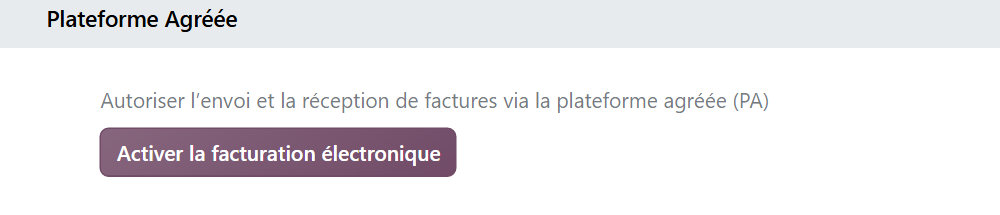
The activation itself requires the identity of the legal representative, signing a designation certificate and one day of lead time while the directory updates. Our tutorial walks through it in nine steps, with the six mistakes to avoid: activating Odoo's approved platform step by step.
Finally, if you do not have a Chorus Pro account yet, the documentation points to the portal itself, with its “Create an account” button.
On the customer side: the Chorus Pro identifier
On the public buyer's record, the documentation asks you to check three fields: Country, VAT and SIRET. Then, in the Accounting tab, “Customer Invoices” section:
- the e-invoice format “EU Standard (Peppol Bis 3.0)”, the exact label in the list in our Odoo 20 database (the documentation says “BIS Billing 3.0”);
- the “SIRET France” identifier, in which you enter 11000201100044, the reference used by Chorus Pro.
In our Odoo 20 database, the format field only appears in developer mode: without it, the “Customer Invoices” section only shows the payment QR code, the identifier and its status.
Two other Odoo 20 details, observed in our test database on fictitious public customers, deserve your attention. When you create a French record with its SIRET, Odoo copies that SIRET into the “SIRET France” identifier. And if you then fill in the VAT number, Odoo puts the customer's SIRET back in, even after 11000201100044 has been entered. So enter the Chorus Pro reference last, and check it again after any change to the record's identifiers. The customer's own SIRET stays where it is at the top of the record: the documentation requires it to be filled in.
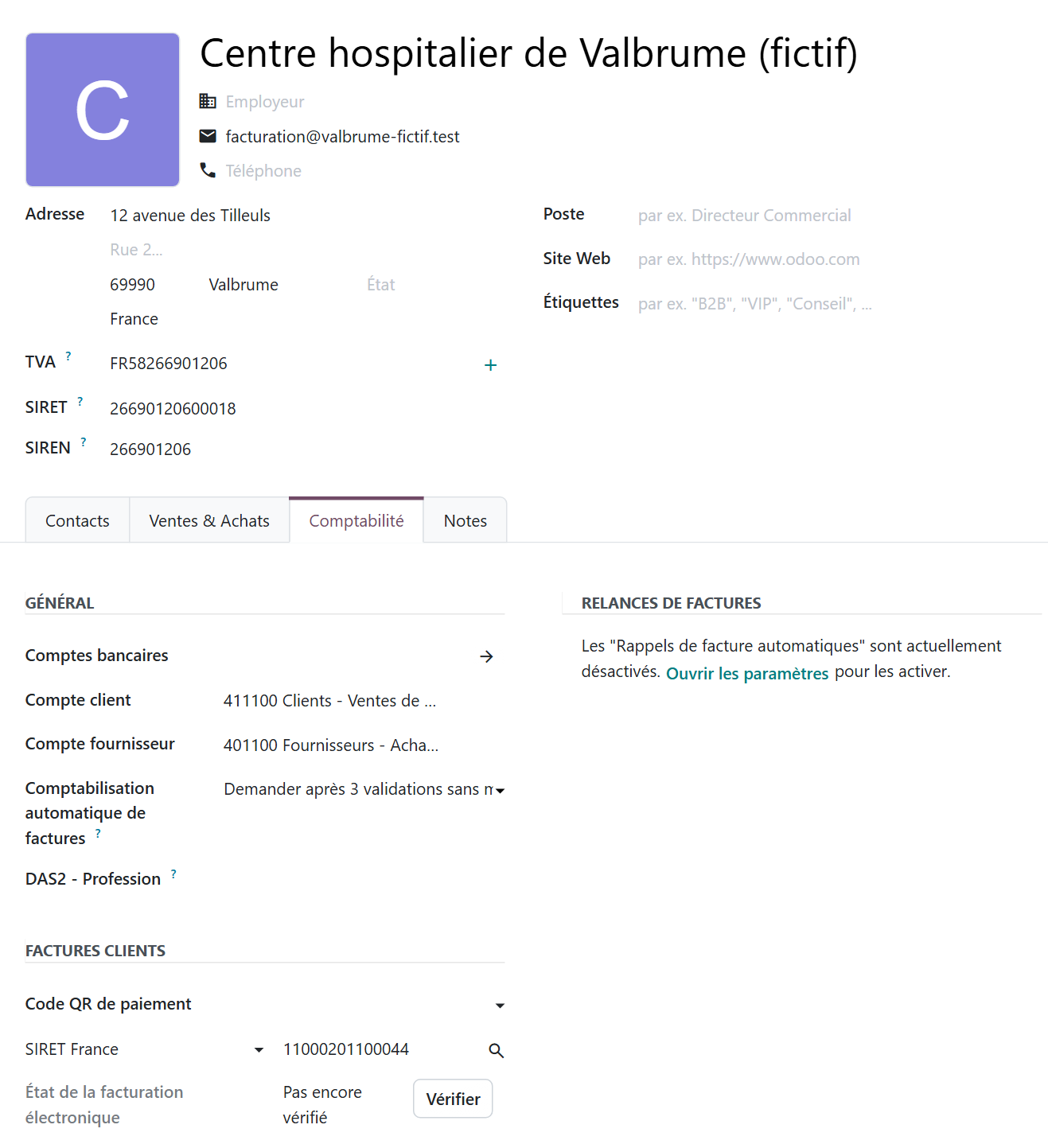
The “Verify” button, to the right of “E-invoicing status”, queries the network to find out whether the recipient can receive your invoices. As long as the status shows “Not verified yet”, nothing guarantees the recipient can be reached. Run the check before the first invoice, not after a rejection.
How do you send an invoice to Chorus Pro, step by step?
Once the preparation is done, sending takes a few clicks. Odoo's documentation describes it as follows.
Step 1Open or create the invoice.
In the “Other Info” tab, fill in the three references Chorus Pro requires. The documentation maps them as follows:
| Field in Odoo (according to the documentation) | Data expected by Chorus Pro |
|---|---|
| Buyer reference | Executing service |
| Contract reference | Contract number |
| Purchase order reference | Legal commitment |
These three fields come with the module dedicated to Chorus Pro. Since our test database does not have it installed, we do not show them in a screenshot, and their on-screen label may differ from the documentation: look for them in the “Other Info” tab once the module is installed.
Do you always have to fill them in? It depends on the buyer. The Chorus Pro directory of public entities indicates, for each entity, whether the service code (the executing service) and the legal commitment number are mandatory. For State services, which share a single SIRET in Chorus Pro, the same 11000201100044, both are always mandatory. The service code usually appears on the purchase order; if not, ask the buyer for it.
Step 3Confirm the invoice, after reviewing the three references.
Step 4Click “Send” and, in the sending window, check electronic sending. The documentation refers to the “By Peppol” option. In our Odoo 20 database, where the approved platform is installed, this sending method appears on the customer record (“Invoice sending” field, visible in developer mode) under a label that refers to the approved platform and is not yet translated into French: go by what you see on screen.
Step 5Click “Send”. According to the documentation, the invoice's e-invoicing status then changes to “Done”. Tracking how the administration processes it is done in Chorus Pro.

You, when your first invoice to the hospital switches to “Done” without you ever opening the Chorus Pro portal.
Do you still need to go through Chorus Pro with the approved platform?
The question has come up since September 1, 2026. The e-invoicing reform routes exchanges between businesses through approved platforms. For invoices addressed to the public sector, the DGFiP (French tax administration) has settled it: Chorus Pro remains the reference platform, and the supplier keeps the choice of channel.
“From September 2026, businesses supplying the public sector will be able to choose how to send their invoices: Either by using an approved platform […]; Or by using Chorus Pro and its procedures for sending invoices to government bodies […]” (impots.gouv.fr, July 18, 2025, updated September 9, 2025)
The same DGFiP page specifies that some flows remain specific to Chorus Pro and do not go through an approved platform: invoices for public works contracts, statements of court costs, reimbursement requests and management of the public sector's legal commitment reference data. If you invoice public works contracts, Chorus Pro remains mandatory for you.
It also points out that government bodies have been required to use Chorus Pro to receive and process their invoices since 2017. In other words, whatever your sending channel, the invoice ends up in Chorus Pro on the buyer's side.
The reform timeline, the planned penalties and the public sector aspects are covered on our page about e-invoicing with Odoo.
Which errors block an invoice for the public sector?
Several blocking issues can be spotted before sending. Here are the ones that follow from the documentation's prerequisites, Chorus Pro's rules and what we observed in our test database.
| Error | Consequence | Fix |
|---|---|---|
| Chorus Pro module not installed | The three Chorus Pro fields do not exist on the invoice | Install l10n_fr_facturx_chorus_pro |
| “SIRET France” left with the customer's SIRET | The invoice is not addressed to Chorus Pro | Enter 11000201100044 |
| VAT filled in after the identifier | Odoo puts the customer's SIRET back in “SIRET France” | Enter the identifier last |
| Your company's SIRET missing | Sending prerequisite not met | Complete the company record |
| Mandatory service code or commitment missing | The invoice cannot be passed on to the buyer | Check the Chorus Pro directory, ask for the references when the order is placed |
| Recipient never verified | No assurance the recipient can be reached | “Verify” button on the record |
One last error is more organizational. The references of a public contract change from one contract to the next, sometimes from one order to the next with the same buyer. If they live in the salesperson's mailbox and not in Odoo, accounting has to hunt for them at invoicing time. It is better to record them in Odoo as soon as the purchase order arrives, so they are at hand when filling in the three fields on the invoice.
Public contracts also have their display requirements: an expected statement, a specific column, a document in the recipient's language. A quote or invoice that does not come out the way the buyer expects can get a bid rejected. This template work should be planned just like submission to Chorus Pro.
How do you build Chorus Pro into your Odoo project?
Chorus Pro is not handled on its own. It touches sales management (the contract references come with the order), accounting (the confirmed invoice, its follow-up, its payment) and the e-invoicing reform (the company's registration). The right time to scope it is therefore the start of the project, not the day before the first invoice to a hospital.
Three questions to ask yourself before configuring:
- What share of your revenue comes from public customers or purchasing centers?
- Do you invoice public works contracts, which remain specific to Chorus Pro?
- Who in your company collects the executing service, the contract number and the legal commitment, and at what point?
The answers go into the project's specification. To draft a first version, we offer a questionnaire of about ten minutes that produces a PDF with your needs by app and their priorities: the Quick specification builder.
On the accounting side, Chorus Pro is just one building block. Our page on accounting for SMEs with Odoo presents what the app automates (bank reconciliation, payment reminders, reports) and the deployment mistakes to avoid, such as migrating too much history or automating too early.
Hors du Commun is an Odoo integrator in Lyon, and e-invoicing is one of its specialties. For an SME that works with the public sector, the goal is simple: the invoice leaves Odoo only once, to the right recipient, with the right references.
- Odoo, documentation 20.0, Fiscal localizations, France, “B2G invoicing - Chorus Pro” section, 2026: https://www.odoo.com/documentation/20.0/fr/applications/finance/fiscal_localizations/france.html
- DGFiP, impots.gouv.fr, “Chorus Pro will remain the reference platform for public sector e-invoicing from 2026”, 2025: https://www.impots.gouv.fr/actualite/chorus-pro-restera-la-plateforme-de-reference-pour-la-facturation-electronique-du-secteur

Article written by Billy Felicie
Odoo integration expert at Hors du Commun (Lyon). I have been helping SMEs implement their digital tools and optimize their business processes for more than 5 years.