
To migrate from PrestaShop to Odoo without losing your search rankings, you need to list every URL of the store that Google knows, match each one to its new page in Odoo, then create a 301 redirect from the old URL to the new one before the switchover. You also carry over the titles, descriptions and copy of your product pages, and you monitor indexing in Google Search Console for several weeks.
The rest is a matter of method. The danger is not the destination software: it is that the day after the switchover, hundreds of product pages return a 404 error, which tells search engines the page no longer exists and eventually gets it removed from the index. The screens and labels in this guide are those of Odoo 20.
Why do your page URLs inevitably change?
Every e-commerce platform builds its URLs its own way. With friendly URLs enabled, the default route described in the PrestaShop 8 documentation builds a product page URL from the category, the product ID, its name and the .html extension. A wall bracket filed under the “Supports et fixations” category therefore answers to a URL like /supports-et-fixations/22-support-mural-inox-40-cm.html. A category takes the form ID plus name, as in /3-supports-et-fixations.
Odoo follows a different logic. A product page lives under /shop/, followed by a slug taken from the product (on our test database, its internal reference and name) and then its ID in Odoo. A category lives under /shop/category/. In a product's SEO optimization window, the “Custom URL” field lets you edit the middle part of the URL, but the /shop/ prefix and the ID suffix stay fixed.
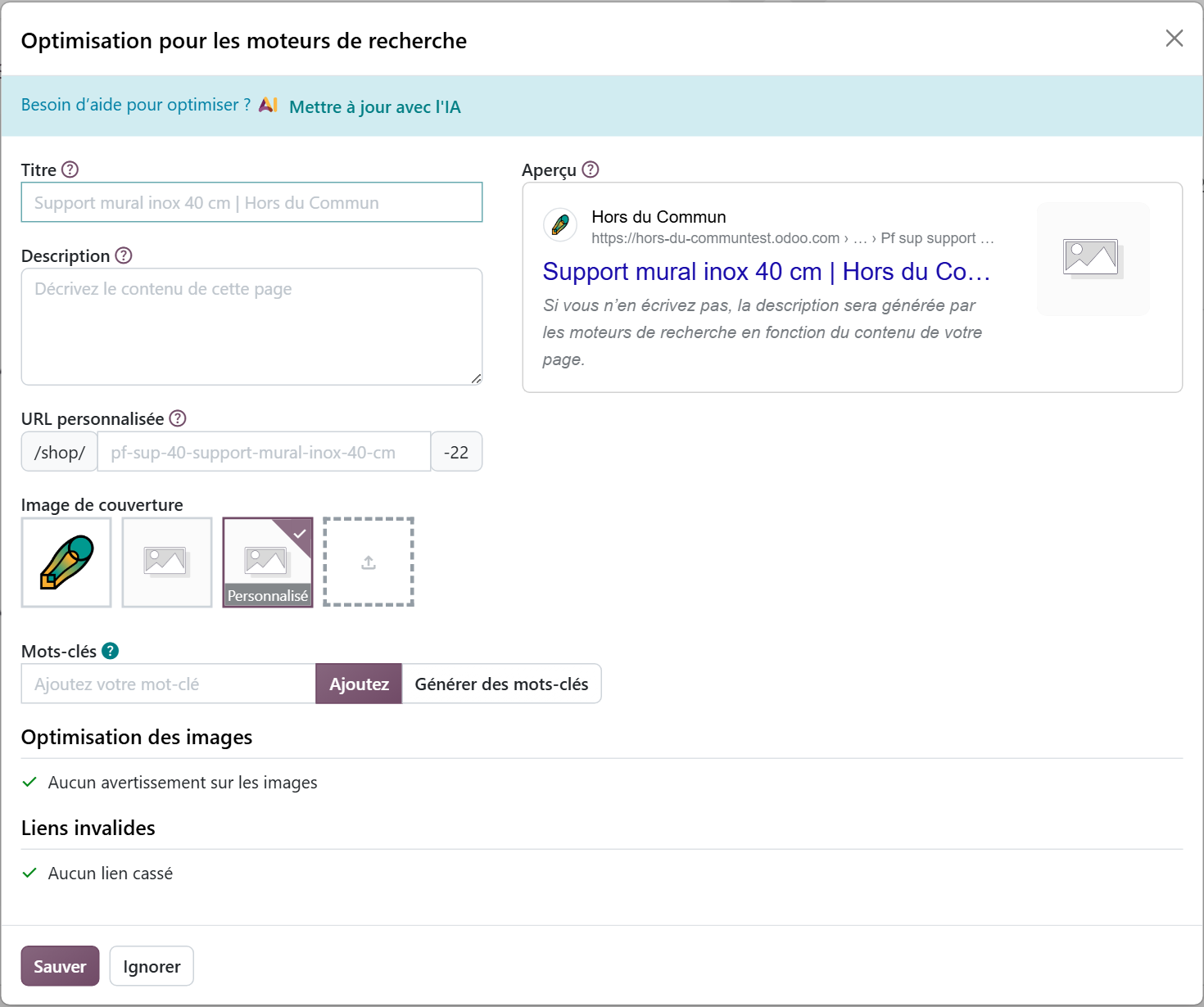
The upshot: no product page and no category keeps its PrestaShop URL. This is not an Odoo flaw: it happens whenever two systems build their URLs differently. The whole point is to tell Google cleanly where each page has gone.
If the decision to leave PrestaShop has not been made yet, start there. Our comparison covers, area by area, what PrestaShop and Odoo 19 do (online sales, inventory, purchasing, accounting, point of sale, after-sales, version upgrades) as well as the full cost of a live store. You can read it here: the Odoo 19 vs PrestaShop comparison.
Which PrestaShop URLs should you list before the migration?
All the ones that carry value: those that are indexed, those that get visits, and those that other sites link to. In the simplest case, a domain name change alone, a generic redirect is enough. For a more complex migration, like this one, Google asks you to list the old URLs and map each one to its new destination.
Its documentation suggests several sources to cross-check:
- the store's sitemaps, which in principle contain the most important URLs;
- your analytics tool or server logs, to spot the pages with the most traffic;
- the Search Console “Links” report, for pages that receive internal and external links;
- the store software itself, which gives access to the list of all content.
Don't forget images. Google points out that image and video files are among the URLs to include in the migration plan.
Finally, choose an observation period long enough to cover your seasons. A garden equipment store that lists its visited pages in December will miss its best April pages.

You when you're moving thousands of product pages and realize each one has to leave Google its new address.
How do you match each old page to its new URL?
The deliverable for this step is a simple two-column table: the old PrestaShop URL and the new Odoo URL. On the SEO side, it is the most important document of the migration. You build it once the catalog has been imported into Odoo, since an Odoo product URL depends on its ID.
| PrestaShop page | Destination in Odoo |
|---|---|
| Product page | The page of the same product, under /shop/ |
| Category | The equivalent eCommerce category, under /shop/category/ |
| Content page (shipping, terms, about) | The Odoo website page that carries this content |
| Discontinued product | The product that replaces it; with no equivalent, a 404 response, which is what Google expects for content that is not carried over |
The golden rule: each old page points to the page closest to it in content. Redirecting the whole catalog to the home page is the easy way out, and Google advises against it: it confuses visitors and may be treated as a “soft 404” error.
This table depends on the quality of the catalog import. One duplicate product or one badly imported category, and the mapping falls apart. Data migration follows the same principles: define what is useful at launch, do the mapping, clean up before importing. We cover them in detail on our page about data migration to Odoo.
How do you create 301 redirects in Odoo?
Odoo handles redirects in the Website app, with no extra module. The 301 code, which Odoo 20 displays as “301 Moved permanently”, tells search engines that the old URL has been permanently replaced by the new one, and that the new one should appear in the results.
In Odoo 20, this menu appears without enabling developer mode, which the Odoo 19 documentation still requires. The list opens under the title “URL Rewrite”. For each redirect, click “New” and fill in:
- “Name”: a label that helps you find the redirect again;
- “Action”: “301 Moved permanently”;
- “URL from”: the old PrestaShop URL, without the domain name;
- “URL to”: the new URL in Odoo;
- “Website”: the site concerned, if the database has several.
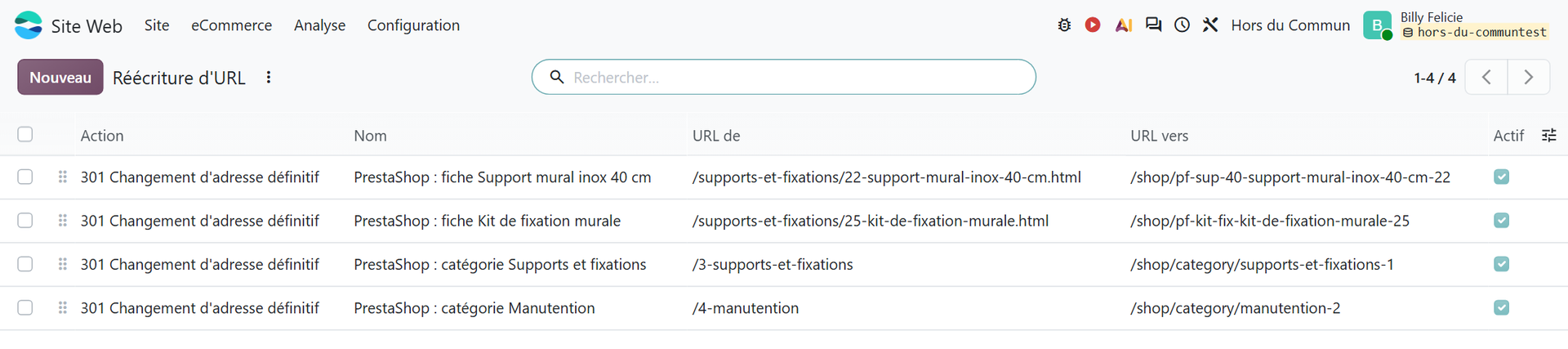
A store with a few thousand SKUs is not entered line by line. The list menu offers “Import”: the mapping table from the previous step becomes a file, loaded in one go, then checked on a sample.
Odoo offers other types. The 302 is for temporary moves: the new URL is then not shown in search results. According to the Odoo documentation, the 308 is used to rename one of Odoo's own dynamic pages, for example /shop to /market. For old PrestaShop URLs that no longer exist, the 301 is the right choice.
Test each batch before the switchover. On our test database, requesting the old URL /4-manutention does return a 301 code to /shop/category/manutention-2. An HTTP header checker, or the browser's Network tab, is enough to verify it. An untested redirect is a page waiting to be lost.
What should you carry over on each page to keep your rankings?
A redirect passes on the URL. It does not pass on the content. If the “Support mural inox 40 cm” page loses its 300-word copy and its carefully written description along the way, Google will rank the new page on what it contains, which means lower.
The “Search Engine Optimization” window opens from the page itself, through the Site › Optimize SEO menu. That is where you find what needs to be carried over from PrestaShop:
- the “Title”, shown as the clickable link in search results;
- the “Description”, often shown under that title;
- the “Cover image”, used when the page is shared on social media;
- a “Preview” that shows how it looks in Google;
- an “Invalid links” section, which flags the page's broken links.
“Keywords” also appear in the window, but the Odoo documentation states that the corresponding tag is now ignored by the major search engines. What counts is the visible text: titles, subheadings, descriptions. The same documentation recommends a single H1 title per page, and filled-in Alt tags on images.
Good news for later: according to the Odoo documentation, renaming a product updates its URL and automatically creates a 301 redirect from the old one. Catalog adjustments after go-live therefore do not undo the work already done.
The migration is also an opportunity to rethink the site's structure and content, rather than copying the weaknesses of the old one. Our page on building a website with Odoo presents a site connected to the CRM and to operations, and devotes a section to SEO: site structure, pillar pages, metadata and internal linking.
How does switchover day go?
On the day the domain name points to Odoo, everything must already be ready: catalog imported, content checked, redirects imported and tested. The order of operations matters more than speed.
- Keep a copy of the PrestaShop sitemap, which will serve as a checklist, and the list of sites that link to the store.
- Point the domain name to Odoo. Keeping the same domain name follows Google's advice to change only one thing at a time.
- Check that the Odoo sitemap is live: Odoo automatically generates a /sitemap.xml file, cached and refreshed every 12 hours.
- Submit this new sitemap in Search Console. Google says it will use it to discover the new URLs, and that the old sitemap can then be removed.
- Fix internal links. Descriptions carried over from PrestaShop often contain links to old URLs; they work thanks to the redirects, but Google recommends replacing them with the new ones.

You when the Odoo store is ready and you want to unplug PrestaShop tonight, before testing a single redirect.
A classic trap: redirect chains. If an old URL redirects to an intermediate URL that is itself redirected, each hop slows the visitor down. Google recommends redirecting straight to the final destination and, failing that, keeping the chain short, “ideally no more than 3”. This happens when the store has already changed its URLs in the past: those older URLs must also point directly to the final page in Odoo.
How long does traffic take to settle?
Expect several weeks. Google warns that rankings may fluctuate during a migration, and that for a medium-sized site it can take “a few weeks or more” before the new URLs gradually replace the old ones in the results. The Odoo documentation adds that a drop in traffic during the first few days is normal.
“Keep the redirects for as long as possible, generally at least one year. This timeframe allows Google to transfer all signals to the new URLs, including recrawling and reassigning links on other sites that point to your old URLs.” (Google Search Central, Site moves, 2026)
During this period, Search Console is your steering tool. Three checks are useful every week:
- URLs reported as not found (404 error): apart from products deliberately removed, each one is a URL missing from the mapping table, to be added to the redirects;
- the sitemap and index coverage reports, where the new URLs should take the place of the old ones;
- queries and pages that are losing clicks, to compare with the period before the switchover.
The Odoo documentation, for its part, aims to be reassuring, provided you follow three best practices: keep existing content, redirect old URLs and monitor traffic.
“In most cases, migrating to Odoo will not have a negative impact on the website's search rankings.” (Official Odoo 19 documentation, Search engine optimization)
The same page states that no platform can guarantee unchanged rankings. If the drop persists, the first things to check follow from the above: missing redirects, thinner content, or important pages left out of the inventory.
What if your search rankings are too valuable to take the risk?
Then there is another path: don't migrate the store at all. When the site converts well, the theme works and the problem lies after the order (inventory, purchasing, invoicing, accounting), you can keep PrestaShop as the storefront and connect Odoo behind it for operations. Search rankings are then untouched, since the URLs do not change.
The choice depends on the store's SEO history, catalog and technical debt. We compare the two paths, a full migration to the Odoo store or a sync that keeps PrestaShop up front, on our page connecting Odoo to PrestaShop.
Either way, the decision is made before the project starts, with Search Console figures in hand. A store that gets half its revenue from Google is not migrated like a showcase site that lives mostly on word of mouth.
- Google Search Central, “Site moves with URL changes”, updated on September 11, 2026: https://developers.google.com/search/docs/crawling-indexing/site-move-with-url-changes?hl=fr
- Odoo, official documentation 19.0, “Search engine optimization (SEO)”: https://www.odoo.com/documentation/19.0/fr/applications/websites/website/structure/seo.html

Article written by Billy Felicie
Odoo integration expert at Hors du Commun (Lyon). I have been helping SMEs implement their digital tools and optimize their business processes for more than 5 years.