
For an SME, Zendesk costs €19 to €115 per agent per month on an annual commitment depending on the edition, or €2,280 to €13,800 per year for a team of ten agents, before any add-on. What Zendesk really costs then comes down to three items the entry price does not show: the edition your support actually needs, add-ons such as Copilot, and usage (AI agent resolutions, voice).
The Zendesk prices quoted here were checked on October 17, 2026 on its official Pricing page for France, in euros. They change regularly: check them on the day you sign. Zendesk remains a benchmark for ticketing and omnichannel. The question is not whether it is good, but how much it will cost your company, and what you will pay on the side.
What are Zendesk's public prices in 2026?
Zendesk sells its customer service per agent per month, in four editions. The page shows two prices for the first three: annual commitment, and a more expensive monthly payment. Zendesk says so itself: “20% off with annual billing”.
| Edition | Annual (per agent per month) | Monthly (per agent per month) | What it adds |
|---|---|---|---|
| Support Team | 19 € | 25 € | Email ticketing, routing, prebuilt dashboards, canned responses |
| Suite Team | 55 € | 69 € | Messaging and live chat, voice, knowledge base, omnichannel routing |
| Suite Professional | 115 € | 149 € | Skills-based routing, IVR, SLAs, satisfaction surveys (CSAT) |
| Suite Enterprise + Copilot | On request | On request | Intelligent triage, auto assist, sandbox, custom agent roles |
Two clarifications before calculating. The page does not say whether these amounts exclude tax: have Zendesk confirm this before building your budget. And the Enterprise edition has no public price; the page refers you to the sales team.
Switching from monthly to annual billing is no small matter. For ten agents on Suite Professional, monthly payment comes to €17,880 over twelve months, versus €13,800 on an annual commitment: a €4,080 difference over one year.
Which Zendesk edition does an SME really need?
The €19 entry price corresponds to Support Team. It is an email ticketing tool, with routing, canned responses and automations. For a small team that only handles emails, it is enough.
As soon as customers write via chat or messaging, or call, look at Suite Team, at €55: it adds messaging and live chat, voice, the knowledge base and omnichannel routing. The FAQ also mentions adding channels to the Support edition, without showing the price.
The real threshold comes next. On the comparison grid of the Pricing page, service level agreements (SLAs) and satisfaction surveys (CSAT) are only checked for Suite Professional, at €115. If you promise your customers a response or resolution time, or if you want to measure their satisfaction after each request, this is the edition you need to cost. Zendesk actually presents it as the most popular.
Three questions are enough to choose:
- Do your customers contact you other than by email? If so, Suite Team, or channels added to Support Team (price on request).
- Do you have written response-time commitments in your contracts? If so, Suite Professional.
- Do you need to route requests by skill (technical, billing, language)? If so, Suite Professional.
An SME that sells maintenance contracts with a guaranteed response time falls into this category. Its realistic budget then starts at €115 per agent, not €19.
Which add-ons push the Zendesk bill up?
The Pricing page then presents the “featured” add-ons, all per agent per month, billed annually:
- Copilot, the AI assistant for agents: €50;
- Workforce Engagement Bundle, to improve service quality and agent performance: €50;
- Contact Center, for complex contact centers: €82.
According to the page, Copilot can only be added to the Professional edition and above. Added to Suite Professional, it brings the cost to €165 per agent per month. Automated quality analysis of conversations, for its part, appears on the grid with the note “Requires the QA add-on”, with no price shown.

You when you call in the finance department as backup to add up Copilot, AI resolutions and voice.
AI agents: a meter that runs per resolution
Zendesk's AI agents are paid for by usage. The unit is the “automated resolution”: a request resolved by the AI agent without escalation to a human. Each edition includes a quota, according to the grid: 5 per agent per month on Support Team and Suite Team, 10 on Suite Professional, up to a limit of 10,000 per year. The page states that this number “varies depending on your edition and number of agents”.
Beyond that, two options: €1.50 per resolution if you commit to a volume, €2.00 on pay-as-you-go. The more requests the AI resolves, the bigger this item gets. That is logical, since each resolution saves human work, but it has to be budgeted.
Before paying for automated resolutions, you still need to know which requests to hand over to an AI, and with which safeguards. We detail concrete use cases (chatbot pre-qualification, request triage, ticket summary and draft reply for the agent) and a three-level rollout on a dedicated page: how to use AI to improve customer support.
Voice and other usage
The FAQ on the Pricing page says it clearly:
“Some features such as the app builder, the action builder and voice are billed based on consumption beyond the credits included in the applicable edition.” (Zendesk, Pricing page, accessed on October 17, 2026)
In other words, a support team that makes a lot of calls can exceed the included credits, and pay for that usage on top of its licenses. The page does not publish these usage rates: ask for them in writing, along with the volume of credits included in your edition.

You when every support call also runs up the usage meter.
How much does Zendesk cost for a team of 5, 10 or 20 agents?
Here is the annual license cost, on an annual commitment, at public prices as of October 17, 2026. No AI resolutions beyond the quota, no voice, no other add-on.
| Team | Support Team | Suite Team | Suite Professional | Professional + Copilot |
|---|---|---|---|---|
| 5 agents | 1 140 € | 3 300 € | 6 900 € | 9 900 € |
| 10 agents | 2 280 € | 6 600 € | 13 800 € | 19 800 € |
| 20 agents | 4 560 € | 13 200 € | 27 600 € | 39 600 € |
A full example: a ten-agent after-sales service
Take a fictitious equipment manufacturer. Its after-sales service has ten agents, answers by email, chat and phone, and is contractually committed to intervention times. It needs Suite Professional and wants Copilot: €19,800 per year in licenses.
It then hands simple requests (order tracking, user manuals, opening hours) to an AI agent. Assume 400 requests resolved by the AI each month. The included quota is 10 resolutions per agent per month, or about a hundred for ten agents if the count is done at account level (calculation method to be confirmed by Zendesk). That leaves about 300 resolutions per month to pay for:
- at €1.50 with a committed volume, €450 per month, or €5,400 per year;
- at €2.00 on pay-as-you-go, €600 per month, or €7,200 per year.
Total: €25,200 to €27,000 per year, before voice usage and before any workforce management or quality add-on. That is €210 to €225 per agent per month, nearly double the edition price.
There is nothing shocking about this calculation in itself: an AI that resolves 300 requests a month frees up agent time. But it is this figure, not the €115 on the grid, that should go into your budget.
What costs are not on Zendesk's price grid?
Zendesk is a customer service tool. Your orders, invoices, contracts and deliveries live in other software: ERP, invoicing tool, inventory management. For an agent to see that a customer has an unpaid invoice or a late delivery, the two have to be connected.
Zendesk claims “more than 1,800 apps, partners and integrations” on its Marketplace, plus an API. This leads to three costs, to be estimated separately:
- the possible price of a Marketplace app, if one is needed to connect your ERP;
- custom development of a connector, when no app covers your case;
- maintaining this link, with every change to either piece of software.
Add internal time on top: an administrator who maintains triggers, macros and views. Zendesk does not bill for this time, but it is real.
Finally, the action that follows the ticket. A customer asking for a refund, a return or an intervention triggers work in another tool: a credit note in accounting, a return order in logistics, the technician's schedule. If these tools do not talk to each other, that means re-entering data, and therefore time and errors.
How much would the same support cost in Odoo?
Odoo approaches the subject differently. Its Helpdesk app manages tickets in the same database as sales, invoicing and inventory. And Odoo does not charge per agent: it charges per user. On its pricing page, Odoo states that its Standard and Custom plans include all apps, for a single price.
On its price grid checked on September 27, 2026, the Standard plan costs €19.90 per user per month on an annual commitment for the first year, then €24.90. The Custom plan, €35.90 then €44.90. A support agent is a user like any other. If they already use Odoo for sales or sales administration, support adds no license.
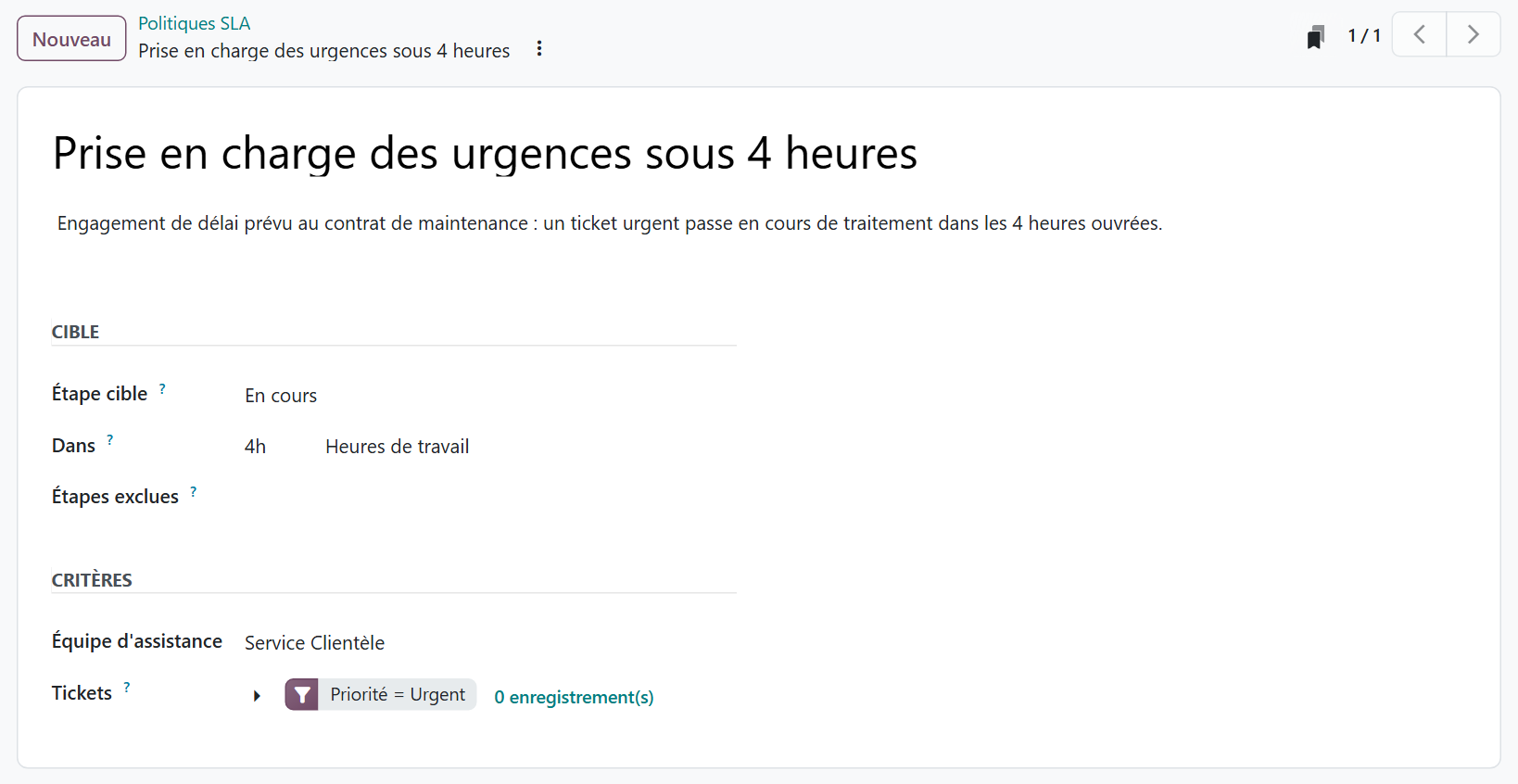
Features that Zendesk reserves for its higher editions are part of the app here. SLAs, for example:
“The SLA Policies feature is enabled by default on newly created Helpdesk teams.” (Official Odoo 19 documentation, Service level agreements)
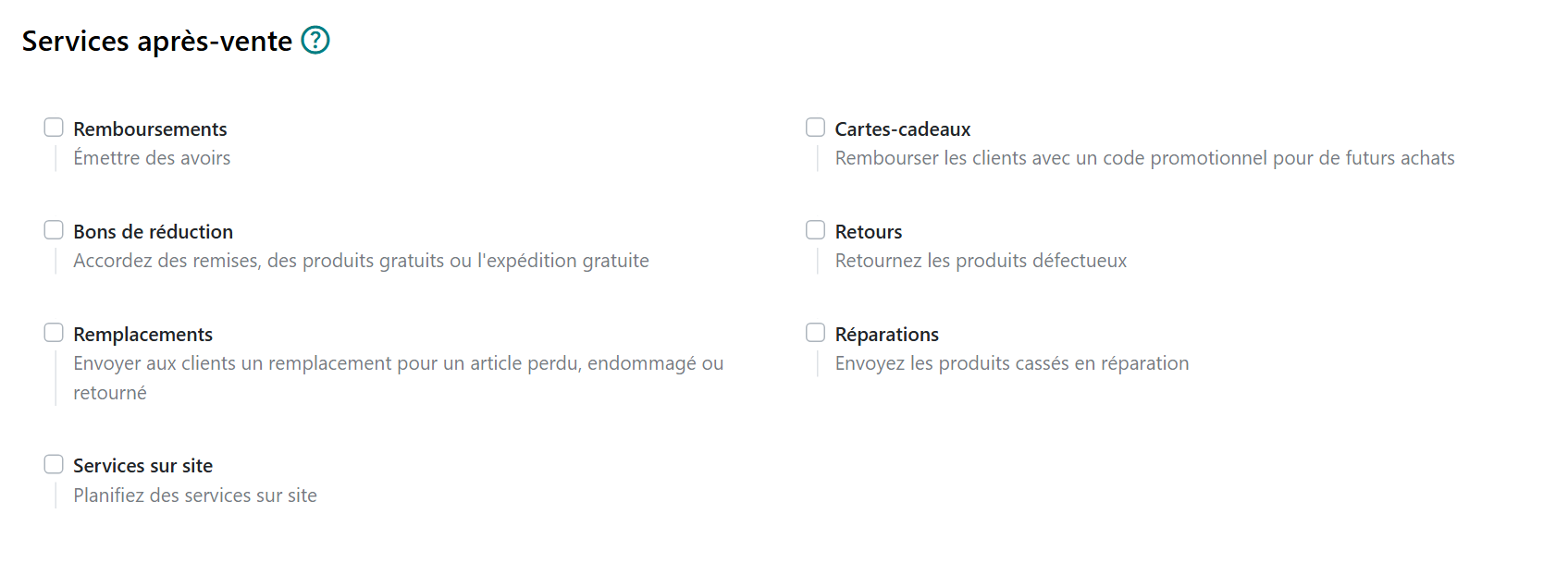
Odoo's documentation also describes after-sales services that can be enabled per team: refund with a credit note, process a return, schedule a repair or an onsite intervention directly from a ticket. Each one relies on another Odoo app, which the Standard and Custom plans already include. That is the fundamental difference with a support-only tool.
To be fair, three caveats. Odoo's AI features consume credits purchased separately. On pure ticketing and omnichannel, Zendesk remains more mature. And Odoo makes sense when it is used beyond support: choosing it only to replace Zendesk would miss its point.
We compared the two tools feature by feature, from the ticket to the credit note, the return and the intervention, with Zendesk's annual bill for a team of eight agents. You can find this comparison here: our Odoo 19 vs Zendesk comparison.
One last point: the license price is not the price of a project. Scoping, data migration, training and connectors weigh more. We detail these items, the pitfalls that make a budget spiral and the possible funding in this article: how much does an Odoo implementation cost?
Should you switch tools to lower the bill?
Not necessarily. Zendesk remains the right choice if support is your core business: high volumes, many channels, agents who never touch orders or invoices, and an ERP that is already well connected. In that case, the cost per agent is justified, and the challenge is choosing the right edition and monitoring usage.
The question is different when the ticket almost always leads to an action elsewhere: a credit note, a return, a part to ship, a technician to schedule. Or when the company is moving to an ERP anyway. The cost of support is then compared with the total cost: licenses for both tools, plus the connector, plus the re-entry.
Before signing or renewing, ask Zendesk these questions, and get the answers in writing:
- are prices exclusive of tax?
- is the automated resolution quota calculated per agent or for the whole account?
- what voice credits does your edition include, and at what price beyond them?
- can the number of agents be reduced during an annual commitment?
If you decide to leave Zendesk, the real question becomes history: should you migrate years of closed tickets? On a dedicated page, we explain what you need to migrate to get started, how a data migration to Odoo works and why the full history is often a trap: migrate your data to Odoo.
- Zendesk, Customer service pricing, prices checked on October 17, 2026: https://www.zendesk.fr/pricing/
- Odoo, documentation 19.0, Helpdesk, Service level agreements (SLA): https://www.odoo.com/documentation/19.0/fr/applications/services/helpdesk/overview/sla.html

Article written by Billy Felicie
Odoo integration expert at Hors du Commun (Lyon). I have been helping SMEs set up their digital tools and optimize their business processes for more than 5 years.