
To sync Amazon FBA stock with Odoo, you enable Odoo's Amazon connector and link the seller account to an FBA stock location. Every order fulfilled by Amazon then automatically leaves that location in Odoo. However, the connector does not retrieve the stock levels held by Amazon: shipments to fulfillment centers are entered as transfers, and discrepancies (returns, losses, removals) are corrected with an inventory adjustment.
In other words, Odoo tracks FBA stock by deduction, not by reading it. That is enough to manage replenishment and stock value, provided you set up three things from the start: where to store this stock in Odoo, how to track shipments to Amazon, and how often to reconcile the two inventories. The screens in this article come from Odoo 20, as does the official Odoo documentation quoted here.
What does Odoo's Amazon connector actually sync?
You enable the Amazon connector in Sales › Configuration › Settings, in the Connectors section, with the “Amazon Sync” option. In Odoo 20, accounts are then managed in Sales › Marketplaces › Amazon › Accounts. On the account form, the “Connect” button sends you to Amazon to authorize access to the seller account.
Once linked, it retrieves orders at regular intervals. Only orders whose status has changed since the last sync come through, and each one becomes a real sales order, with the customer created if it does not exist yet. The table sums up what changes depending on the fulfillment method: FBA (Fulfilled by Amazon) or FBM (Fulfilled by Merchant).
| Topic | FBA order | FBM order |
|---|---|---|
| Orders retrieved | Shipped and canceled | Unshipped and canceled |
| Shipping | Done by Amazon, a stock move is recorded in Odoo | Delivery order created in Odoo, status sent back to Amazon |
| Stock management | Held by Amazon, tracked in Odoo in a dedicated location | Held in Odoo, quantities sent to Amazon |
What the connector does not do matters just as much. Odoo's documentation says so: it is designed to sync order data. Monthly fee reports, disputes and refunds stay in Amazon Seller Central. Anything that is not an order therefore stays invisible to Odoo, and that is where FBA stock drifts.
Amazon is also often just one channel among others: Mirakl, Cdiscount, eBay, distributors. The risks of multichannel management without a centralized ERP, and the platforms you can connect to Odoo, are covered on a dedicated page, which we invite you to read here: Odoo for Amazon and marketplaces.
What is the difference between FBA stock and FBM stock in Odoo?
It all comes down to one question: who holds the true stock figure?
With FBM, Odoo is in charge
You store and ship the goods yourself. Stock is managed in Odoo's Inventory app, and the connector sends Amazon the available quantities of your FBM products. This behavior is set on the account (“FBM Stock” checkbox) and on each offer (“Stock Synchronization” option). Each FBM order creates a delivery order; when you validate it, Odoo notifies Amazon, which informs the customer. Amazon requires a tracking reference for every delivery: if your carrier does not provide it automatically, it has to be entered.
With FBA, Amazon is in charge
Your products are in Amazon's fulfillment centers. Odoo only follows along: when an FBA order is synced, a stock move is recorded for each item, out of the account's FBA location. You can find these moves in Inventory › Reporting › Moves History.
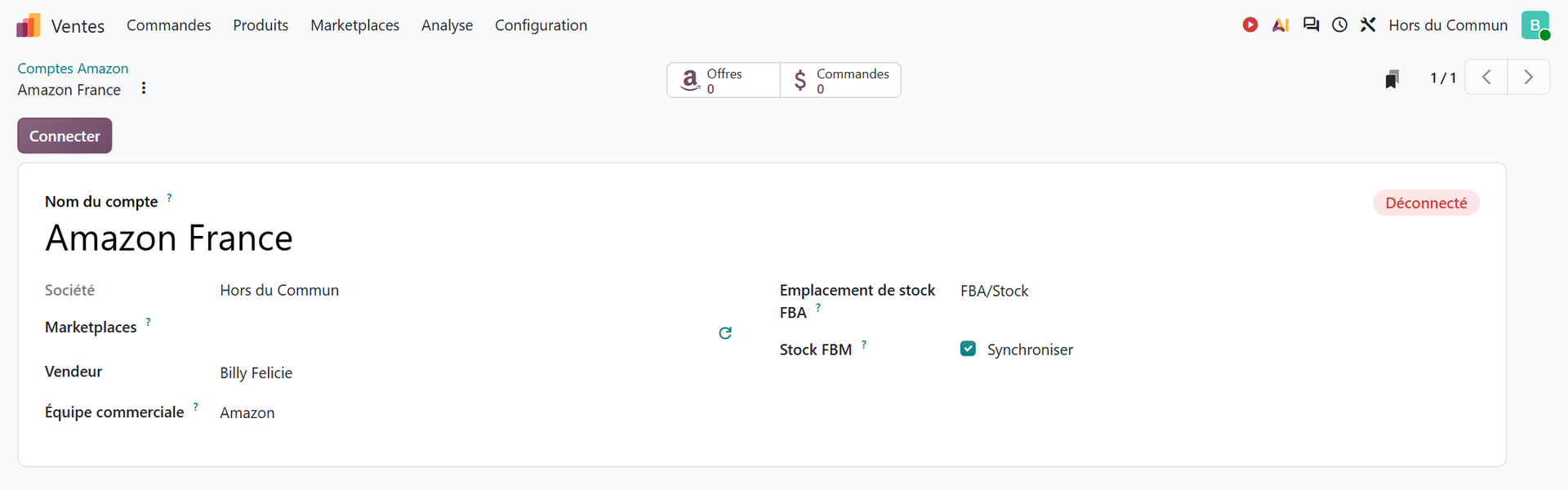
One detail drives everything else: item matching. Odoo finds the right product by comparing the Amazon SKU with the item's internal reference, then stores the pair in an “offer”. If no item matches, Odoo uses a generic product, “Amazon Sale”. The order is created, and so is the revenue, but none of your real items moves in stock. Check the offer list before opening the floodgates, and after every new listing.
Where should FBA stock live in Odoo: the default location or a dedicated warehouse?
By default, all Amazon accounts of the same company use the same Amazon location. In our test database, it is called WH/Amazon and it is an internal location of the main warehouse, the Lyon Warehouse. That is handy to get started, but FBA stock is then counted in that warehouse's quantities.
Take the stainless steel wall bracket in our test database. Fourteen units are in Lyon, all reserved for open orders, and twenty are at Amazon. If the twenty units stay in WH/Amazon, they count toward the Lyon Warehouse: Odoo shows 34 units in stock there, 20 of them free. A salesperson preparing a B2B quote therefore sees 20 brackets available, when there are none left to ship from Lyon.

The fix: create a dedicated warehouse, for example “Amazon FBA”, and assign its stock to the Amazon account, in the “FBA Stock Location” field. Amazon stock stays visible and valued, but it no longer mixes with your warehouse's availability. Quotes and orders placed on the Lyon Warehouse no longer promise units stored at Amazon.

You when Odoo tells you 20 brackets are available in Lyon and the shelf is empty, because they are all at Amazon.
One point still needs checking when the same item is sold through both FBA and FBM. The documentation says the connector sends Amazon the available quantities of FBM products, without specifying whether stock in the FBA location is excluded. Have it confirmed on a test database before checking “FBM Stock”.
This dedicated warehouse is only one piece of the logistics setup. Our page on inventory management with Odoo presents a seven-step rollout method, from the flow audit to cycle counts, including routes, putaway and min-max replenishment.
How do you track stock shipments to Amazon in Odoo?
Odoo's documentation states this in black and white:
“When sending new products to Amazon, the user must manually create a transfer (delivery order) to move these products from their warehouse to the Amazon location.” (Official Odoo 20 documentation, Manage Amazon orders)
A shipment to an Amazon fulfillment center therefore only enters Odoo if someone records it. With a dedicated warehouse, recording it becomes simple. On the “Amazon FBA” warehouse form, the “Resupply From” field points to the Lyon Warehouse: Odoo then creates a replenishment route between the two. It produces a delivery order leaving Lyon, to a transit location, then a receipt in the Amazon FBA warehouse.
This split matches reality: between leaving your dock and going on sale at Amazon, the goods can no longer be sold from Lyon and cannot yet be sold on Amazon. They stay in transit in Odoo. Validate the FBA receipt when Seller Central confirms the shipment has been received, not on the day the truck leaves. If Amazon receives fewer units than expected, you record the quantity actually received and the discrepancy shows up right away.
The documentation also suggests automating this replenishment with reordering rules on the Amazon location. You set a minimum and a maximum per item, and Odoo calculates what needs to be sent back to Amazon, using the route that leaves from Lyon.

Here, the wall bracket has dropped below its minimum of 25 units: Odoo suggests sending 20 to reach the maximum of 40. The mounting kit, with 45 units against a minimum of 30, triggers no shipment. These rules only work if Odoo's FBA stock is accurate, which brings us to the real issue.
What does Odoo do with returns, losses and removals handled by Amazon?
Nothing, and that is normal. These events are not orders, so the connector does not see them. Yet Amazon handles a lot of them for you:
“Our customer service teams handle returns and refunds, and we also take care of unsold inventory, whether you choose to get it back or have it disposed of.” (Amazon, Fulfilled by Amazon)
Each of these operations changes your actual stock at Amazon without touching Odoo's FBA location. A customer returns a bracket and Amazon puts it back on sale: Odoo took it out at order time and does not see it come back. A carton is damaged in a fulfillment center: Amazon removes it from sellable stock, Odoo still counts it. You request disposal of unsold items: same thing.
Odoo's documentation gives the fix: an inventory adjustment, which it recommends after replenishment. A simple routine is enough to keep it up.
- At a fixed frequency, every week for fast-moving items, you pull the FBA stock levels from Seller Central.
- You compare them, item by item, with the stock of the Amazon FBA warehouse in Odoo.
- You enter Amazon's quantities in Physical Inventory, filtered on that warehouse, then apply them with an explicit “Inventory Reason”: “FBA reconciliation week 42”, rather than a vague reason.
- You review large discrepancies before applying them: a receipt validated too early or a badly matched offer can explain them just as well as a loss.

You when you try to understand why Seller Central counts 41 mounting kits and Odoo 45, with three customer returns and a damaged carton in the middle.
Beyond a few hundred items, this manual reconciliation becomes heavy. Amazon provides developers with an API to read FBA inventory: custom development can then prepare the adjustment in Odoo, which someone reviews and validates. Before you start, measure the real volume of discrepancies over a few weeks: that is what justifies this development, or not. Our guide how to connect Odoo with an API helps you decide: when an interface is worth it, what it costs to maintain and how it survives Odoo upgrades.
Several Amazon accounts or countries: one location or several?
The connector handles several seller accounts and several marketplaces per account: Amazon.fr, .de, .es, .it, .nl, .co.uk, among others. By default, all accounts of the same company use the same Amazon location. The documentation describes a workaround to isolate a marketplace: remove that marketplace from the original account, create a second record for the same account with only that marketplace, and assign it a different stock location.
Before splitting, check how your stock is actually distributed at Amazon. If you are enrolled in the Pan-European FBA program, Amazon itself distributes your stock across the countries you have activated. Splitting stock by country in Odoo would then create locations that match no physical reality you control. A simple rule: one Odoo location per stock you can reconcile against an Amazon report, not one location per flag.
How does Odoo handle Amazon invoices and payments?
Stock is only half the story: margin shows up in the accounting. Three points from Odoo's documentation are worth anticipating.
- Amazon does not share its customers' email addresses: Odoo cannot send them invoices. Invoices generated in Odoo are uploaded manually to Amazon's back office, and for business customers, the VAT number is also retrieved manually.
- Customers pay Amazon, which pays you the money in grouped transfers. The documentation recommends a dedicated bank journal, for example “Amazon Payments”, with a dedicated intermediary account, and grouping payments into batch deposits. Amazon's vendor bills for its fees are handled the same way.
- Amazon does not always apply the same taxes as Odoo: a few cents of difference can appear and are cleared during payment reconciliation.
The account also carries a sales team, “Amazon” in our test database: it is used to isolate Amazon sales in sales analysis, and can be changed to separate one account from another. The configuration of journals and suspense accounts is decided with your accountant. To see how Odoo suggests bank reconciliations and how your accountant can work directly in the database, see our page on SME accounting in Odoo.
Where do you start to make FBA stock reliable in Odoo?
If you are just starting, or if your FBA stock in Odoo has already stopped meaning anything, here is a logical order.
- Align Amazon SKUs with Odoo's internal references, and check that no order lands on the generic “Amazon Sale” product.
- Create the Amazon FBA warehouse, assign it to the account, and move into it the stock sitting in the default location.
- Make a first inventory adjustment based on the stock levels in Seller Central: this is your starting point.
- Record each shipment to Amazon through the replenishment route, and validate the FBA receipt when Amazon confirms it.
- Schedule the weekly reconciliation, with a named owner and an explicit adjustment reason.
- Only then, set the minimum and maximum replenishment rules on the FBA warehouse.
In short, Odoo's Amazon connector syncs orders, not FBA inventory. FBA stock in Odoo is accurate if shipments are tracked, items are properly matched and someone regularly reconciles the figures with Seller Central. At Hors du Commun, an Odoo integrator in Lyon, we connect Odoo to Amazon, FBA and FBM flows included, and we continue with ongoing support after go-live.
- Odoo, official Odoo 20 documentation, “Manage Amazon orders”: https://www.odoo.com/documentation/20.0/fr/applications/sales/sales/amazon_connector/manage.html
- Amazon, “Fulfilled by Amazon”, official FBA service overview page: https://sell.amazon.fr/expedie-par-amazon

Article written by Billy Felicie
Odoo integration expert at Hors du Commun (Lyon). I have been helping SMEs implement their digital tools and optimize their business processes for more than 5 years.