
To plan production at finite capacity in Odoo, you enable work orders, describe each work center (working hours, efficiency, setup time, alternative work centers) and routings with realistic durations, then click Plan on the manufacturing order: Odoo places each operation in the work center's first free slot, with no overlap with what is already planned there. Requirements planning, on the other hand (manufacturing lead times, replenishment rules, Master Production Schedule), stays at infinite capacity: Odoo's finite capacity lives at the level of operation scheduling, not at the MRP level.
It is the most debated limit of manufacturing in Odoo, and it is misunderstood both ways: some believe Odoo ignores machine load, others find out too late that the promised date does not account for the bottleneck. Here is what the standard does, what you need to configure, where it stops, and how an industrial SME turns it into a schedule that holds, without custom development.
Does Odoo really plan at finite capacity?
Yes, but at one specific level. Two mechanisms coexist in the Manufacturing app, and they do not reason the same way.
The first is requirements planning. When a sales order or a replenishment rule triggers a manufacturing order, Odoo calculates its dates from lead times expressed in days: the product's manufacturing lead time and the days to prepare. Whether the shop floor is empty or overloaded, it applies the same number of days. The official documentation says so plainly:
“Lead times do not take into account [...] the capacity of the work center.” Official Odoo 19.0 documentation, “Lead times” page of the Inventory app.
The second is work order scheduling. Once the manufacturing order is confirmed, the Plan button (“Programmer” in the French interface, “Planifier” in the French documentation) places each of its operations on its work center's calendar. Here, Odoo looks at the load: it looks for the first slot, within the work center's working hours, that does not overlap any work order already planned. If the work center is full on Tuesday, the operation slides to Wednesday. This is finite capacity scheduling, in “as soon as possible” mode.
The practical consequence: the end date produced by Plan is more reliable than the one produced by lead times, because it accounts for operations already committed. But it does not flow back on its own into purchase planning or into the date promised to the customer. Making that link is up to the organization.
This mechanism is only one building block of a manufacturing project, which starts with accurate bills of materials and routings. We detail this approach, from bill of materials to MRP, on our page dedicated to Odoo for manufacturing.
What do you need to configure before planning?
Odoo only respects a capacity if you describe it. Without work centers, durations and calendars, there is nothing to plan. Here are the settings that matter, in the order we set them up on a project.
Enable work orders
This setting displays work centers and the Operations tab of bills of materials. By default, each operation waits for the previous one to finish. If two operations can progress in parallel, or if one must wait for a specific other one, the bill of materials lets you define these dependencies operation by operation (“Blocked By” field), once you enable the Work Order Dependencies setting and the Operation Dependencies box in the Miscellaneous tab of the bill of materials.
Describe each work center
The work center form holds everything the calculation uses. Here is the one for a robotic welding station, in a fictitious sheet metal workshop that we use throughout this article.
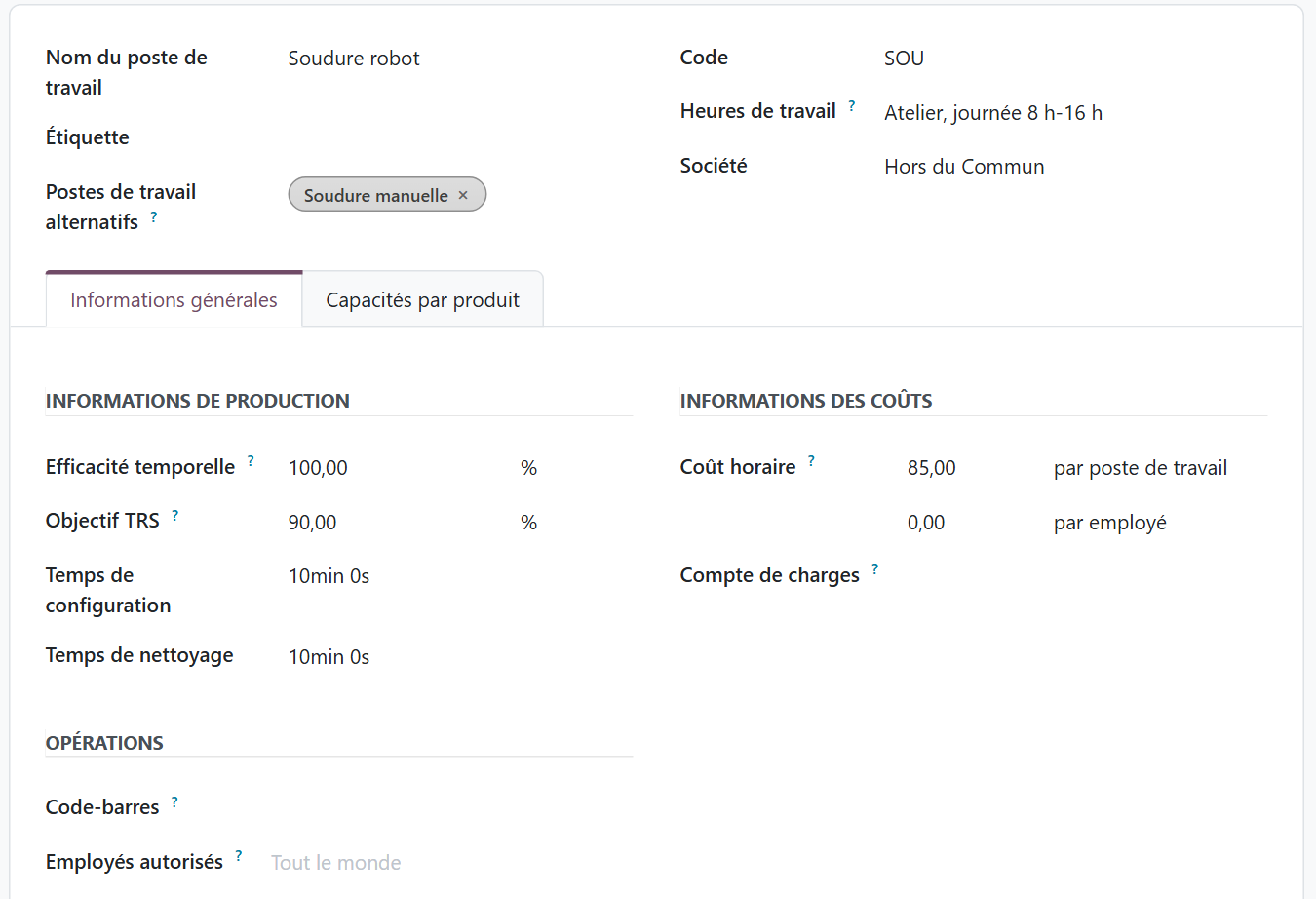
| Work center setting | What it changes in the schedule |
|---|---|
| Working hours | The slots in which the work center can receive operations. By default, Odoo applies 40 hours per week, Monday to Friday from 8 a.m. to 5 p.m. A team working two 8-hour shifts needs its own calendar. |
| Time efficiency | A speed multiplier. A work center that takes twice as long is set to 50%, and all its expected durations are extended accordingly. |
| Setup and cleanup time | Added to each work order, before and after execution. Forget them, and it looks as if you can run ten small batches back to back in a day. |
| Capacities per product | The number of units processed at the same time (an oven, a booth, a four-slot jig). Odoo then calculates a number of cycles instead of multiplying the unit time. |
| Alternative work centers | The work centers able to perform the same operation. When planning, Odoo picks the one that finishes earliest. |
Give operations realistic durations
In the Operations tab of the bill of materials, each operation has a work center and a duration. This is where the quality of the schedule is decided. A duration taken from a sales sheet gives a theoretical schedule; a duration measured on the shop floor gives a schedule that holds. Odoo can calculate the duration from the time actually logged on the latest work orders: that is the setting to aim for as soon as you have a few weeks of history.
How does Odoo place work orders?
Back to our fictitious workshop: laser cutting on two shifts, a press brake, robot welding (the bottleneck) backed up by a slower manual welding station, and a paint booth that handles four frames at a time. Six manufacturing orders are confirmed for the week.
Confirming a manufacturing order does not reserve any slot. Until someone clicks Plan, the work centers do not know this load is coming. On click, Odoo starts from the order's scheduled date, or from now if that date has passed (Odoo 19). In Odoo 20, Plan starts from now, and the Plan at date action, in the Actions menu, keeps the scheduled date. Odoo then processes the operations in the order of their dependencies. For each one, it calculates the expected duration (setup, cycles, cleanup, adjusted for efficiency), then looks for the first free slot on the work center and on its alternative work centers. The manufacturing order takes as its start and end dates those of its first and last operations.
The result can be read in the timeline view, work center by work center.

Everything the standard does is visible here. Operations on the same work center follow one another without ever overlapping. The press brake and welding stop at 4 p.m. and resume the next day at 8 a.m., while laser cutting, on two shifts, runs until 9 p.m. And because robot welding was already loaded, Odoo sent the welding of the wall brackets to manual welding, its alternative work center: slower, but free sooner.
This is the shop floor manager's screen: it shows the gaps, the overloads and the bottleneck. Grouped by manufacturing order, the same view answers the salesperson who asks “when will it be ready?”. You can drag a work order with the mouse, and Odoo can shift the operations that depend on it along with it.
If a work center is under maintenance, the intended method is to enter a time off for it from its working hours (Time Off app, developer mode). The next time someone clicks Plan, operations move to the alternative work center.
Where does finite capacity stop in Odoo?
The mechanism is solid, but it has clear boundaries. Knowing them keeps you from promising a date the system never calculated.
- First planned, first served. Odoo places each manufacturing order at the moment of the click, in the slots still free. It does not reorder what is already planned to push an urgent order through: the priority is the order in which you plan.
- No global optimization. No button recalculates the whole backlog to minimize delays or group batches that share a setup.
- The Plan button does not look at components: it places operations even if the sheet metal has not arrived, and Odoo flags the risk separately (Late Availability filter). In Odoo 19, the Plan based on component availability action, in the Actions menu, moves the order's start to the expected arrival date of the components; it was removed in Odoo 20.
- Capacity means the work center's capacity. The calendar used is the work center's; allowed employees restrict who can work there, they do not count who is present. If your real bottleneck is the certified welder, you need to model them as a work center.
- Requirements planning stays at infinite capacity. The dates of orders created by replenishment come from lead times in days, and the Master Production Schedule calculates quantities, not work center hours.
These boundaries matter all the more because French plants are already running close to their limits:
“42% believe they could not increase their output with their current resources.” Insee (French national statistics institute), business survey in industry, Informations rapides no. 179, July 2026.
When more than four industrial companies out of ten say they are at the limit of their capacity, an infinite capacity schedule becomes a costly fiction: it promises dates the shop floor will not meet, and delays are discovered at the bottleneck, too late to warn the customer.

You when MRP has launched everything at infinite capacity and robot welding discovers the week's load on Wednesday morning.
You still need to know what to produce: a finite capacity schedule does not fix a wrong volume forecast. For a manufacturer that launches production in advance, we developed a production forecast by product and by delivery month in Odoo.
Which planning routine should you put in place?
Since the priority is the order in which you plan, finite capacity in Odoo is first and foremost an organizational discipline. Here is the routine we recommend to industrial SMEs.
- One planner only. If three people plan as things come in, priority becomes random. One person plans, the others ask.
- Plan by due date. Every morning, or with each wave of orders, sort the confirmed unplanned orders by due date and plan them in that order. An urgent order is handled by unplanning, then replanning the orders concerned.
- Look at the bottleneck before promising. Before announcing a lead time, the salesperson checks the planning, which reflects the real load, not the theoretical lead time on the product form.
- Track delays with the standard filters. Delayed Productions isolates orders whose expected end is past the deadline or whose components arrive late; Late shows those whose expected start has passed without them starting: that is the agenda of the production meeting.
- Adjust durations every month. Operators start and finish their work orders in Odoo; the work order analysis compares expected and actual, and a lasting gap is corrected in the bill of materials or in the work center's efficiency.
- Enter unavailability. A work center that is down on the shop floor but available in Odoo skews everything that follows.

You when three people plan manufacturing orders in whatever order they find them.
That leaves procurement. Since the schedule does not check components, purchasing must work on the same dates as the shop floor, otherwise welding is planned to the hour for sheet metal that arrives the following week. The way we configure purchasing and replenishment in Odoo so that they follow production is covered on a separate page.
When should you go beyond the standard?
For most SMEs with 10 to 50 employees, the standard is enough if it is well configured and well used. A few signals, however, show that you are hitting the ceiling:
- Sequencing is expensive: changing color, material or tooling takes an hour, and the order of batches changes the work center's real capacity.
- Several resources must be brought together at the same time, for example a machine and a qualified operator.
- The backlog changes every day and the planner spends their mornings unplanning and replanning to push urgent orders through.
- The promised date must come out of the capacity calculation from the quote stage, without human intervention.
Three options then exist. Third-party modules offer more advanced scheduling (as late as possible, by priority, across the whole backlog); you evaluate them like any code added to the database, checking how they are maintained across version upgrades. Targeted custom development can automate a specific rule, for example replanning every night the orders not yet started, by due date. Finally, a specialized scheduling tool connected to Odoo is justified in workshops with heavy sequencing.
In every case, you do not develop to make up for incomplete configuration: most “wrong” schedules come from wrong durations or calendars, not from a limit of the software. Before choosing, it is better to measure the gap between the shop floor and the software, then decide what belongs to configuration and what belongs to development: that is the purpose of the audit, whose process we detail on our page how an Odoo audit works.
Where to start in your workshop?
No need to model the whole plant on day one. The approach that works comes down to four steps.
- Identify the bottleneck. The work center that sets the pace of the shop floor is known to everyone, except the software. It is the one that deserves the most precise configuration.
- Describe it faithfully: real calendar with shifts, setup times, capacity per product, alternative work center if there is one.
- Measure for four weeks: operators log their work orders, you compare expected and actual, you correct the durations.
- Then extend to the other work centers, and connect the sales routine to the planning.
Finite capacity in Odoo is not a magic button. It is a simple mechanism, as soon as possible and without overlap, that becomes very reliable when the shop floor data is accurate and a single person controls the order of priorities.
At Hors du Commun, an Odoo integrator in Lyon, production and production planning are among our specialties: we structure bills of materials, routings and work centers before adding any feature, then we support our industrial clients with ongoing support after go-live, because a work center that changes or a new routing must be reflected in the configuration.
- Odoo, official documentation 19.0, Lead times (Inventory app): https://www.odoo.com/documentation/19.0/fr/applications/inventory_and_mrp/inventory/warehouses_storage/replenishment/lead_times.html
- Insee, “In July 2026, demand expected by manufacturers, especially from abroad, rebounds”, Informations rapides no. 179, 2026: https://www.insee.fr/fr/statistiques/9030956

Article written by Billy Felicie
Odoo integration expert at Hors du Commun (Lyon). I have been helping SMEs implement their digital tools and optimize their business processes for more than 5 years.