
As a CEO, CFO or CIO, your job is not to write lines of Python code or XML tags. Your role is to make sure the information system supports the company's growth without blowing up the IT budget.
Yet when an integrator bills you dozens of days of development to "customize" Odoo, you need to understand what is going on under the hood. Why? Because the quality of an Odoo module's architecture directly determines the future cost of your migrations and the day-to-day stability of your ERP.
Odoo is a remarkably powerful modular ERP. Every feature (CRM, Sales, Accounting) is a module. And when you ask for custom development, your provider builds a custom module. If that module does not follow the standard architecture set by the publisher, you create what is called technical debt.
“Unmanaged technical debt is a time bomb for companies. According to McKinsey, companies that actively manage their technical debt bring their products to market up to 50% faster and cut their maintenance costs drastically compared with their competitors.” McKinsey & Company: "Tech debt: Reclaiming tech equity" (2023) - Link to the study
🔗 Take action now: Before accepting your integrator's quote for custom development, make sure the scope is sound. Learn the proven method on how an Odoo audit works to frame your real needs.

You, a seasoned CIO, when you open the previous partner's source code and discover that all the business logic was coded directly in the XML views.
The strict anatomy of an Odoo module
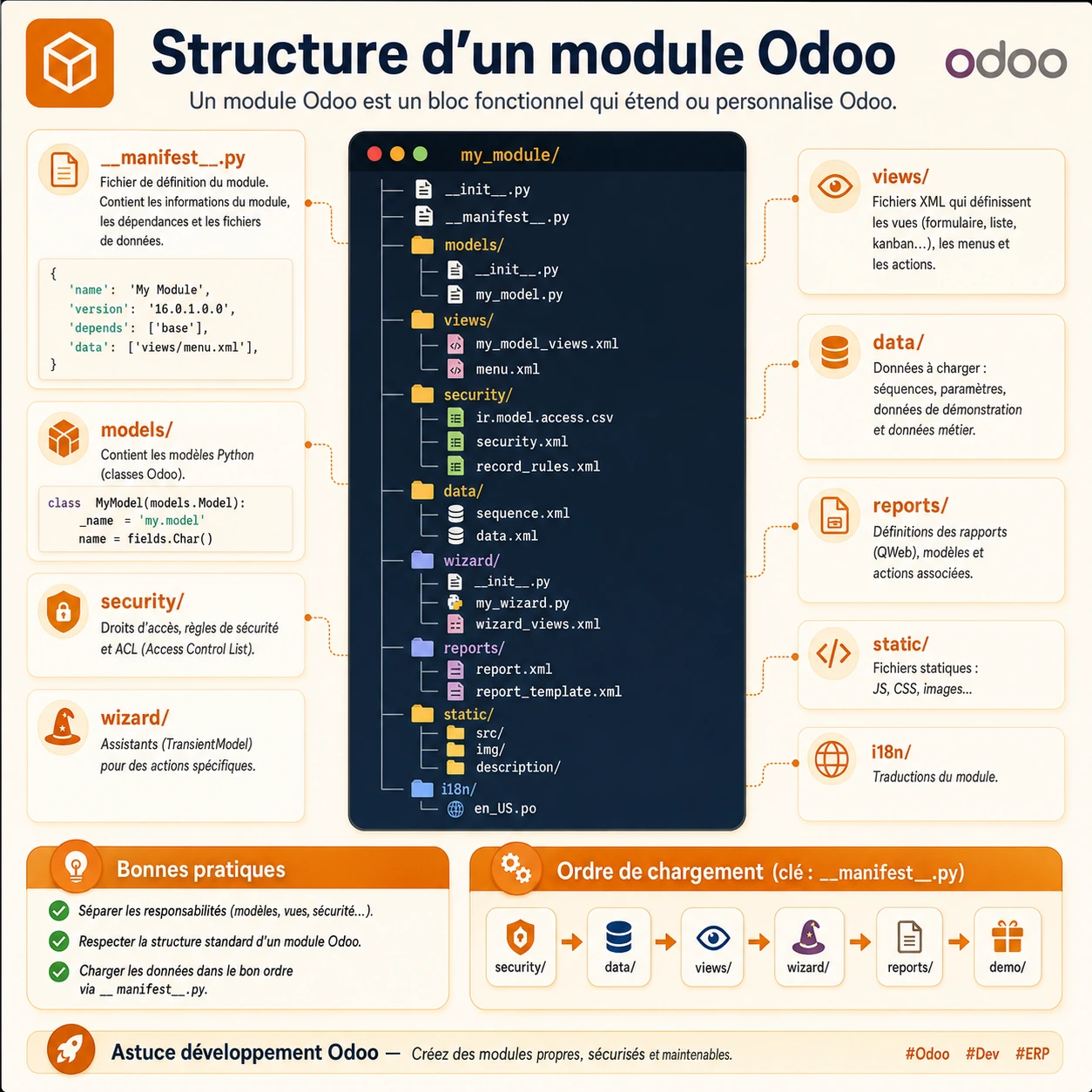
An Odoo module is not just a script dropped into a folder. It is a functional building block (Functional Building Block) governed by strict software engineering rules (the MVC pattern: Model-View-Controller). Here is the exact map of a well-structured professional module.
| Folder / File | Technical role | Business impact (why it matters) |
|---|---|---|
| __manifest__.py | Declares the module, its version and its dependencies. | It is the module's ID card. If it is filled in badly, Odoo will not be able to update the module cleanly during a migration. |
| models/ | Contains the Python classes (the database tables). | It is the business engine. This is where your margins, your stock and your complex business rules are calculated. |
| views/ | XML files defining the interface (forms, lists, kanban). | It is the user experience. If it is badly coded, your teams will waste time with unreadable or non-responsive screens. |
| security/ | Access rights files (ACLs) and record rules. | Critical. This is what stops an intern from validating an invoice or exporting your customer database. |
| data/ & demo/ | Sequences, initial configuration data (Master Data). | Lets you pre-configure the module so it is ready to use as soon as it is installed (e.g. preconfigured taxes). |
| wizard/ | Transient models (TransientModels) for pop-ups. | Handles one-off actions (e.g. the pop-up screen that asks you to confirm before launching a bulk import). |
The brain of the operation: the `__manifest__.py` file
Every Odoo module starts with a manifest file. This Python document acts as the conductor. It states the module's name, its version, its author, and above all: its dependencies.
If your custom module changes the customer invoice, its manifest must declare that it depends on the standard `account` module. Without this strict rule, Odoo will try to install your module before installing Accounting, which will instantly crash your database.
🔗 Going further: Building custom modules pushes up a project's budget. To keep your IT costs under control, read our detailed analysis of the cost and funding options for an Odoo implementation in an SME.
Models & Views: separating the engine from the bodywork
Odoo requires logic to be separated from display. This rule is non-negotiable.
- The `models/` folder (the engine): This is where, in Python, the developer creates the tables in your PostgreSQL database. If you want to add an "Employee ID number" field on the employee record, it is declared in a model. This is also where the methods (automated actions) are coded, such as "If the quote is signed, create a project".
- The `views/` folder (the bodywork): Written in XML, this folder simply places the fields created by the model on the end user's screen. It defines whether a field is a drop-down menu, a checkbox, or whether it should be invisible to certain teams.
The costly mistake: A poor integrator will tend to put complex calculation logic directly in the interface (the XML views) or in front-end scripts in the `static/` folder (JS/CSS). The result? The ERP becomes painfully slow and maintenance turns into a nightmare.

Your lead developer when auditing an external module and finding that the Models / Views separation is followed to the letter.
🔗 Take action now: Need to connect Odoo models securely with your other software (WMS, BI, e-commerce)? Discover the right technical architecture on how to connect Odoo with an API.
The Security folder: the ultimate shield for your company data
This is probably the most critical folder for a CIO. The `security/` folder usually contains two key elements:
1. The `ir.model.access.csv` file (ACL, Access Control List):
It defines, in black and white, who can do what on the database table. It uses a matrix of 4 rights: Read, Write, Create, Unlink (delete). If you develop an expense report module, this file guarantees that an employee can only Create and Read their own expenses, while the CFO can Write and Delete them.
2. Record Rules (XML files):
They go even further by filtering data at the record level. Record Rules are what make a salesperson at the Lyon branch see only quotes for the Lyon area, without access to the Paris branch's revenue, even though both use the same Sales module.
“ERP projects rarely fail because of missing software features, but very often because of an over-customized business architecture that makes upgrades impossible. Extreme customization is the enemy of agility.” Gartner Research: "ERP Strategy and Architecture" - Link to Gartner's expertise
Load order: the hidden trap for junior integrators
An Odoo module loads its files in a very specific order, defined in `__manifest__.py`. The golden rule is: Security -> Data -> Views -> Wizard -> Reports.
Why is this order vital? Imagine the module tries to display a screen (View) with an action button reserved for "Managers", but the access rights (Security) have not yet been loaded into the database. The system will throw a fatal error (`OwlError` or `XML Parsing Error`) and crash.
Likewise, the core business data (`data/` folder) must be loaded before the views, so that drop-down menus have something to display when the user opens the screen for the first time.
In conclusion: should you avoid custom modules?
Not at all. Odoo's open architecture is designed precisely to let you build the perfect ERP for your specific processes. However, building a module should never be seen as a quick IT "hack".
Every line of custom code commits your company for the long term. Require your integration partner to follow Odoo Best Practices, to keep separate environments (Dev, Staging, Prod) and to comment their code. A well-built module today means a smooth, fast and inexpensive migration to the next version of Odoo tomorrow.
🔗 Going further: A successful ERP project is first and foremost a governance project. Make sure you have the right method by reading our strategic guide on how to carry out an Odoo implementation the right way.

Article written by Billy Felicie
IT architecture and Odoo integration expert at Hors du Commun (Lyon). I help SMEs and mid-sized companies structure their information systems and secure their custom development to achieve the best TCO (Total Cost of Ownership).