
Migrating to Odoo 20: is it worth it for your SME?
It is May 2026. The Odoo ecosystem is buzzing ahead of Odoo Experience, scheduled for September at Brussels Expo. If you are the CEO, CFO or CIO of an SME, one question is probably on your mind: should you set aside the budget and the time to migrate to Odoo 20?
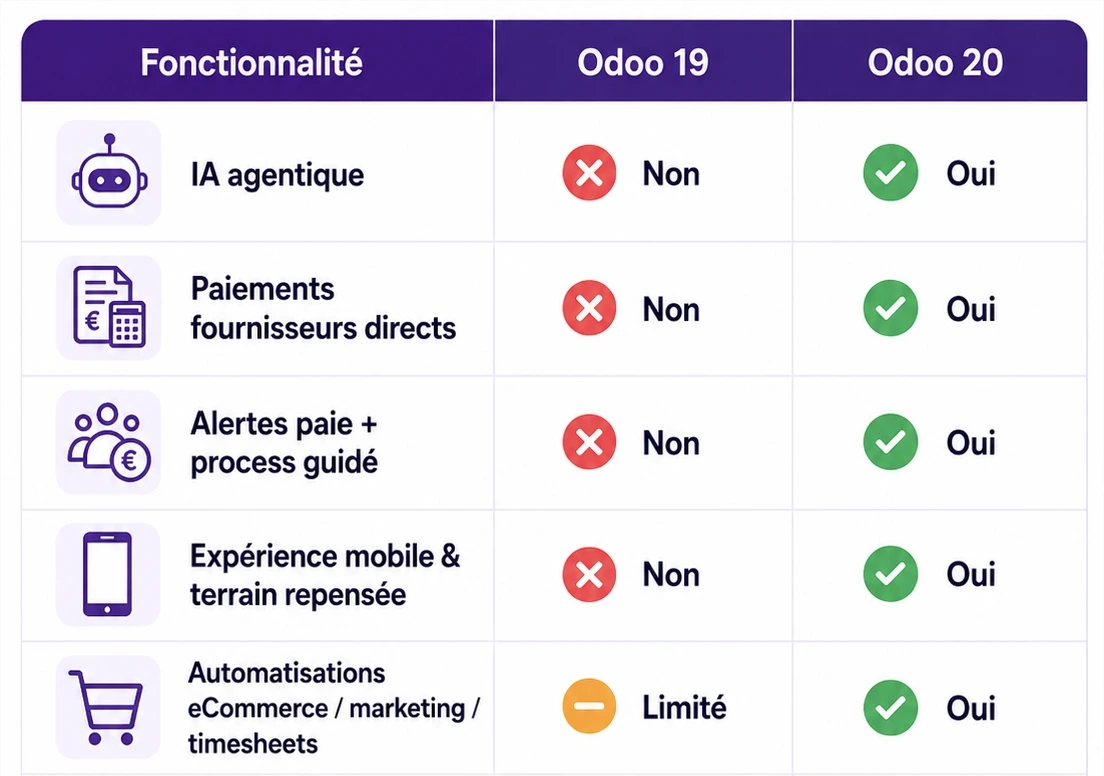
Let's be clear from the start: what is presented today comes from a very advanced roadmap, not final release notes. Still, the product direction is unmistakable. Odoo 20 does not just pile on gimmicky features. It goes after the root cause of your lost profitability: manual work and re-entering data.
Odoo 20's promise can be summed up simply: the ERP no longer just stores your information, it drastically simplifies your daily operations, whether for your field teams, your finance department or your sales reps.
Summary table: what will really change for your SME
Before getting into the technical details, here is a clear, jargon-free recap of the major changes announced for version 20, sorted by business app.
| Odoo app | Main announced features | Concrete impact (benefit for SMEs) |
|---|---|---|
| Discuss / CRM / Project | Agentic AI: carries out tasks (creating leads, summarizing meetings, generating projects from a PDF). | AI no longer just produces text, it performs actions in the ERP. Less data entry for your sales reps and project managers. |
| Accounting | Built-in payments & AI reconciliation: standard SEPA batches, highly flexible reconciliation, multiple legal identifiers. | No more juggling between Odoo and the bank portal. Anomalies are immediately clear to the CFO. |
| Payroll | Pre-closing alert dashboard: automatic detection of expired contracts, missing IBANs or incorrect variables. | No more crashes on payday. Payroll is based on actual time off and removes harmful manual entries. |
| Timesheets | Floating timer & AI suggestions: a stopwatch available everywhere and AI suggesting time spent based on activity. | No more forgotten time-and-materials billing. Technical teams log their hours without friction. |
| Point of Sale (POS) | Lighter hardware & standard combos: printer connection through local Chromium, automatic menus, redesigned floor plan. | Ultra-fast hardware deployment for retailers and a checkout interface that keeps up better during rushes. |
| Technical (API) | XML-RPC / JSON-RPC removed: final switch to the JSON-2 API introduced earlier. | You must audit your custom connectors before migrating to avoid a complete outage. |
1. Agentic AI: intelligence that no longer just "answers" but "acts"
This is the paradigm shift of this version. Until now, AI in business software often looked like a glorified chatbot. With Odoo 20, we move to agentic AI. Equipped with "topics" and "tools", it can carry out concrete actions directly in your database.
Picture a B2B services SME. You receive a 40-page client specification as a PDF. Instead of asking your project manager to spend the morning creating tickets, Odoo 20's AI analyzes the document and proposes a complete project structure, with stages, assigned tasks and milestones. All you have to do is approve it.
On the CRM side, a sales director no longer needs to filter endless lists. They simply ask: "Show me the opportunities with no follow-up in 30 days and reassign them to the sales reps who have fewer than 5 open leads." The analysis instantly turns into operational action.
“The economic potential of generative AI lies in its ability to automate execution work. AI can now automate activities that take up 60 to 70% of employees' time, radically transforming the productivity of support and sales functions.” McKinsey & Company, "The economic potential of generative AI" study (June 2023)
🔗 Take action now: Want to understand how AI can transform your daily work even before v20? Discover, in practical terms, the 8 AI tools to set up with Odoo to boost your productivity without blowing up your IT budget.

You, when you realize the AI no longer just gives you advice, but creates leads and projects for you in 3 seconds.
2. Accounting and payroll: anticipate instead of react
Finance and HR have always been the poor relations of user experience. Odoo 20 aims to make accounting readable for business owners, not just for accountants.
Operational accounting
The roadmap announces major progress on vendor payments (SEPA, secure bank batches straight from Odoo) and much more flexible bank reconciliation. If you are an SME handling 80 vendor bills a month, your team prepares the payment batch in the ERP, approves the amounts and triggers the bank transfer without ever opening your bank's portal. On top of that, managing multiple identifiers (TVA, the French VAT; SIRET; intra-EU VAT number) drastically reduces cross-border compliance errors.
🔗 Going further: Finance is the core of the engine. To make sure your current setup holds up against regulations, read our complete guide to accounting for SMEs with Odoo.

Your CFO when they see that bank reconciliation finally happens on its own without wrecking the trial balance.
Payroll secured before closing
The worst nightmare of an HR director or CFO is finding an error on the day salary transfers go out. Odoo 20 includes a pre-payroll alert dashboard. Before you even start the calculation, the system warns you: missing IBAN for a new employee, expired contract, or a salary change that requires a recalculation. Manual work entries are replaced by logic based on schedules and actual time off. You no longer fix payroll, you secure its calculation at the source.
3. Time, planning and mobility: the ERP closer to the field
If you run an IT services company, a consulting firm or a maintenance business, time tracking is your lifeblood. And let's be honest: nobody likes filling in their timesheets (Timesheets).
Odoo 20 brings out two powerful weapons: a global timer available from any view (your technician starts it straight from the work order), and an AI time suggestion assistant. At the end of the day, the ERP cross-checks your tickets, calls and completed quotes to suggest: "1h30 on project A, 45 min on support B". All you have to do is approve. The result? Less "forgotten" time and maximized time-and-materials billing.

Your field sales rep trying to escape filling in timesheets on Friday evening (no more excuses with AI).
Field service & calendar convergence
The line between planning and field execution disappears. The Field Service app merges with Planning to centralize travel, route optimization and equipment allocation. Odoo 20 also wants to eliminate duplicate calendars: built-in personal booking pages (Calendly style), two-way Google/Outlook sync, and instant visibility of where your employees are working (office, remote, on the road).
🔗 Take action now: Losing money because of poor resource management? Structure your approach by discovering our expert solutions for projects, timesheets and planning.
4. Sales, POS and marketing: converting without friction
Odoo 20 makes selling smoother, whether online, in a physical store or in B2B.
- Point of Sale (POS): No more nightmares installing thermal printers. With local network access through Chromium, hardware setup gets lighter. On the business side, "automatic combos" (the system suggests a meal deal as soon as a dish and a drink are scanned) and a redesigned floor plan editor save precious seconds in the middle of a rush.
- E-commerce: The goal is to increase average order value and reduce after-sales service. Automated cross-selling (suggesting a pouch when a cosmetics gift set is added to the cart), standard returns management from the customer portal, and progress bars ("Only €18 left for free delivery") are powerful weapons for SMEs.
- Multichannel marketing automation: Building journeys finally becomes visual and realistic. B2B example: an unsigned quote triggers an email on day 2, a text message on day 5, and creates an automatic follow-up activity for the sales rep on day 7. Marketing and sales finally pull in the same direction.
Head to head: Odoo 19 vs Odoo 20
To see the difference in day-to-day use, here is a direct (and nuanced) comparison of key processes. Note that v20 does not just add things, it also brings technology breaks.
| Key feature | Odoo 19 | Odoo 20 |
|---|---|---|
| Artificial intelligence | Limited text assistant (writing, advice). A human carries out the final action. | Agentic AI. Carries out business actions (creating leads, building projects from A to Z). |
| Timesheets | Classic manual entry or starting a timer linked to a specific task. | Global floating timer + AI suggestions pre-filled from the day's activity. |
| Accounting and reconciliation | Semi-assisted reconciliation, sometimes rigid on complex differences. | Greater AI tolerance, advanced standard SEPA batch payments, multiple identifiers. |
| Payroll security | Errors (IBAN, end of contract) are often caught at calculation time. | Pre-closing alert dashboard that blocks errors upstream. |
| Legacy API (XML-RPC) | Legacy protocol still fully supported by your current connectors. | Removed for good. Your modules must be migrated to the JSON-2 API. |
The truth under the hood: should you migrate on release day?
Let's tackle the sore point, without beating around the bush. Odoo 20 brings deep structural changes. The well-known JSON-2 API (introduced in v19) will come into its own in fall 2026, because the old XML-RPC and JSON-RPC endpoints are scheduled for removal. On top of that, the likely move to the Owl 3 front-end framework will affect the interface.
What does this mean in practice for your SME?
If you have custom connectors (to an external WMS, niche business software or an analytics BI platform) that use the old API, your database will crash if you migrate without an audit first. Your custom modules must be rewritten or adapted.
“Modernizing ERPs toward agile cloud architectures is no longer an option, it is a survival imperative. Migrating core financial systems to the cloud is now the top priority for finance leaders, well ahead of simply cutting operating costs.” Gartner, official press release (November 2023)
Odoo's golden rule: never migrate your production environment on the release day of a new major version. The right question is not "should we migrate?" but "how do we prepare the migration?".
Ask your integrator for a copy of your database (Staging) migrated to v20. Test your processes end to end: complex quotes, generating manufacturing bills of materials, payroll calculations and API calls. Only once these unit tests pass can you consider the go-live.

The integrator when you tell them you clicked "Upgrade to Odoo 20" in production, on a Friday at 6 p.m., without testing.
🔗 Going further: don't let a technical migration wreck your business. Understand the exact methodology and the safeguards you need by reading our article on how to carry out an Odoo implementation successfully.
- McKinsey & Company, The economic potential of generative AI: The next productivity frontier: https://www.mckinsey.com/capabilities/mckinsey-digital/our-insights/the-economic-potential-of-generative-ai-the-next-productivity-frontier
- Gartner, Cloud ERP migration is a top priority for finance leaders: https://www.gartner.com/en/newsroom/press-releases/2023-11-28-gartner-says-cloud-erp-migration-is-a-top-priority-for-finance-leaders

Article written by Billy Felicie
Odoo integration expert at Hors du Commun (Lyon). I help SMEs implement their digital tools and secure their ERP migrations with a pragmatic, ROI-driven approach.