
No, you should not automatically change ERP after taking over a business: you change it when the inherited system threatens business continuity or blocks the takeover plan, and you keep it, at least for a while, when it does its job properly. The right method is to secure what exists during the first 100 days, decide on facts rather than gut feeling, and then put the ERP change in the business plan instead of having to rush it.
The question almost always comes up at the same moment: the deal is signed, and the new owner discovers a standalone invoicing tool, three Excel files for inventory, and an ERP that only the accountant knows how to run. Replacing everything is tempting. Sometimes it is the right decision; often it is a decision made too early.
Do you really need to change ERP as soon as you take over the business?
The new owner does not have two options, but three. Keep the system, upgrade it or replace it. The middle path (fixing, completing and connecting what exists) is often the most sensible one in the first year.
Changing ERP in the weeks following the takeover stacks three risks at once.
- Teams are already unsettled. Forcing a new software on them on top of that takes away the last familiar landmark they had.
- You don't know the real processes yet. Configuring an ERP for an organization you haven't observed yet means locking in mistakes.
- Cash is tight. The acquisition loan weighs on the first fiscal years, and a poorly scoped project adds an unexpected expense at the worst possible time.
Waiting too long has a cost too. Every month with unreliable figures is a month of flying blind.
| Option | When to choose it | The main risk |
|---|---|---|
| Keep | The system is maintained, the data is reliable, the teams actually use it. | Postponing a problem that grows with the business. |
| Upgrade | The foundation holds, but a building block is missing (CRM, inventory, e-invoicing) or re-entering data wastes time. | Piling up patches instead of treating the root cause. |
| Replace | The system is no longer maintained, the data is locked in, or it blocks the takeover plan. | Launching the project without scoping, too early, with no budget set aside. |
Which signals make it necessary to change ERP quickly after an acquisition?
Some findings leave no choice. A single one is enough to make replacement a priority, even if it won't happen in two weeks.
- The software is no longer maintained by its vendor: no more fixes, no more regulatory updates.
- You don't really own the system. The contract is in the name of the seller or their holding company, the server sits with a provider nobody knows, the administrator credentials have vanished. As long as you don't control the system, you don't control your data.
- The data can't be extracted: no clean export of customers, products or invoices. The longer you wait, the more expensive migrating it will be.
- E-invoicing is not covered. Since September 1, 2026, every business must be able to receive electronic invoices, and SMEs will have to issue them starting September 1, 2027. Software that doesn't keep up with this reform has a known expiry date.
- Only one person knows how to run the system. If they leave, or if that person is the seller themselves, the knowledge leaves with them.
- The system blocks the takeover plan. You bought the business to open online sales, merge two companies or launch a manufacturing activity, and the current software can't do it.
These signals concern continuity and strategy. An old-fashioned interface is not one of them: it is unpleasant, but not a good enough reason to launch a project lasting several months right after an acquisition. Telling the difference between a system that is simply dated and one that is really holding the business back takes a finer grid: we laid it out in answering the question how to tell if an ERP is too old.

You when the seller assures you that “everything is in the software” and the inventory lives in a file named STOCK_DEF_v4.xlsx.
When is it better to keep the existing system after the takeover?
Keeping the ERP in place is not an admission of weakness. It is often the most profitable decision of the first six months, provided you make it with full knowledge of the facts and not by default. It is justified when three conditions are met.
- The system is maintained and you are in control of it: contract in your name, administrator access recovered, backups checked.
- The data is usable. You can pull revenue by customer, margin by product family and an inventory report without spending a day reworking extracts.
- Teams actually use it. No parallel file serving as the “real” reference, no systematic re-entry between two tools.
In that case, upgrade rather than replace: add the missing building block, eliminate the most costly double entry, clean up the product database. Replacement will come back on the table once you know the business from the inside, and your employees will keep familiar ground while everything else changes.
What should you do with the ERP during the first 100 days after the takeover?
The first 100 days are not for changing ERP. They are for securing what exists and gathering the facts you need to decide. Here is the roadmap we recommend to people taking over SMEs.
Weeks 1 to 2Take back control of the system
Recover all administrator access, check whose name the license, hosting and maintenance contracts are in, and have them transferred. Run a full backup, then check that it restores: a backup that has never been restored is only a hypothesis.

You when you're looking for the ERP administrator password, the first Monday after signing.
Map what really exists
List every piece of software, every subscription and every shared file. Then follow a real order from end to end, from the customer's request to payment, noting every tool used and every re-entry. Hidden files surface quickly.
Weeks 6 to 10Capture the seller's knowledge
If the seller stays on with you for a few months, now is the time to make the most of it. Have them explain the pricing rules, the special discounts, the customers handled differently. Write everything down: this knowledge isn't in any software, and it will be useful whatever you choose.
Weeks 10 to 14Decide, cost, plan
With this information, you can decide between keeping, upgrading or replacing. The decision then fits on one page: the findings, the chosen option, the budget, the schedule and the people involved.
If you are preparing a takeover or have just signed, the list of checkpoints to review, before and after signing, is longer than these four steps. We have gathered it in a guide that you can read here: the information system audit guide for a business takeover.
What budget should you plan for changing ERP after a takeover?
The most important rule is simple: the information system budget is planned before signing, in the takeover business plan, not afterwards, out of whatever cash is available. The study by Bpifrance (French public investment bank) on business transfers shows why.
“In hindsight, about a third of buyers had to postpone or even reduce the investments needed for the business to grow properly, because of the financial costs of the loan used to finance the takeover.” (Bpifrance Le Lab, “Transmission et reprise d'entreprise : perspectives de marché et facteurs clés de succès” (Business transfer and takeover: market outlook and key success factors), November 2025)
An investment missing from the financing plan therefore has a good chance of never being made. If the pre-acquisition audit shows that the ERP will need replacing within two years, that amount must appear in the file presented to the banks. Well argued, it reassures rather than worries them.
An ERP change budget breaks down into five items.
- Licenses. For Odoo, prices are public: the Standard plan is listed at €19.90 then €24.90 per user per month with an annual commitment, the Custom plan at €35.90 then €44.90 (prices checked on odoo.com on September 27, 2026).
- Implementation: scoping, configuration, any custom development.
- Data migration: cleanup, formatting, imports and checks. This is the item most often underestimated.
- Team training, to be planned by job role rather than in a single general session.
- Ongoing support after go-live, to absorb the questions and adjustments of the first months.
Finally, keep a margin for the unexpected, because overruns are common.
“The report also revealed that more than a quarter of organizations exceeded their project budgets, with additional technology needs cited as the leading cause.” In other words, more than a quarter of organizations went over their ERP project budget, mainly because of technology needs discovered along the way. (Panorama Consulting Group, The 2026 ERP Report, March 2026)
The lesson for a new owner is straightforward: serious scoping costs less than a late discovery, and that is exactly what the first 100 days make possible. The orders of magnitude and the available funding to build this line of the business plan are detailed on our page cost and funding of an Odoo implementation for an SME.
Why does Odoo often serve as the backbone after a takeover?
Once replacement is decided, the new owner is not looking for “the best ERP on the market”. They are looking for a system that replaces the inherited patchwork without creating a new monster. A horizontal ERP like Odoo fits the bill for four reasons.
A phased rollout, without switching everything at once
Odoo is split into apps: Sales, Invoicing, Purchase, Inventory, Manufacturing, CRM, Project. You start with what hurts, for example the quote, order, invoice chain, then add the other building blocks. The Standard and Custom plans give access to all apps, which avoids renegotiating a license at every step.
The holding company and the acquired company in the same database
Many takeovers go through a holding company. Odoo manages several companies in a single database, with data that is shared (products, contacts) or restricted to one of them, and a switcher at the top of the screen to choose the company or companies you are working on. The holding company and the acquired company remain two separate companies, each with its own accounting; Odoo branches are reserved for sites of the same company, not for subsidiaries.

Point to watch: according to Odoo's pricing page, adding a company to the database moves you to the Custom plan. This is a criterion to factor in from the costing stage, not a surprise to discover on the first license invoice.
Importing existing files
Inherited Excel files are not lost. Odoo imports Excel or CSV files, offers ready-to-fill templates for the most common data (contacts, products…) and matches the file's columns to its own fields. The ones it doesn't recognize must be mapped by hand: a chance to ask whether the information is worth keeping.
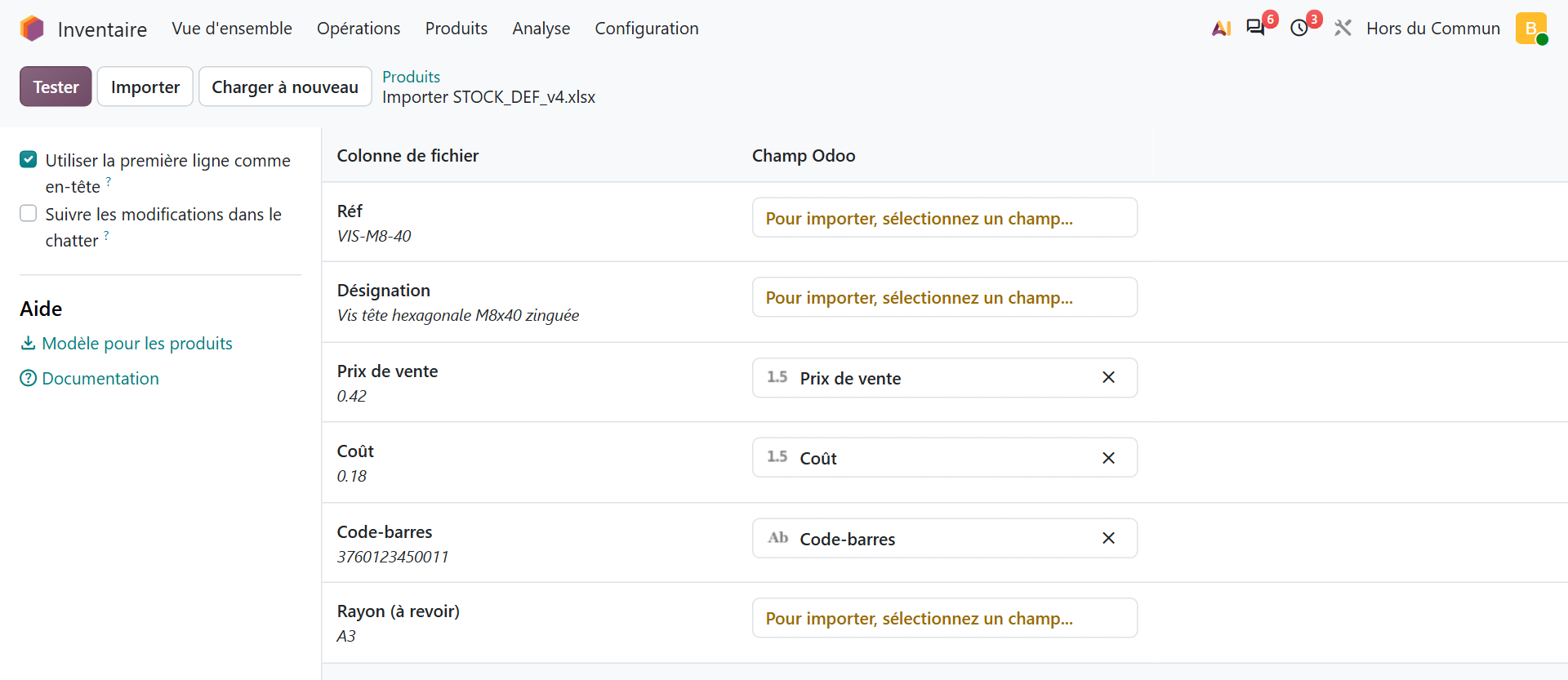
The tool does its part, but the real work remains the cleanup beforehand: duplicates, inconsistent references, incomplete records. A file like this one almost always contains a screw entered twice under two references that differ by a single space.
A foundation that accepts industry-specific software alongside it
Replacing the ERP doesn't mean replacing everything. Highly specialized industry software that does the job well can stay and connect to the foundation.
Odoo is not the answer to every takeover: beyond 250 employees, with an already structured information system, the trade-off is different. But most of the projects we run involve companies with 10 to 50 users, exactly the size of most SMEs that change hands.
How do you change ERP without disrupting the business you have just taken over?
Once the decision is made, the danger is no longer the choice of software, it is the switchover. Six rules avoid most surprises.
- No “big bang”. Split the project into short phases, and make sure the first one relieves a pain everyone feels.
- Choose the switchover date: avoid the fiscal year-end close, the seasonal peak and vacation periods.
- Limit the history you migrate. Customers, products, suppliers, open items and balances: yes. Ten years of lost quotes: no. The old system can remain available in read-only mode.
- Appoint a key user for each department, involved from the scoping stage, responsible for testing and training their colleagues. After a takeover, it is also a way to recognize those who carry the company's know-how.
- Test on a copy of the database before go-live, with real orders and real tricky cases.
- Plan a short period of double-checking on sensitive flows (invoicing, payments), never an extended period of running both systems.
Of these six rules, data migration is the one that derails the most projects: our method to migrate your data to Odoo without carrying over the errors of the old system describes it step by step.
How do you decide: what decision grid for the new owner?
At the end of the first 100 days, answer these seven questions honestly.
- Is the system still maintained by its vendor, and will it be in three years?
- Are the contracts, access and data fully under your control?
- Can you cleanly export customers, products, suppliers and invoices?
- Does the system handle receiving and issuing electronic invoices?
- How many hours a week do teams spend re-entering or reconciling information?
- Does knowledge of the system rest on a single person?
- Does the system make it possible to carry out the growth plan that justified the takeover?
An unfavorable answer to questions 1 to 4: replacement must be planned, with a budget and a schedule. Unfavorable answers to questions 5 to 7 only: upgrading the existing system is often enough in the short term, and replacement is prepared for the following year. Everything is favorable: keep your system, and put your energy into the rest of the takeover.
Changing ERP after a takeover is neither an obligation nor a taboo. It is an investment decision that is prepared before signing, checked during the first 100 days and carried out in stages.
- Bpifrance Le Lab, “Transmission en France : un marché de 370 000 entreprises d'ici 2030” (Business transfer in France: a market of 370,000 companies by 2030), analysis of the study “Transmission et reprise d'entreprise : perspectives de marché et facteurs clés de succès”, November 2025: https://lelab.bpifrance.fr/transmission-en-france-un-marche-de-370-000-entreprises-d-ici-2030/
- Panorama Consulting Group, “Panorama Consulting Group Releases Latest Study of ERP Implementation Outcomes” (The 2026 ERP Report), March 2026: https://www.panorama-consulting.com/panorama-consulting-group-releases-latest-study-of-erp-implementation-outcomes-across-the-globe/

Article written by Billy Felicie
Odoo integration expert at Hors du Commun (Lyon). I have been helping SMEs implement their digital tools and optimize their business processes for more than 5 years.