
To get your sales reps to adopt Odoo CRM, the tool has to save them time before it serves management reporting: a pipeline modeled on how they really sell, a short opportunity form, follow-ups that suggest themselves and quotes made from the CRM. Then management steers only from Odoo: what is not in the CRM does not exist in the sales meeting.
An ignored CRM is rarely a software problem. It is a tool installed without settling three questions: what sales reps are asked to enter, what they get in return, and what the manager looks at every week. Here are those three decisions, with the Odoo screens that make them concrete.
Why don't sales reps use the CRM?
The CRM is installed, the team trained for half a day. Three months later, the pipeline is full of “in progress” opportunities that have not moved since spring. The real deals live elsewhere: in notebooks, the mailbox, the sales director's Excel file.
The causes are almost always the same:
- The CRM is seen as a control tool. The sales rep has understood that they enter data to be monitored, not to sell better.
- Data is entered twice. The meeting report goes out by email, the opportunity is updated in Odoo, and the sales director still asks for his Monday spreadsheet.
- The form is too heavy. Thirty fields, twenty of which nobody reads: after a week, the ten useful ones are abandoned along with the rest.
- The sales rep gets nothing out of it. No useful reminder, no faster quote: only extra work.
- The manager does not use it. He keeps doing check-ins by phone, and the message sent to the team is crystal clear: the CRM is optional.
None of these is fixed by changing software. And the issue directly concerns SMEs, where the tool is still far from widespread:
“In 2025, the share of enterprises using customer relationship management (CRM) software ranged from 24.69% for small enterprises to 65.43% for large ones.” (Eurostat, E-business integration, European Union statistics, data extracted in May 2026)
Small enterprises, as defined by Eurostat, have 10 to 49 employees: three out of four do not have a CRM yet. Those that adopt one usually have neither an IT department nor a dedicated project manager to establish its use. Adoption therefore rests on the business owner and the sales manager, and that is good news: they are the ones who hold the levers described below.

You when you're told you'll now have to log every call in the CRM.
Should you start from the tool or from the way you sell?
From the way you sell, always. A pipeline that does not reflect reality on the ground is abandoned within weeks, because the sales rep does not know which column to put the deal in. Before opening Odoo, write down the real stages of your sales and, for each one, what must be true to move on to the next.
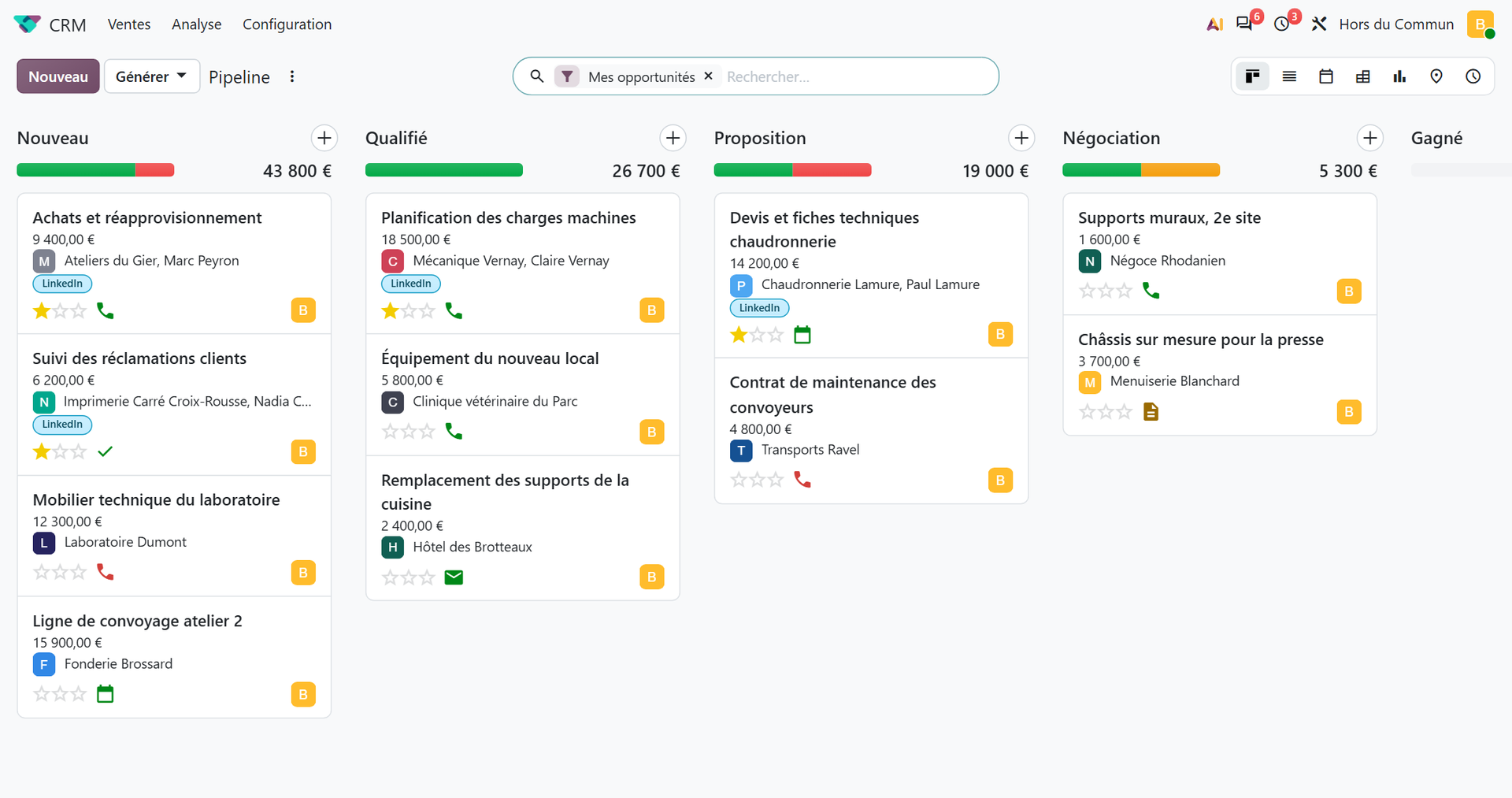
For an industrial or wholesale SME selling B2B, this often gives five columns. New: an inbound contact, not yet qualified. Qualified: need, decision-maker and deadline known. Proposition: a quote has gone out, with a follow-up date. Negotiation: the customer is discussing price, lead time or terms. Then won, or lost with a reason.
Each stage must match an observable fact, never an impression (“looking good”, “hot”). The pipeline review becomes quick: you no longer debate progress, you observe it. On each card, the next activity icon turns red as soon as it is overdue, which shows at a glance the deals that are waiting on someone.
Leads or direct opportunities?
Odoo lets you add a qualification step before the opportunity: the Leads box, in CRM ‣ Configuration ‣ Settings. If your sales reps qualify requests themselves, leave it unchecked: that is one less screen per deal.
Lost reasons, decided in advance
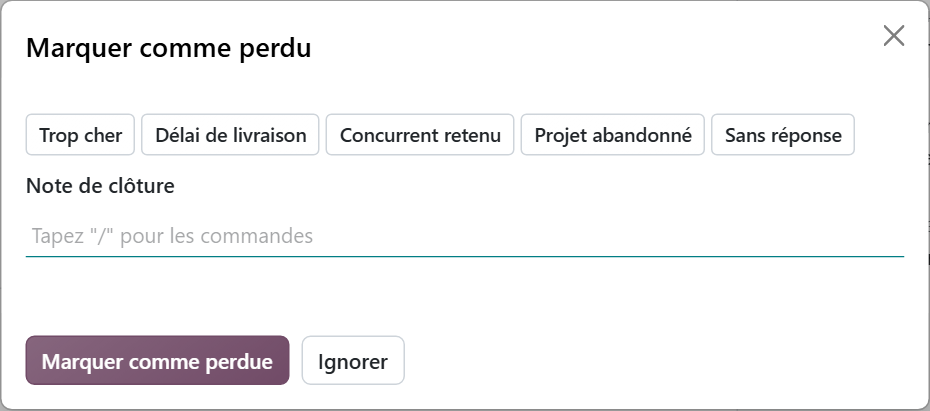
When an opportunity is marked as lost, Odoo opens the “Mark Lost” window and offers the lost reasons defined in the configuration. The reason is not mandatory out of the box: make it a team rule. Five or six reasons are enough (price, lead time, competitor chosen, project abandoned, no response), created in CRM ‣ Configuration ‣ Pipeline ‣ Lost Reasons. After a quarter, you will know why you lose.
This work on stages and reasons is the heart of a successful rollout, well before the technical side. We detail how we carry it out, from analyzing the way you sell to one-on-one coaching, on our page dedicated to CRM and sales management with Odoo in Lyon.
How do you reduce data entry to the bare minimum?
Every field requested must serve a decision. If nobody reads it in a report or a meeting, remove it from the form. A useful opportunity form fits on one screen: customer, contact, expected revenue, expected closing date, stage, next activity. The rest can be hidden with Studio, Odoo's screen configuration tool, without touching code. Studio is part of Odoo's Custom plan (€35.90 then €44.90 per user per month on an annual plan, prices checked on September 27, 2026): without it, the integrator can lighten the form by configuring the views. Studio also lets you make mandatory the two fields that feed the forecast: expected revenue and expected closing date.
Next, capture information where the sales rep already works, instead of asking them to copy it over:
- The sales team's email alias, set in CRM ‣ Configuration ‣ Sales Teams. Any message sent to this address creates an opportunity, with the email filed in its history. Forwarding a request is enough.
- The Outlook or Gmail connector offered by Odoo: from an email, the sales rep creates the opportunity and files the exchanges in it without leaving their mailbox.
- The phone: Odoo works on mobile, and the meeting report can be typed right after the appointment, while it is still precise.
One last point, often overlooked: migrating existing data. If the CRM starts empty, or full of duplicates imported in a hurry, sales reps will keep their file “for the time being”. The day the team opens Odoo, it must find its deals there. If your prospects are sitting in several Excel files and an old software package, we have described the method to migrate your data to Odoo without duplicates, to apply before the launch.
Reducing data entry is not a comfort. It is a condition of performance, as shown by a Gartner survey of B2B sellers:
“50% of sellers say they are overwhelmed by the amount of technology required to do their jobs. Overwhelmed sellers are 45% less likely to attain their quota.” (Gartner, survey of 1,026 B2B sellers, published in September 2024)
The lesson for a business owner: the CRM must replace tools, not be added to them. If the information is in Odoo, the Excel spreadsheet disappears, and so does the email report. As long as both coexist, you have added a layer of technology.

You when you copy into the CRM the report you just emailed to your director.
What does the sales rep gain from using Odoo CRM?
Every sales rep asks the question. If the answer is “nothing”, no instruction will stick. Odoo has what it takes to answer it, provided it is configured with that in mind.
Follow-ups that no longer get forgotten
Each opportunity carries activities: email, call, meeting, to-do, with a due date and an assignee. Overdue activities jump out in the pipeline: no more need for a follow-up notebook.
Activity types are set in CRM ‣ Configuration ‣ Activities ‣ Activity Types. A type can suggest the next activity as soon as the previous one is marked as done, with a delay set in advance. Example: when “Send the quote” is done, Odoo suggests “Follow up on the quote” three days later. An email template can be linked to each type, so that the follow-up message is ready, and editable before sending. For longer sequences, activity plans (same menu) schedule a whole series at once: first email, meeting, quote, follow-up.
Quotes without re-entry
From an opportunity, the New Quotation button creates the quote with the customer already filled in (the Sales app must be installed). The quote stays linked to the opportunity. For the sales rep, this is often the deciding argument: the CRM is no longer extra data entry, it is the shortest path to the quote. And when the quote becomes an order and then an invoice in the same database, nobody re-enters anything about the prospect all the way to payment. We detail what the company gains from this in our article Centralizing your sales management: why it pays off.
Clear priorities
Odoo calculates a probability of winning for each opportunity through its predictive scoring, fed by the history of won and lost deals. The better the pipeline is kept, the more reliable it becomes: the sales rep knows where to put their energy.
| Sales reps' objection | Answer in Odoo |
|---|---|
| “I forget my follow-ups” | Activities with due dates, next activity suggested automatically |
| “I re-enter everything” | Team email alias, Outlook or Gmail connector, quote created from the opportunity |
| “The form is too heavy” | Unnecessary fields hidden by configuring the views or with Studio (Custom plan), without custom development |
| “I don't know what to prioritize” | Probability of winning calculated by predictive scoring |
What role should the manager play in CRM adoption?
The main role. The team uses the CRM exactly as much as the manager does. If he still asks for a verbal update or a spreadsheet on the side, the CRM becomes a duplication of effort, and duplicated effort always ends up abandoned.
One rule: the pipeline review happens in Odoo
The sales meeting is held with a shared screen, in Odoo. A deal that is not in the CRM is not discussed and does not count in the forecast.
The Forecast report (CRM ‣ Reporting ‣ Forecast) groups opportunities by expected closing month. Each card shows the expected revenue weighted by probability, and the column total gives what the month can reasonably bring in. Dragging a card from one month to another updates its closing date.
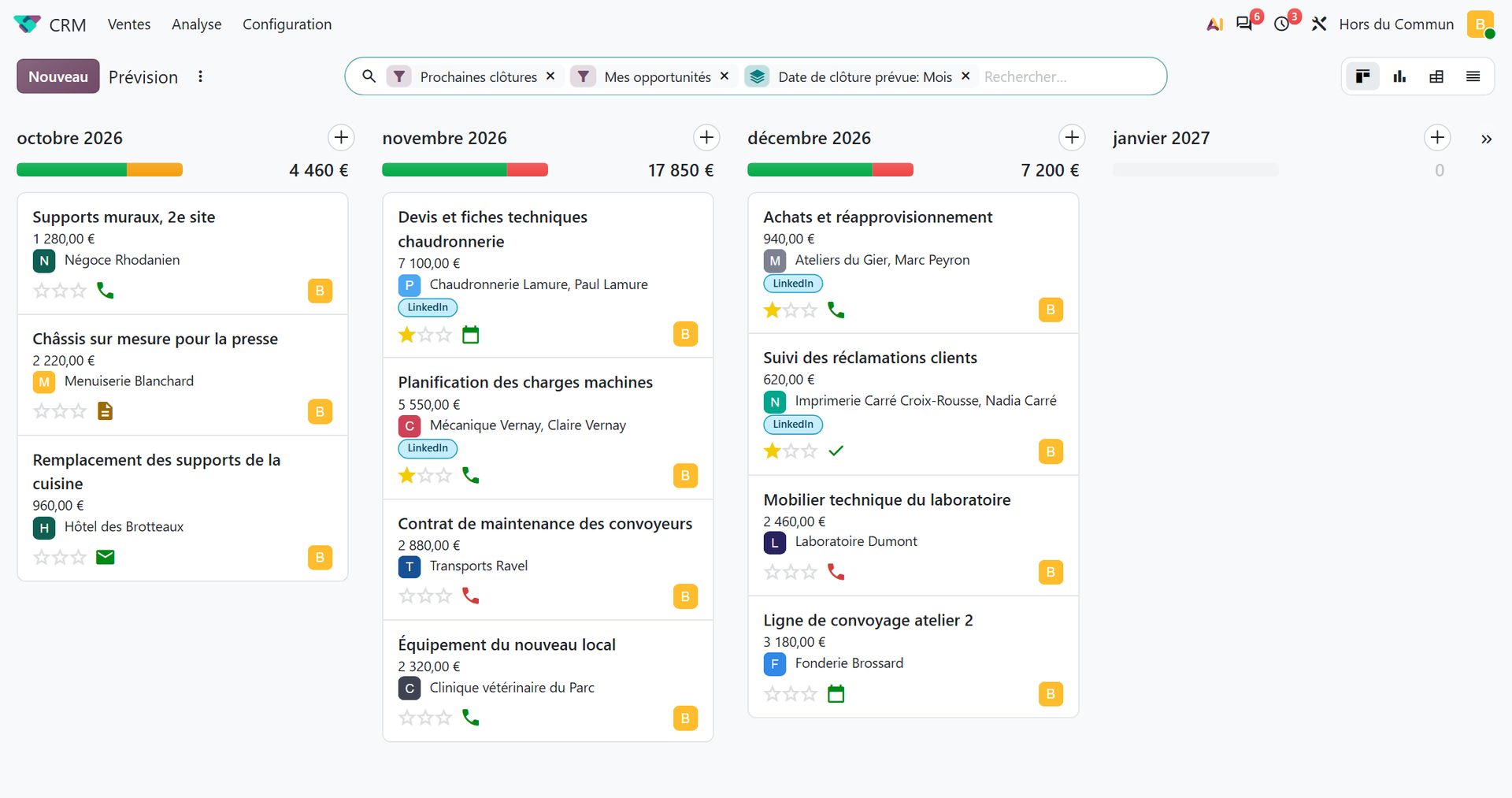
Before the meeting, one click on the red part of the progress bar at the top of each pipeline column isolates the opportunities whose activity is overdue: those are the ones that need a decision. This marker only works if the team really schedules its activities: it is also a good adoption test.
Coach, don't monitor
The CRM gives the manager what he needs to support each sales rep: lost reasons reveal a pricing or qualification problem, the forecast shows who is short of deals for the coming months. Use this data to help, never to humiliate. A sales rep who is publicly criticized for an overdue activity stops scheduling them. And the business owner leads by example: their own deals are in the CRM.
How do you train and launch Odoo CRM without putting the team off?
A good configuration launched badly is still a failure. A few principles make the difference:
- Involve a sales rep from the configuration stage: this point person validates the stages and fields, then becomes the go-between with their colleagues.
- Train on their own files, not on a demo database: each sales rep learns by moving their real deals forward.
- Start small: pipeline, activities and quotes at launch. Activity plans and advanced reports come once the habits are in place; the predictive scoring probability, calculated automatically, only becomes meaningful after a few months of won and lost deals.
- Set a switchover date. From that day on, the Excel file becomes read-only. Two tools running in parallel guarantee that the older one wins.
- Plan a quarter of an hour per week at the start, to remove a field, rename a stage, add an email template.
Every visible adjustment shows the team that it is being heard, and that is what turns a constraint into a tool. Support after go-live matters as much as the launch: pain points only appear with use.
If the team still asks for a “simpler” tool, listen to it: it is often the form that is too heavy, not the software. Do your sales reps cite Pipedrive as the benchmark for simplicity? Our Odoo 19 vs Pipedrive comparison details what you gain and what you lose on each side, so you can decide on facts.
How do you know whether Odoo CRM adoption has really taken hold?
The number of logins tells you nothing. An adopted CRM is recognized by the quality of what it contains. Six indicators, all readable in Odoo, are enough:
- Every open opportunity has a next activity scheduled. A deal with no next step dies in silence.
- Overdue activities remain rare, from one week to the next.
- No opportunity lacks an expected revenue or an expected closing date, otherwise the forecast means nothing.
- Lost deals have a lost reason: the sales rep plays along, even when the news is bad.
- Quotes go out from opportunities, not from a list created separately.
- No parallel file circulates anymore, and the sales meeting happens on screen, in Odoo.
Look at them after one month, then after three: the first tells you whether the habits are forming, the third whether the CRM has become the team's tool or one more chore.
Getting your sales reps to adopt Odoo CRM is not an IT project, it is a management decision. The software provides the follow-ups, the quotes and the forecast. The rest depends on three choices only management can make: ask for little, give a lot in return, and steer only from the CRM.
- Eurostat, E-business integration, Statistics Explained, 2025 data extracted in May 2026: https://ec.europa.eu/eurostat/statistics-explained/index.php?title=E-business_integration
- Gartner, Gartner Sales Survey Reveals Sellers Who Partner With AI Are 3.7 Times More Likely to Meet Quota, September 2024: https://www.gartner.com/en/newsroom/press-releases/2024-09-16-gartner-sales-survey-reveals-sellers-who-partner-with-ai-re-three-point-seven-times-more-likely-to-meet-quota

Article written by Billy Felicie
Odoo integration expert at Hors du Commun (Lyon). I have been helping SMEs set up their digital tools and optimize their business processes for more than 5 years.