
No, the Odoo point of sale software is not NF525 certified: Odoo claims neither this mark nor a certificate from an accredited body, and its compliance with the VAT anti-fraud law relies on a certificate issued by the publisher, Odoo SA, to Odoo Enterprise customers. This is not a weakness: since February 21, 2026, the publisher's individual certificate is once again accepted as proof by the French tax authorities, on the same footing as a certificate from an accredited body, such as NF525.
So the real question is not “NF525 or not?” but “can I show the right document, for the right version, on the day a tax inspector walks into my store?”. This article sets out the facts, backed by official texts and Odoo 20 screenshots, and lists the implementation mistakes that can make an Odoo point of sale non-compliant even though the software itself is compliant.
Is Odoo certified NF525 or by another body?
NF525 is not a synonym for “compliant POS system”. It is a certification mark, issued by the body Infocert. Other bodies, such as LNE, have published their own certification standard for POS systems. These certifications are one way of proving compliance, not the only one.
Odoo chose the other route provided for by law. Its official documentation for the French localization, in version 19 as in version 20, describes a dedicated module and “a downloadable certificate of conformity” issued by Odoo SA itself. It mentions neither NF525 nor LNE. On October 17, 2026, neither Odoo SA nor any Odoo product appeared in the certificate search engine run by Infocert.
In other words, the document you will show during an audit is an individual certificate from the publisher, not an NF525 certificate. If a call for tenders expressly requires the NF525 mark, Odoo does not provide it. To comply with Article 286 of the French General Tax Code (CGI), the publisher's certificate is enough.
Who must use secure POS software?
The obligation comes from Article 286, I, 3° bis of the CGI. It applies to any business subject to VAT (TVA) that sells to private individuals and records the payments received in POS software or a POS system. The software must then meet four conditions: inalterability, security, retention and archiving of data.
The BOFiP (the French tax authorities' official guidance) clarifies the scope:
- A company that sells only to businesses is excluded, since all its sales are invoiced. As soon as it also has private customers, it falls within the scheme.
- Businesses under the VAT exemption threshold (franchise en base), those that carry out only exempt transactions and farmers under the flat-rate refund scheme are out of scope.
- Nothing requires you to use a POS system. A retailer who records takings in a paper journal is not affected. One who uses software with a POS function is.
- A scale that stores payments, or that is connected to the POS terminal, must also be secured.
An important point for Odoo, which does far more than POS: for multi-function software, only the POS and payment collection function must be secured, not the whole software. The BOFiP adds that management or invoicing software that tracks payments from private customers can also fall within scope. If you collect payments from private customers outside the Point of Sale app, have your accountant validate the scope.
A common case: the online store. As a concession, the BOFiP exempts an e-commerce site that only accepts payments handled by a credit institution meeting its conditions. As soon as another payment method comes into play, the exemption no longer applies.
NF525 certificate or publisher's certificate: which one should you show?
Either one. The text in force provides for two forms of proof: a certificate issued by an accredited body (such as NF525), or an individual certificate from the software publisher, following the template set by the authorities. The tax doctrine is explicit:
“This is an alternative form of proof: just one of these two documents (certificate or individual certificate) is enough to demonstrate compliance with the above conditions.” (BOFiP-Impôts, BOI-TVA-DECLA-30-10-30, version of March 25, 2026)
If the topic seems confusing, that is normal: the rule changed twice in one year.
- The 2025 Finance Act (Law No. 2025-127 of February 14, 2025, Article 43) abolished the publisher's certificate as of February 16, 2025. Only a certificate from an accredited body remained accepted.
- The authorities tolerated the publisher's certificate until August 31, 2025. After that, the software had to be certified or be the subject of a certification application filed by its publisher, with certification becoming mandatory on March 1, 2026, a date later pushed back to September 1, 2026.
- Before that deadline, the 2026 Finance Act (Law No. 2026-103 of February 19, 2026, Article 125) reinstated the publisher's certificate, as of February 21, 2026.

You, when your POS certificate is abolished in 2025, reinstated in 2026, and your accountant asks which of the two documents you have.
For an Odoo point of sale, the conclusion is simple: Odoo SA's certificate is valid proof today. Be wary of content written in 2025: it describes a rule that is no longer in force.
How do you get Odoo's certificate for your point of sale?
Odoo's official documentation sets a condition from the outset:
“This certificate is issued by Odoo SA to Odoo Enterprise users who have a subscription number.” (Official Odoo 20 documentation, France fiscal localization, VAT anti-fraud certification)
According to that same documentation, the procedure takes three steps:
- Check that the module “France - VAT Anti-Fraud Certification for Point of Sale (CGI 286 I-3 bis)”, technical name l10n_fr_pos_cert, is installed. The Odoo 20 documentation lists it among the modules installed automatically with the French localization.
- Fill in the country on the company record, so that entries are encrypted for the inalterability check.
- Download the certificate of conformity provided by Odoo SA from your customer account on odoo.com, check that it correctly identifies your company, then keep it. The BOFiP accepts a downloaded certificate that the company completes with its own identity details.
The BOFiP sets out what the certificate must contain: it is personal, issued in your company's name, and states the name of the software, its version and the date of acquisition. A mere mention in the terms and conditions of sale does not count as a certificate. Print it and file it with your tax documents.
If you use Odoo Community, the free version, you do not have access to this certificate. The BOFiP points out that a company that obtains software free of charge is responsible for having an individual certificate produced or obtaining a copy of the certificate. The other settings of a POS deployment (hardware, payment journals, inventory, loyalty) are detailed on our page dedicated to Odoo point of sale software for retail and restaurants.
What does Odoo actually do to guarantee POS inalterability?
The certification module changes how the Point of Sale behaves in four ways, which we checked in an Odoo 20 test database with a fictitious register, “Comptoir Lyon”.
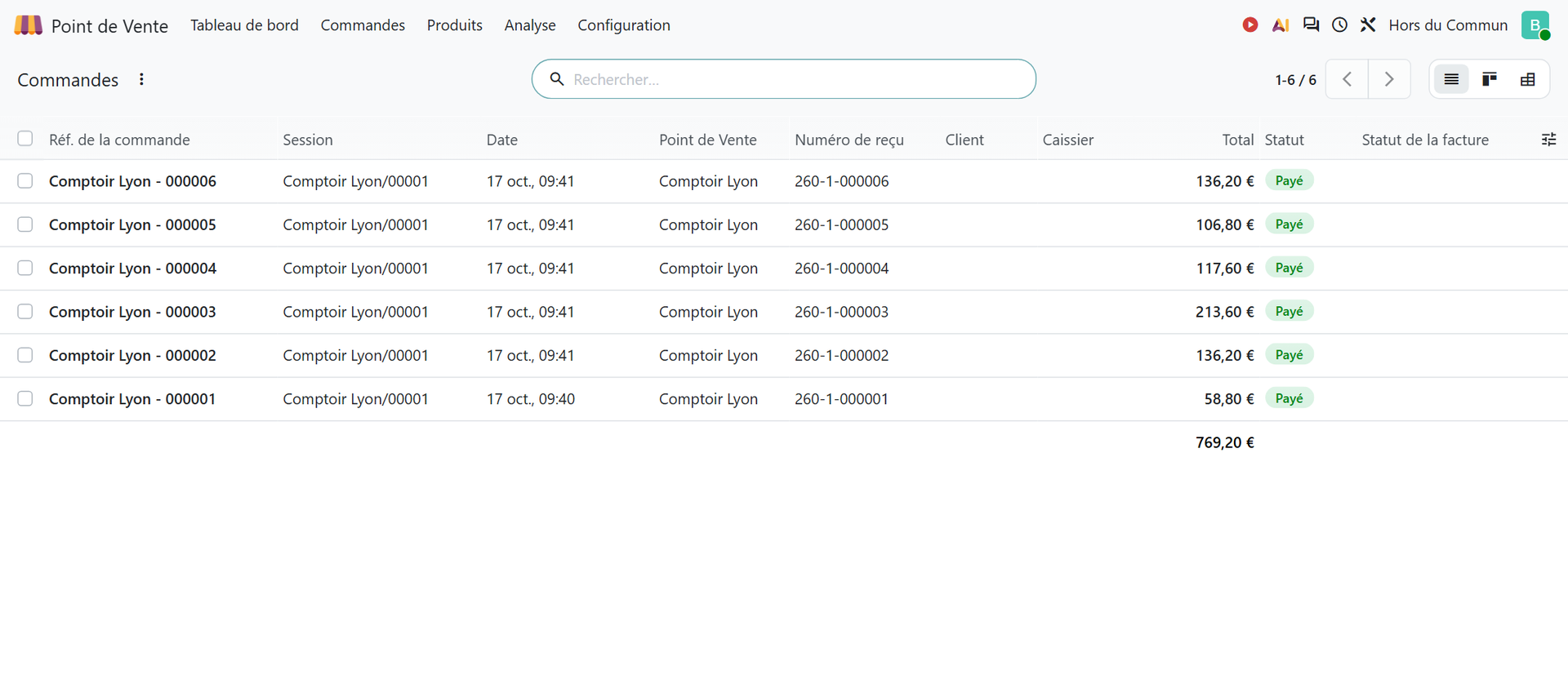
1. Every paid receipt is chained to the previous ones
On validation, each POS order receives a gapless sequence number and a fingerprint (a “hash”) calculated from its key data and the fingerprint of the previous order. Changing a receipt after the fact breaks the chain, and it shows.
2. A paid receipt can no longer be changed
For a French company, Odoo blocks any change to the key data of a paid order: date, lines, payments, session, user. In our Odoo 20 test database, any attempt is rejected with this message: “According to French law, you cannot modify a point of sale order.” A mistake is corrected with a return or a refund, in other words with a reversing transaction, as the BOFiP requires. The documentation states that the same lock applies to invoices and journal entries.
3. Daily, monthly and annual closings are automatic
Every day, month and year, Odoo calculates the total sales for the period and the grand total accumulated since the first sale. In Odoo 20, you find them under Point of Sale › Reporting › French Statements › Sales Closings.
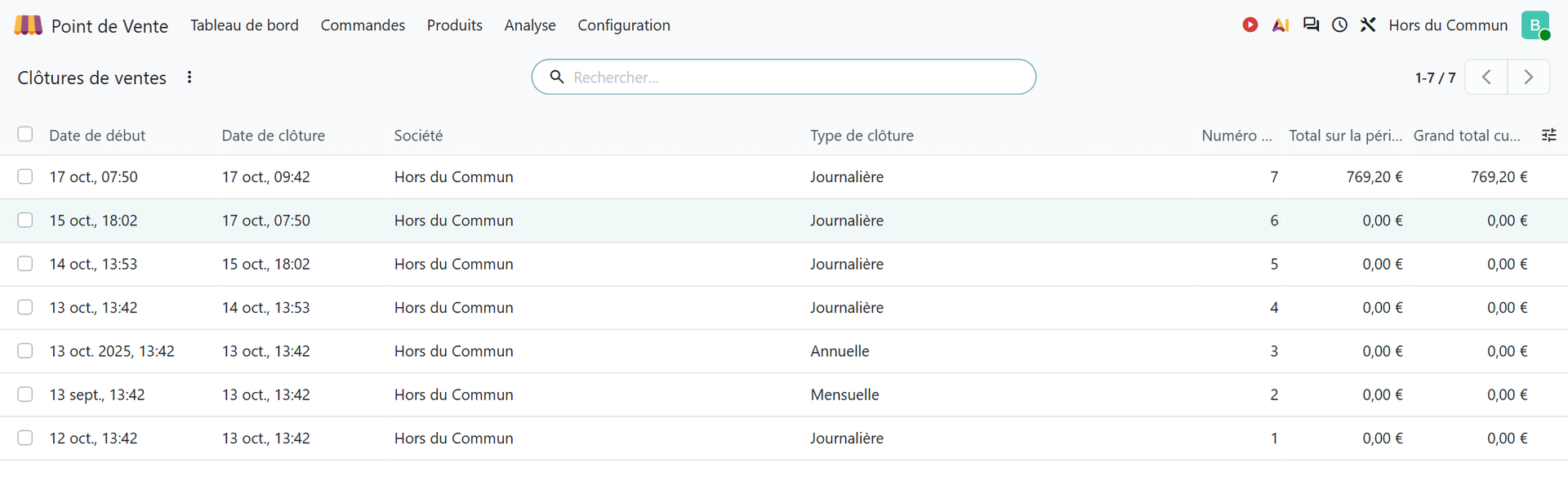
In this example, days with no sales produce a closing at €0.00, and the test day shows €769.20 in sales, the sum of the six receipts. These closings meet a BOFiP requirement: a daily, monthly and annual closing, with cumulative totals that must never be purged.
4. An on-demand integrity check
An administrator can run the check at any time from Point of Sale › Reporting › French Statements › POS Inalterability Check. Odoo recalculates all the fingerprints and produces a report showing the first and last transactions in the chain, and flags the first altered document if it finds one.
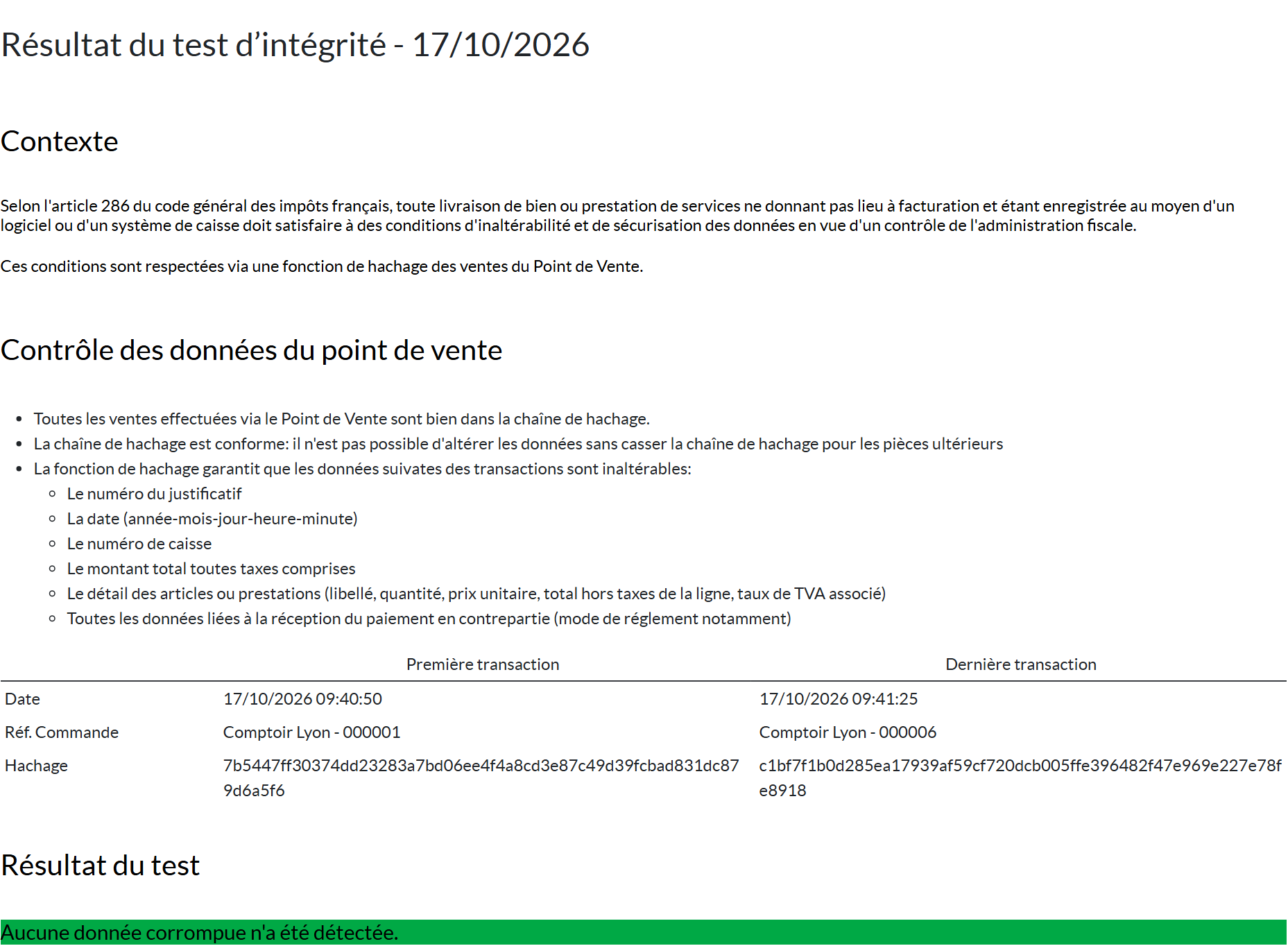
Running this report should be a reflex after any technical work on the database.
What are the risks during a tax audit?
Tax officers can turn up unannounced at your business premises (Article L. 80 O of the French Tax Procedures Code) to check that you hold the certificate for each POS software or system. They do not have to prove fraud: the absence of the document is enough. Refusing their visit is penalized in the same way.
The penalty is set by Article 1770 duodecies of the CGI: a fine of €7,500 per POS software or system without proof. You have thirty days to submit your observations and provide the missing document: if it is produced within that time, the fine is not applied. Once the fine has been applied, you have sixty days to bring yourself into compliance, after which the authorities can come back to check and penalize you again. Producing a fake certificate is a separate matter: it is the criminal offense of forgery.

You, when the tax officer asks for your POS certificate and the scale connected to the counter counts as a second piece of software.
This unannounced visit is limited to physical observations: the officer does not examine your accounts. Securing your POS can, however, also be checked during a tax audit of your accounts, and then it is your entries that are reviewed. POS sales that flow cleanly into the accounting journals each time a session is closed save you from reconciling them by hand. Configuring journals, taxes and bank reconciliation is at the heart of our page on SME accounting with Odoo.
Which pitfalls can make an Odoo point of sale non-compliant?
Odoo's software is certified by its publisher. Your installation, however, can fall outside that framework. Here are the mistakes that really matter.
- Tampering with the security mechanism. The BOFiP is clear: anyone who changes the inalterability, security, retention or archiving functions, through development or configuration, voids the certificate and becomes a “publisher” themselves, with the obligation to secure the new version. Odoo's documentation forbids changing the code that ensures data integrity and disclaims all liability for malfunctions caused by uncertified third-party apps.
- Uninstalling the certification module. According to Odoo's documentation, uninstalling resets the security fingerprints: the system no longer guarantees the integrity of past data.
- Forgetting about versions. The certificate covers one version of the software. Every new major version, as defined by the BOFiP (a version that changes the security parameters), requires a new certificate. At each Odoo migration, check that your document covers the version actually installed.
- Overlooking other devices. One proof document per POS software or system: a scale that stores payments, an ordering kiosk that accepts payment methods other than bank cards, or a second POS software each need their own.
- Training on the live register. “Training” or “test” mode is also subject to rules for identifying fictitious transactions. To train your teams, use a test database.
- Keeping only Z reports. The BOFiP requires all data to be kept line by line for six years, not just end-of-day totals.
Are you taking over an Odoo point of sale that is already installed, with modules added over the years by a former provider? Have someone check that none of them touches POS orders or the certification module before relying on the certificate. This check naturally fits into the audit and scoping phase of an Odoo project, which reviews the existing setup before any configuration. We describe how it unfolds, from workshops with key users through to gap analysis, on our page how an Odoo audit works.
What should you check before putting the Odoo point of sale into service?
Before the first receipt is rung up, five checks are enough to stay on the safe side.
| Item to check | Where to check it |
|---|---|
| Active Odoo Enterprise subscription | Your Odoo contract, subscription number |
| Anti-fraud certification module installed | Apps, module l10n_fr_pos_cert |
| Country filled in on the company record | Settings, Companies |
| Certificate downloaded, personal, up-to-date version | Customer account on odoo.com, then filed with tax records |
| Fingerprint chain intact | Point of Sale › Reporting › French Statements |
One last topic comes right after the POS: the e-invoicing reform. The Odoo 20 documentation describes an automatic transmission, every ten days, of transaction and payment data subject to e-reporting, including sales to private individuals, and lists a module “France - E-reporting for Point of Sale”. A secure POS and e-reporting rely on the same sales data: it is best to configure them together. The reform timeline and what Odoo covers are detailed on our page on e-invoicing with Odoo.
In short: Odoo is not NF525 certified, and it does not need to be for your POS to be compliant. What counts is Odoo SA's individual certificate, an Enterprise subscription, an intact certification module and an installation that nobody has changed where they should not have. These points are checked before a point of sale goes live, then at each migration and throughout ongoing support after go-live.
- BOFiP-Impôts, BOI-TVA-DECLA-30-10-30, “Obligation d'utilisation de logiciels ou systèmes de caisse sécurisés” (obligation to use secure POS software or systems), version of March 25, 2026: https://bofip.impots.gouv.fr/bofip/10691-PGP.html/identifiant=BOI-TVA-DECLA-30-10-30-20260325
- Odoo, official Odoo 20 documentation, “France” (fiscal localization, Point of Sale section, VAT anti-fraud certification): https://www.odoo.com/documentation/20.0/fr/applications/finance/fiscal_localizations/france.html

Article written by Billy Felicie
Odoo integration expert at Hors du Commun (Lyon). I have been helping SMEs implement their digital tools and optimize their business processes for more than 5 years.