
Yes, Odoo is a good ERP for a services company of 10 to 250 people: it connects the CRM, quotes, projects, timesheets, subscriptions, support and invoicing in a single database, which lets you invoice at a fixed price, on time spent or by milestone, and track the margin of each engagement. It becomes a bad choice when the team does not log its time, or when it is configured as if for a company that sells products.
A services company sells hours, days, fixed-price packages and contracts. Its asset is its teams' time, and its margin is decided between what was sold, what was actually consumed and what was invoiced. An ERP is useful to it if it makes these three numbers readable without a spreadsheet on the side. The screens in this article are from Odoo 20; it works the same way in Odoo 19, give or take a few labels.
Why does Odoo suit services companies?
In most of the consulting firms, agencies, engineering firms and maintenance companies we meet, information is scattered. Sales reps track their deals in a CRM, project managers in a task management tool, consultants log their time in a spreadsheet, and invoicing is done in accounting software. Every move from one tool to the next means re-entering data, and every re-entry is a chance to forget a billable hour.
Odoo removes these handoffs. The standard flow of an engagement looks like this:
- an opportunity in the CRM becomes a quote, with service products;
- the signed quote automatically creates the project and its tasks;
- consultants log their time on these tasks;
- the hours logged feed the delivered quantity on the order, and therefore what remains to be invoiced;
- the invoice is generated from the order, and the payment is reconciled in accounting.
Everything is in the same database, with a single customer file. The project manager, the sales rep and the CEO look at the same numbers. That is the main argument, well before the functional depth of each app.

You when the CRM, the timesheet spreadsheet and the invoicing software show three different revenue figures for the same engagement.
This reasoning applies to most service businesses, from consulting to on-site work. We detail the apps we deploy for each one, and how we connect them, on our page Odoo for services companies.
Can Odoo invoice at a fixed price, on time spent and by milestone?
Yes, and it is often the deciding criterion. In Odoo, the invoicing method is set on the service product, in the “Invoicing Policy” field. Three settings cover most service contracts.
- Prepaid/Fixed Price: the fixed-price package. The amount sold can be invoiced as soon as the order is confirmed, whatever the time spent.
- Based on Timesheets: time and materials. Each hour logged on the task is added to the delivered quantity and becomes billable.
- Based on Milestones: invoicing in stages. When a project milestone is marked as reached, the corresponding share of the order becomes billable.
The second important setting is “Create on Order”. With “Project & Task”, confirming the quote creates a project and one task per service line. Nobody needs to recreate the engagement by hand, and time is linked to the right order line from the start.
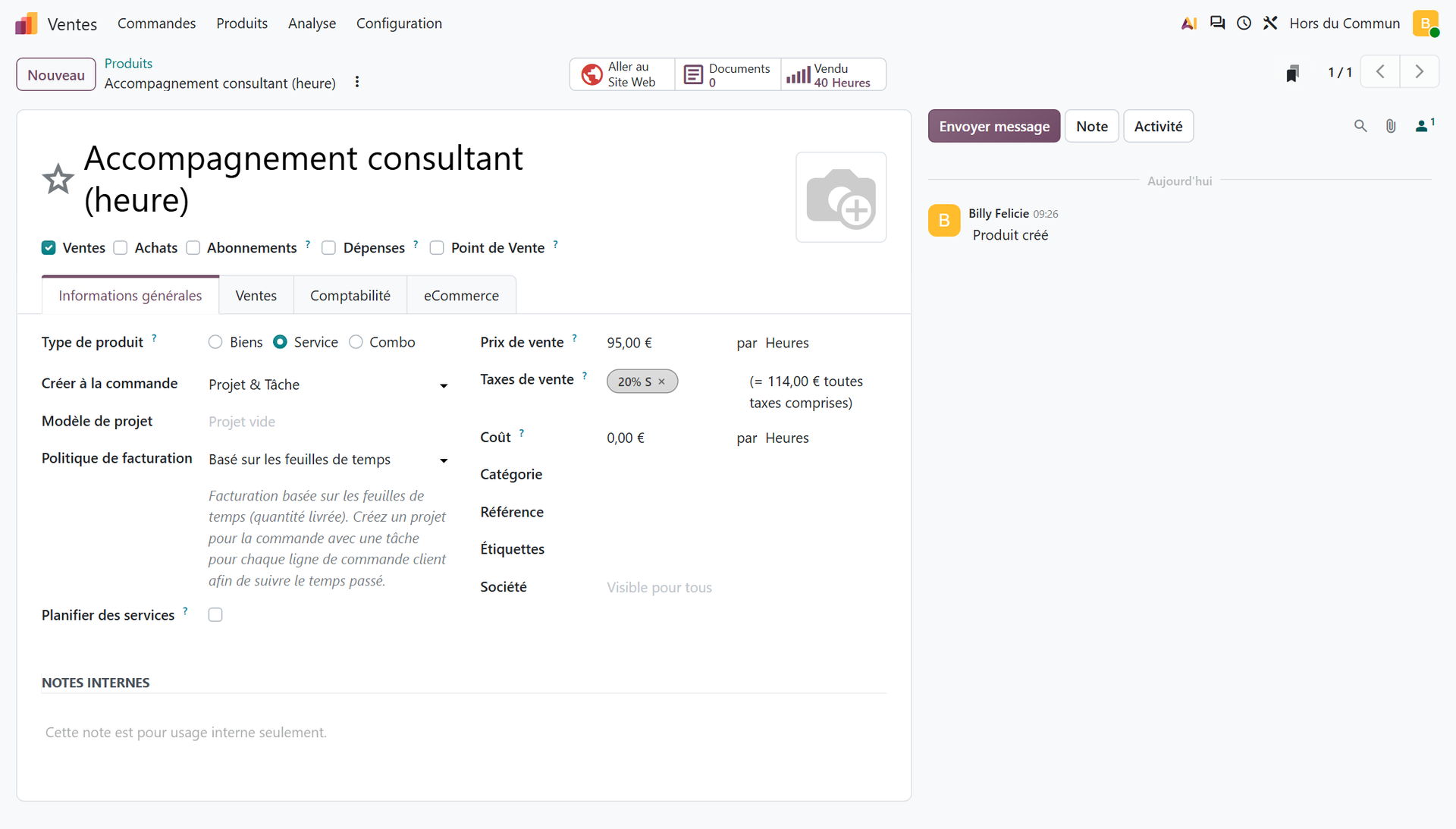
The choice between fixed price and time and materials is not technical, it is commercial. Odoo's documentation sums it up well:
“Time and/or materials invoicing is generally used when it is not possible to accurately estimate the size of a project, or when the requirements of a project are likely to change.” (Official Odoo 19 documentation, Time and materials invoicing)
A single order can mix both. In our demo database, a quote combines a fixed-price assessment and support sold by the hour: one project, two tasks, two invoicing rules. It is the most common case in consulting, and Odoo handles it without development. Re-billable expenses (travel, the consultant's hotel nights) follow the same path: an expense linked to the order can be re-invoiced to the customer from that order.
Can you track the margin of each engagement in Odoo?
Yes. The project created by the order carries an analytic account, and Odoo gathers there what was sold, invoiced and consumed. On the cost side, the timesheet is valued at the hourly cost of the employee who logged it. On the sales side, the amounts come from the orders and invoices linked to the project.
In Odoo 20, buttons at the top of the project form give the summary: sales, estimated costs, actual costs, hours logged versus hours planned. In the Invoicing tab, you map each consultant to an order line, with their sales price and hourly cost.
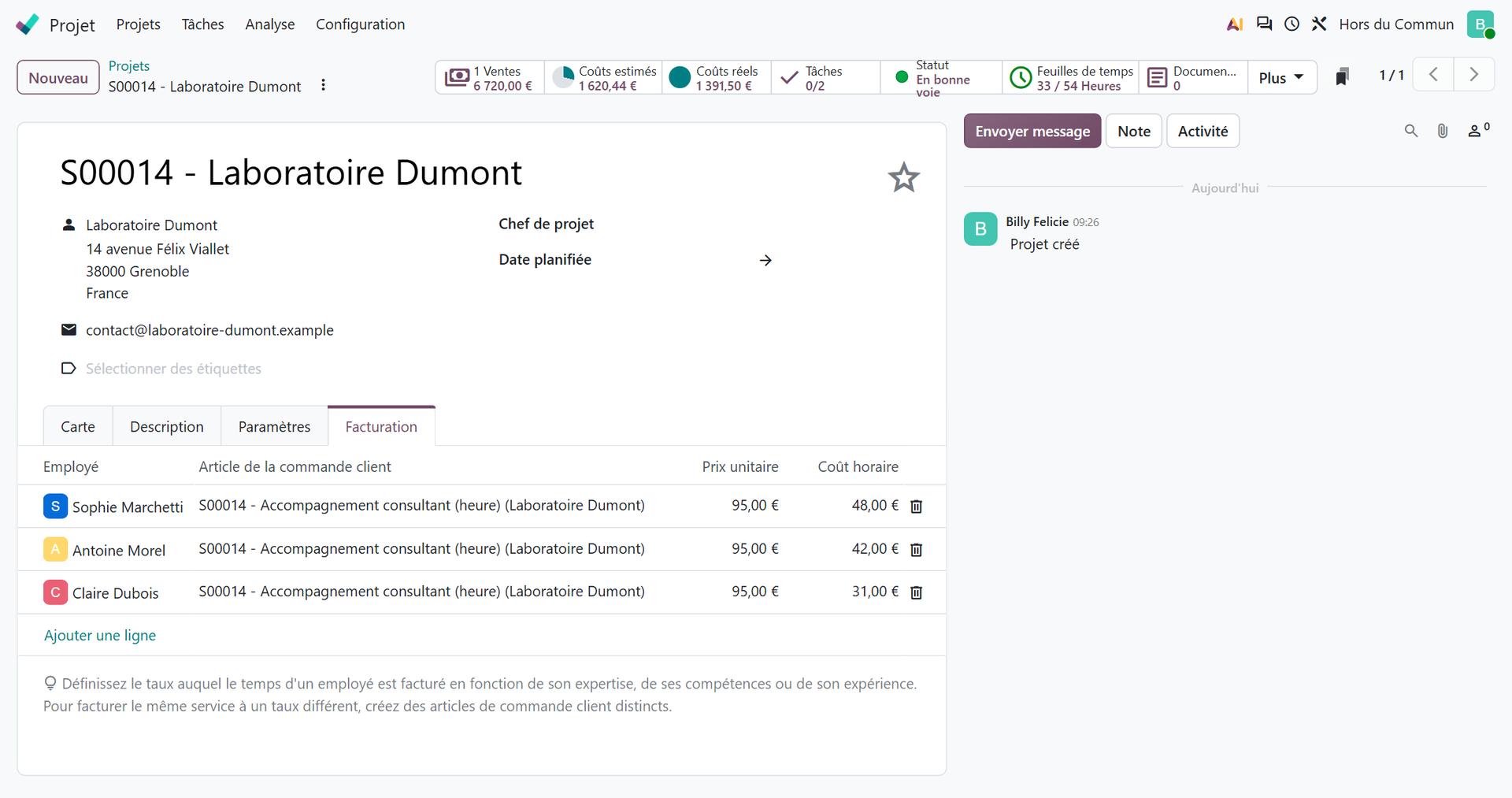
In this example, three consultants logged 33 hours out of the 54 planned (14 for the assessment, 40 for the support). Odoo values them at their respective hourly cost (€48, €42 and €31) and shows €1,391.50 in actual costs, to compare with the hours sold at €95 each. The project manager sees during the engagement, not at closing, whether the hours budget is starting to slip.
One point to watch when fixed price and time and materials share the same project: the mapping in the Invoicing tab applies to all tasks. Without care, the hours spent on the fixed-price assessment end up linked to the line sold by the hour, and invoiced a second time. Check the order line on the timesheets before the first invoice.
Two conditions make this number reliable. The first: an accurate hourly cost on each employee record, ideally a fully loaded cost validated with your accountant, and reviewed with every raise. The second: time logged every day or every week. A consultant who fills in their month from memory on the last Friday produces a wrong margin, whatever the software.

You when your spreadsheet says the engagement is profitable, but nobody has logged an hour in it for three weeks.
To make this discipline easier, the Timesheets app offers a timer: the consultant clicks Start when beginning a task, Stop when leaving it, and the time spent is added to their timesheet. The manager can then validate the time, and a setting lets you invoice only validated timesheets. Configuring projects, timesheets and team planning is covered on a dedicated page, which we invite you to read here: projects, timesheets and planning in Odoo.
What about recurring contracts, support and field work?
Many services companies live on recurring revenue: maintenance, managed services, subscriptions, annual contracts. Three Odoo apps cover these needs, and they all share the same customer base as projects.
- Subscriptions: automated recurring invoicing, renewals and recurring revenue tracking, based on recurring plans (monthly, yearly…).
- Helpdesk: support ticket management. With the Timesheets and Time Billing options enabled on a team, the time spent on a ticket can be invoiced to the customer, after the fact or in advance.
- Field Service: scheduling interventions at customer sites, route and worksheets to fill in on site.
The point is not to have three more apps. It is to see, on a customer's record, their maintenance contract, their open tickets, the ongoing project and their unpaid invoices. A sales rep preparing a renewal then knows whether the customer used twice as much support as planned. That overall view is what separate tools never provide.
Which French settings should a services company check?
This is the point demos forget. In France, VAT (TVA) on a provision of services is not due at the same time as VAT on a sale of goods:
“Article 269-2-c of the CGI (French General Tax Code) provides that for provisions of services, the tax becomes chargeable, as a general rule, upon receipt of down payments, of the price or of the remuneration, or, by option, on the basis of debits.” (BOFiP, France's official tax guidance, BOI-TVA-BASE-20-20, Provisions of services)
In practice, if you have not opted for the debit basis, the VAT on a services invoice is reported in the month the customer pays, not the month of the invoice. Odoo can handle this: in the Accounting settings, the Cash Basis option enables VAT on payments received. The French chart of accounts provided by Odoo also distinguishes sales taxes on goods (“20% G”, due on invoice) from those on services (“20% S”, due on payment), with a suspense account for output VAT.
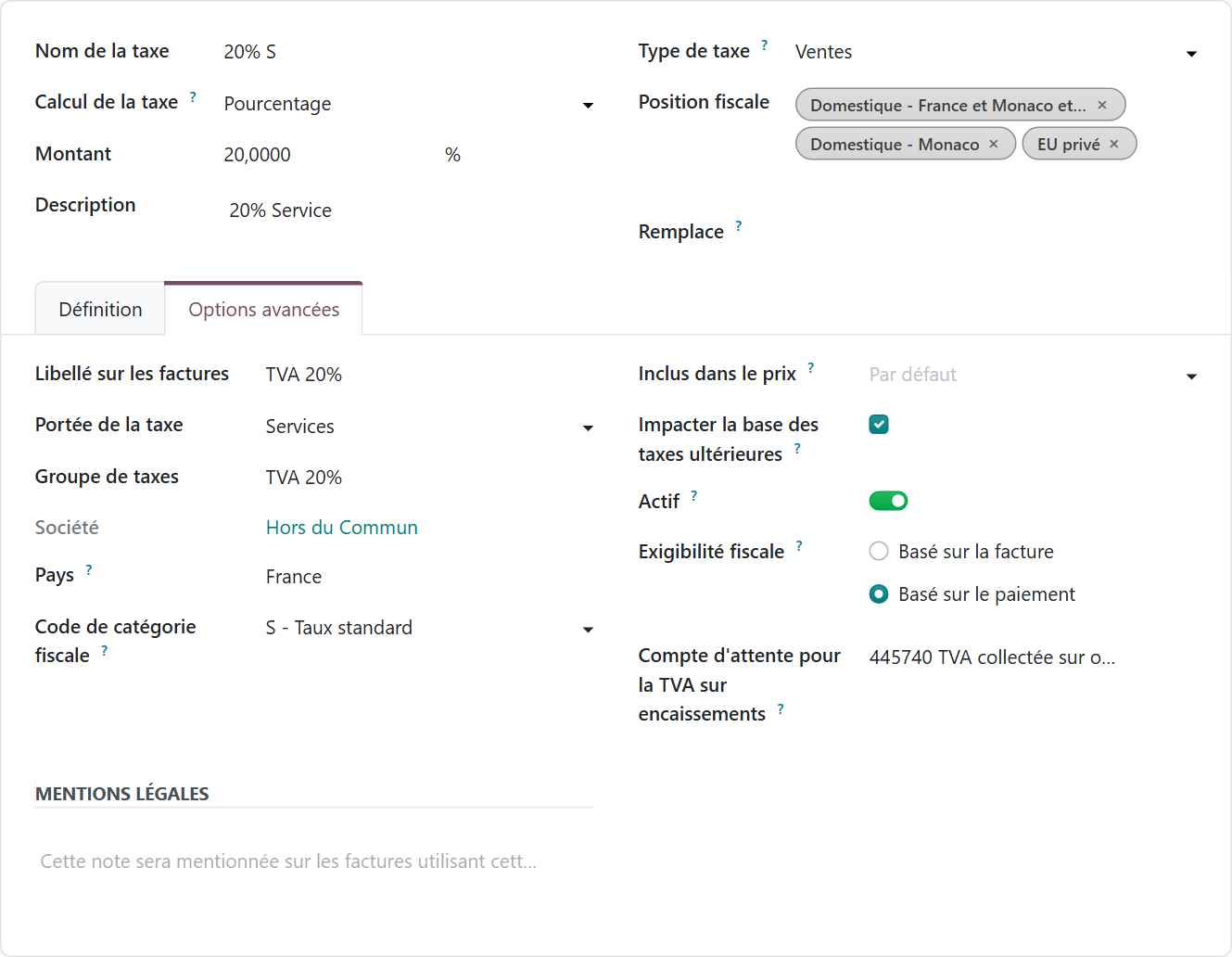
The classic trap: service products created with the goods tax. The VAT is then reported too early, and the discrepancies show up at the first consistency check. Check the tax on each service product before the first invoice, and have your accountant validate the principle. The topic becomes even more important with the e-invoicing reform, which also requires sending the administration payment data for transactions whose VAT is due on receipt of payment, chief among them provisions of services. We explain how to prepare Odoo for this deadline on our page e-invoicing with Odoo.
What are Odoo's limits for a services company?
Better to know them before signing.
- Time entry is still done by people. Odoo calculates a margin from what it is given. If the team refuses to log its time, no configuration will make up for it.
- The hourly cost is an average entered by hand. Odoo does not calculate on its own a full cost that includes overhead: that is a management decision to make with your accountant.
- Fixed price is invoiced on order or by milestones. The actual progress of a fixed-price package is read in hours consumed. The question of work in progress at year-end closing is handled with your accountant, not in the configuration.
- Large organizations have other needs. Beyond a few hundred employees, with service centers in several countries and fine-grained skills management, dedicated resource management software can be justified.
- Some requirements call for custom development. A report format imposed by a key account or a very specific rate grid does not always fit the standard.
On this last point, the rule is simple: you exhaust the standard before writing a line of code. Much of a services company's needs can be covered by configuration, and each piece of custom development added makes version upgrades heavier.
Which services companies is Odoo the right choice for?
Odoo is at its best in services companies of 10 to 250 people that have outgrown the spreadsheet but have neither an IT department nor a big-vendor budget. It is also the core of our business: at Hors du Commun, most of our projects involve teams of 10 to 50 users.
The line of business matters less than size. Our services clients include a training organization, a communications agency and a maintenance company. Three unrelated businesses, yet the same backbone: sell, deliver, measure time, invoice, collect payment. The lesson we draw from this: that backbone is what needs careful configuration, the rest follows.
On the budget side, license prices are public. On odoo.com, the Standard plan costs €19.90, then €24.90, per user per month with an annual commitment, and gives access to all apps. The Custom plan (€35.90, then €44.90) adds Studio, multi-company management and the external API: it is often the one you need as soon as a services group has several entities. Watch out for the Light User license, at €7.90: according to Odoo's pricing grid, it covers time off, expenses, planning or field service, but not timesheet entry. A consultant who logs their hours therefore counts as a full user. On top of these licenses comes the cost of the implementation, which depends on the scope and the quality of the data to migrate.
How do you make an Odoo rollout succeed in a services company?
Projects that fail in services rarely fail because of the software. They fail because consultants do not adopt time entry, or because invoicing was configured on a theoretical case. Our method comes down to four principles.
- Start from the real flows. How is a deal sold, how does it become an engagement, who enters what, how is it invoiced? The invoicing rules follow from your contracts, not from a demo.
- Start with the backbone. CRM, quotes, projects, timesheets and invoicing first. Subscriptions, Helpdesk and Field Service next, once the first flow is running.
- Test on real engagements. Three or four recent engagements replayed end to end, from quote to payment, reveal the gaps in the configuration before go-live.
- Make time entry painless. A timer, weekly validation by the manager, and margin figures shared with the team: when consultants see what their time entries are used for, they enter them.
It all starts with a clear description of your needs: your contract types, your invoicing rules, your KPIs. You can put it in writing yourself with our Quick specification builder for Odoo, which then serves as the basis for scoping.
In short, Odoo is a good ERP for a services company as long as it is configured to sell time, not products: the right service products, the right invoicing policies, accurate hourly costs, cash-basis VAT, and a team that logs its time. That is what we set up at Hors du Commun with the services SMEs we support, before and after go-live.
- Odoo, official Odoo 19 documentation, “Time and materials invoicing”: https://www.odoo.com/documentation/19.0/fr/applications/sales/sales/invoicing/time_materials.html
- DGFiP (French tax administration), Bulletin officiel des finances publiques, BOI-TVA-BASE-20-20, “Taxable event and chargeability, provisions of services”: https://bofip.impots.gouv.fr/bofip/283-PGP.html/identifiant=BOI-TVA-BASE-20-20-20120912

Article written by Billy Felicie
Odoo integration expert at Hors du Commun (Lyon). I have been helping SMEs implement their digital tools and optimize their business processes for more than 5 years.