
For an SME, AI in Odoo costs the Odoo license, which you already pay, plus prepaid AI credits, listed at €1 per credit in Odoo's in-app purchase catalog, plus configuration time. Two items can be added: switching to the Custom plan if your use cases fall under agentic AI, and credits for other services, such as vendor bill digitization.
So there is no single “Odoo AI price,” but a low entry cost, pay-as-you-go consumption, and a less visible cost: the time spent writing the right instructions and checking the results. Here is each item with Odoo's public prices, followed by the example of a fictional SME with 15 users. Screens are from Odoo 20.
What makes up the cost of AI in Odoo?
The cost of AI in Odoo breaks down into four very different items.
| Item | How it is paid | What makes it vary |
|---|---|---|
| Odoo license | Per user per month | Standard or Custom plan, number of users |
| AI credits and other in-app purchases | Prepaid credit packs | Feature used, complexity and size of the request |
| API key from an AI provider | Provider's invoice | Odoo version, hosting, chosen AI model |
| Configuration | In-house time or integrator time | Number of use cases, data quality, testing |
Before putting numbers on it, one question comes first: for which uses? Drafting an email, summarizing a note, reading a vendor bill: each one consumes differently. If you are still choosing your use cases, we have put together a guide, sent by email, covering eight artificial intelligences to set up with Odoo to boost productivity. You can request it here: the 8 AIs to set up with Odoo.
Do you need to change your Odoo subscription to use AI?
For everyday uses, not necessarily. The Standard and Custom plans both give access to all apps. According to Odoo's pricing page as of September 27, 2026, the Standard plan costs €19.90 per user per month with an annual commitment in the first year, then €24.90. The Custom plan costs €35.90, then €44.90.
The catch comes down to two words printed on the pricing page: “agentic AI.” The page places agentic AI, like Studio and the external API, in the Custom plan column. It does not give the exact list of features concerned. If your project relies on agents that create or update records, get Odoo to confirm in writing, before you sign, which plan your use falls under.
The same caution applies to AI fields, the fields that fill themselves in from an instruction. The Odoo 20 documentation states that you add them with Studio, or without Studio as a property field, and it warns that installing Studio can affect the database's pricing plan. The same need can therefore lead to a plan change, or none, depending on how it is configured.
For 15 users, the gap between the two plans is 15 × €16, or €240 per month in the first year, then 15 × €20, or €300 per month after that. Over the first year, that comes to €2,880, more than four times the in-app purchase budget in the costed example below.
How much do Odoo AI credits cost?
Odoo's AI features consume credits purchased separately from the subscription. The Odoo 20 release notes state it bluntly, in a passage left in English: all AI features now require credits, purchased through the in-app purchase system (IAP). The Odoo documentation sums up the principle:
“Credits are purchased in packs from the Odoo IAP catalog, and pricing is specific to each service.” (Official Odoo 20 documentation, In-app purchases)
In the in-app purchase catalog, checked on October 17, 2026, the Odoo AI service is listed at €1 per credit, with 20 free credits. Four packs are offered, all at the same unit price:
- starter pack: 10 credits for €10;
- standard pack: 100 credits for €100;
- advanced pack: 500 credits for €500;
- expert pack: 1,000 credits for €1,000.
That leaves the real question: how many credits per action? The catalog gives no rate per feature. It only states, in English, that consumption varies with the AI feature, the complexity of the task and the size of the request. Summarizing three lines and having an agent analyze a long document do not cost the same: only measuring your own uses will tell.

You, trying to work out how many credits a note summary costs, knowing it depends on the size of the request.
The catalog also spells out four rules that matter to a CFO. Credits do not expire. They are tied to one service and one database: digitization credits do not pay for AI, and vice versa. Automatic top-up can be enabled, which buys a new pack without any action on your part. Finally, unused credits can be refunded on request within 30 days of purchase.
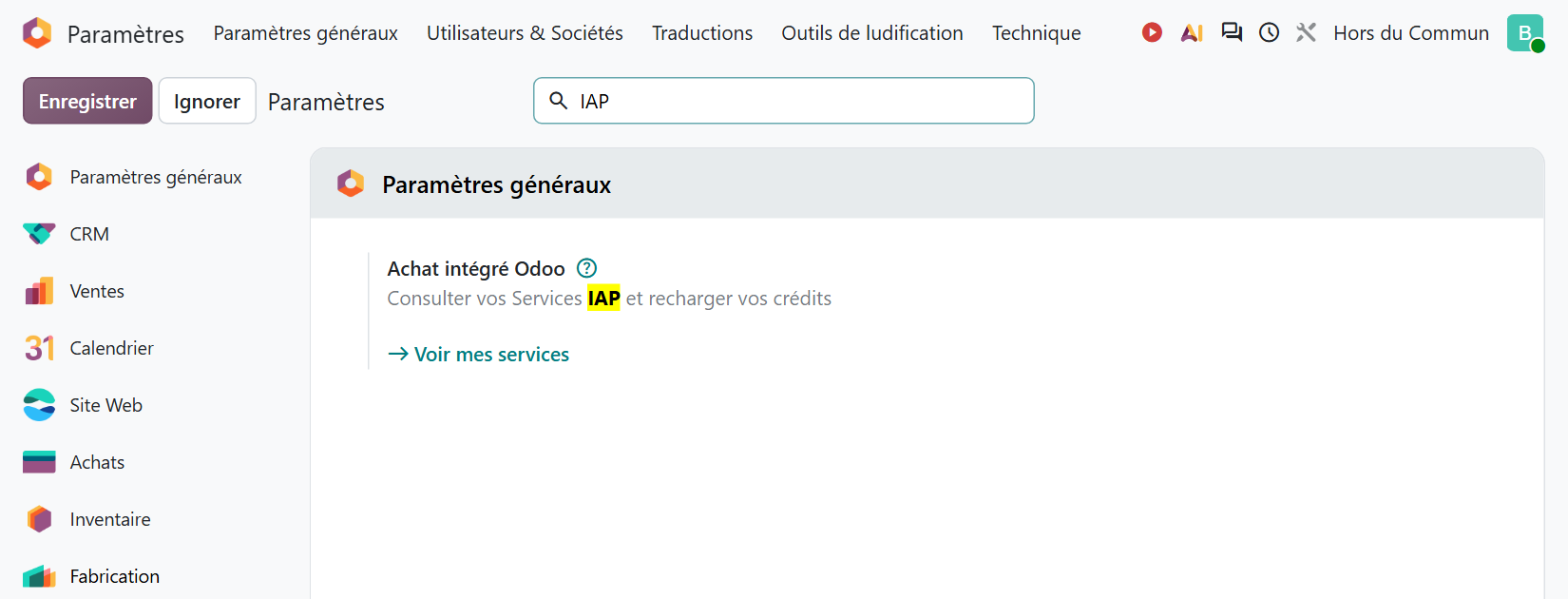
In the database, credits are accessed from the General Settings, in the “Odoo IAP” block: the “View My Services” link opens the “IAP Accounts” list, with the balance of each service and a “Buy credits” button.
What other paid services come on top of AI in Odoo?
Part of what business owners call “Odoo's AI” does not run on Odoo AI credits, but on other in-app purchase services, each with its own credit account. Odoo's pricing page explicitly lists them among what is not included in the plans: SMS, contact autocomplete, lead generation, and the AI that scans vendor bills and expense reports.
Prices taken from the catalog on October 17, 2026:
- Document digitization (vendor bills, expense reports, resumes): one document uses one credit, 200 free documents, then €15 per 100 documents, €120 per 1,000, €1,000 per 10,000.
- Contact autocomplete: one credit per company or person enriched, 30 free enrichments, then €6.50 per 100 and €60 per 1,000.
- Lead generation: €0.20 per credit, in packs starting at 500 credits for €100, with each company or person found using one credit.
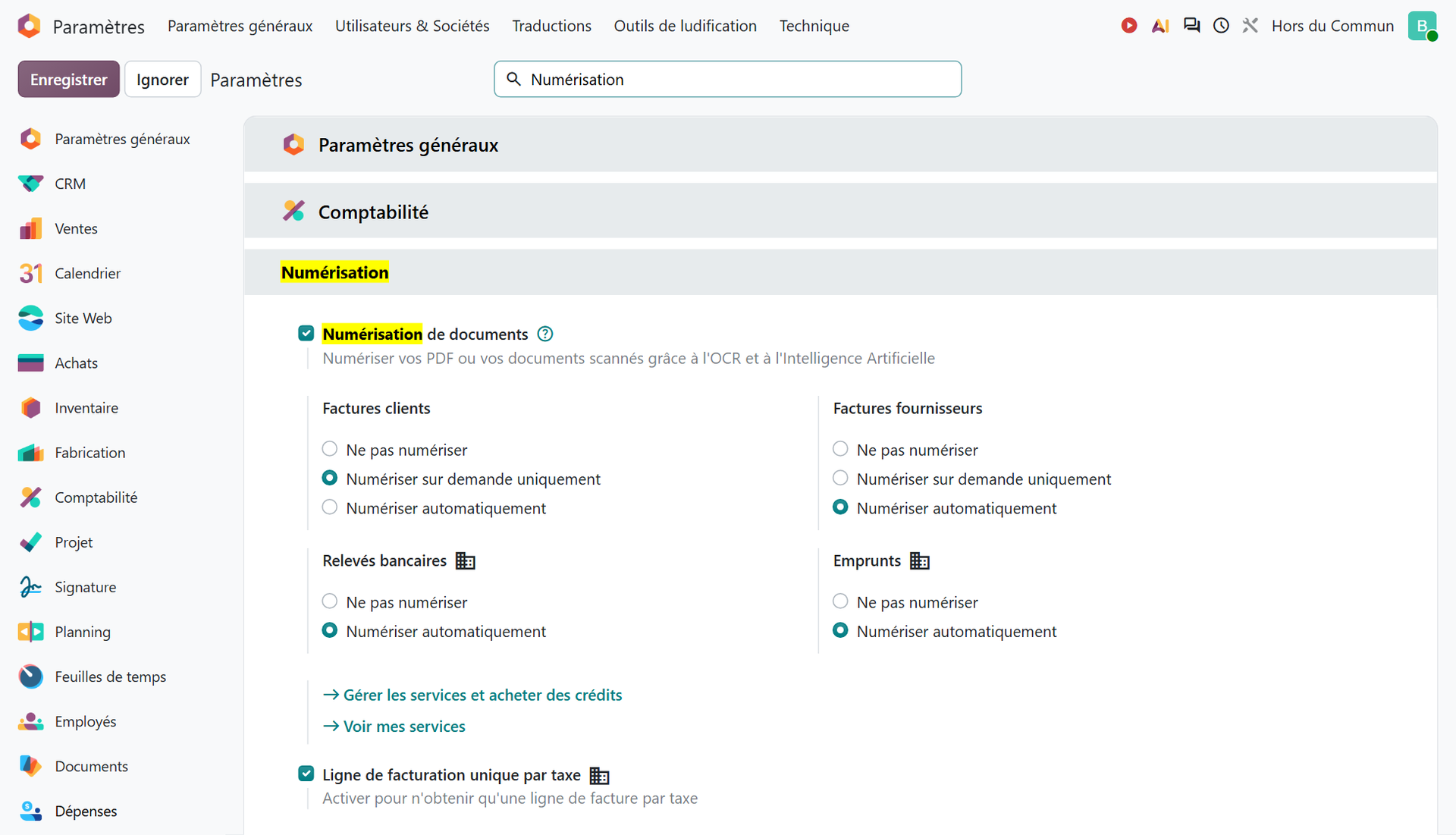
For an SME that receives 300 vendor bills a month as PDFs, digitization means 3,600 documents a year. Four packs of 1,000, or €480, cover the year, and the remainder is not lost since credits do not expire. This item could go down with the reform. The Odoo documentation states that, depending on the settings, bills received through Peppol are imported into the purchase journal and created as drafts; that they then use no digitization credits remains an inference, to be confirmed with Odoo. The pace will depend on your vendors. We cover the reform timeline and what Odoo handles on our page dedicated to e-invoicing with Odoo.
Can you use your own OpenAI or Gemini key to pay less?
The answer depends on your Odoo version and your hosting. In Odoo 19, the official documentation lists Gemini and OpenAI (ChatGPT) as supported providers. API keys are required there for databases on Odoo.sh or on your own server, and optional on Odoo Online. They are entered in the AI app, under Configuration › Settings, in the Providers section.
With your own key, the Odoo 19 documentation warns that using AI may incur additional fees with the provider, and that exact costs depend on the AI model used and the type of account with each provider. So expect a second invoice, a second account to manage, and privacy terms to read with that provider.
In Odoo 20, things change. The release notes state that all AI features run on credits, and the documentation page on API keys, marked as under construction, points to the Odoo AI page of the in-app purchase catalog. On an Odoo 20 test database hosted on Odoo Online, searching for “OpenAI” in the settings returns no setting. If you are migrating an Odoo 19 database that used its own key, get Odoo to confirm what happens to it in Odoo 20, and plan a credit budget.
How much does configuring AI in Odoo cost?
This is the item that appears in no catalog. A poorly scoped AI burns credits producing unusable answers. Configuration means writing the instructions (the text of each AI field, the system prompt and the sources of each agent), testing on real cases, correcting, then training teams to review what the AI suggests.
Insee (France's national statistics institute) shows this in its study on digital technology in businesses: in 2024, 9% of companies with fewer than 50 employees (in a scope starting at 10 employees) used AI, compared with 33% of those with 250 employees or more. The institute puts forward an explanation that speaks directly to cost:
“Adopting new technologies requires bearing fixed costs, and proves all the less costly when the company already has assets that complement AI (digital infrastructure, digital skills, etc.).” (Insee Première no. 2061, 2025)
Applied to Odoo, one consequence follows: AI costs less in a clean database. If your product records are incomplete, your contacts duplicated or your sales stages fuzzy, the AI is building on sand. The Odoo documentation warns that an AI field displays a warning when its instruction asks for information missing from the record. The time spent cleaning up data is therefore part of the real cost of AI, just like the credits.
This time is estimated like any other Odoo project: use case by use case, with a clear definition of what is expected. What makes a project budget vary, from scope to the state of the data, and the pitfalls that make it spiral are detailed in our article on the real price of an Odoo implementation.
What budget should an SME with 15 users plan for?
Take a fictional trading SME, with 15 users on the Standard plan. It wants three uses: help drafting emails and quotes, automatic reading of its 300 monthly vendor bills, and enrichment of new customer records.
| Item | Assumption | Order of magnitude |
|---|---|---|
| Standard license | 15 users, Standard plan | Unchanged, if Odoo confirms these uses do not fall under agentic AI |
| Odoo AI credits | 20 free credits, then one pack of 100 | €100, to be measured over the first month |
| Digitization | 3,600 bills a year | €480 (four packs of 1,000) |
| Contact autocomplete | Pack of 1,000 enrichments | 60 € |
| Configuration | Instructions, testing, training | The item that determines the outcome |
Under these assumptions, and excluding configuration, this SME's in-app purchases stay under €700 in the first year. If it later wanted an AI agent that updates its orders, and that use fell under agentic AI, switching to the Custom plan would add €240 per month in the first year, then €300: that is where the real trade-off lies.
These are orders of magnitude: the only reliable figure for Odoo AI credits will be the one measured on your database. Hence the value of starting small.
How do you keep the AI bill from spiraling in Odoo?
A few settings are enough to stay in control of your credits.
- Set an alert threshold. Each IAP account in the database has two fields, “Email Alert Threshold” and “Email Alert Recipients.” According to the catalog, recipients are notified before the balance reaches that threshold. Put the person who pays there, not just the person who uses it.
- Keep automatic top-up turned off at the start: in the first few months, each pack purchase should remain a deliberate decision.
- Watch what runs on its own. The Odoo 20 documentation states that a scheduled action runs once a day to fill in AI fields that are still empty, and that it is active by default. Before adding an AI field to thousands of records, measure on a small batch.
- Choose the right digitization mode. With “Digitize on demand only,” the user decides which documents are sent for digitization; “Digitize automatically” processes every document received.
- Measure before expanding. One first use case, one month of balance tracking, then a decision: expand, adjust the instructions, or stop.

You, discovering on Monday morning that the scheduled action has filled an AI field on all 4,000 contacts in the database.
Odoo 20 AI agents do have a safeguard: according to the release notes, an agent that reaches its tool call limit asks the user for confirmation before continuing. It is not a budget cap, but it is a signal not to approve on autopilot. To find out what the assistant, agents and AI fields actually do before costing their use, our guide to Odoo AI for SMEs, written on Odoo 19, reviews them one by one, along with their limits.
In short, AI in Odoo costs little in credits and a lot in attention: credits can be managed, agentic AI can force a plan change, and configuration makes the difference between an expense and time saved. Cost it use case by use case, before plugging in any AI at all.
- Odoo, official Odoo 20 documentation, “In-app purchases (IAP)”: https://www.odoo.com/documentation/20.0/fr/applications/essentials/in_app_purchase.html
- Insee, “Les technologies de l'information et de la communication dans les entreprises en 2024” (information and communication technologies in businesses in 2024), Insee Première no. 2061, July 2025: https://www.insee.fr/fr/statistiques/8604126

Article written by Billy Felicie
Odoo integration expert at Hors du Commun (Lyon). I have been helping SMEs implement their digital tools and optimize their business processes for more than 5 years.