
To reduce the cost of an Odoo project in an SME, you need to act on what really weighs on the bill: implementation time, far more than licenses. The most effective levers are well known: start with a tight scope, favor standard configuration over custom development, clean your data before the migration, and choose the subscription plan that fits your real needs.
None of these levers means cutting corners on quality. They mean not paying for what isn't used, or isn't used yet.
Where does the money really go in an Odoo project?
The most visible cost is the license. It is also the most predictable. According to Odoo's pricing page, the Standard plan costs €19.90 per user per month with an annual commitment in the first year, then €24.90. The Custom plan costs €35.90, then €44.90. The same page states that the implementation service is not included in these plans.
Yet implementation is what makes a budget vary: scoping the requirements, configuration, data migration, testing, user training and, where needed, custom development. An Odoo project is paid for first and foremost in working days, both yours and your integrator's. Reducing the cost therefore means reducing the number of days needed, and above all the number of unplanned days.
Overruns are common, and their main cause is well identified:
“The report also reveals that more than a quarter of organizations exceeded their project budget, with additional technology needs cited as the top cause.” (Panorama Consulting Group, press release presenting The 2026 ERP Report, March 4, 2026)
In the same press release, Chris Devault of Panorama explains the mechanism: organizations often discover deal-breaking misalignments late in the project, and then turn to additional technologies, scope expansion and custom development. That is the whole point: a gap spotted during scoping is settled with a decision; a gap spotted three weeks before go-live is settled with a contract amendment.
Our white paper, presented as the complete guide to optimizing your processes and keeping your costs under control, is available by filling out a short form on this page: how to implement Odoo in your SME without breaking the bank. The following sections review the concrete levers.
How do you reduce the initial scope without giving up the essentials?
Odoo's Standard and Custom plans include all the apps for a single price. That is an advantage, and also a trap: it is tempting to open accounting, CRM, the website, marketing, payroll and planning from day one. The license doesn't change, but every app added at launch requires its own configuration, data, testing and training, all at the same time as everything else.
The most cost-effective lever is to split the project into phases. The first phase covers the processes the business cannot run without. The next ones come once the first is stable, when teams have mastered the tool and can express what they really expect.
Take the example of a 25-person trading company. Phase 1: sales, purchasing, inventory and invoicing, because they are what bring the money in. Phase 2: CRM and automated sales follow-ups. Phase 3: the online store. Each phase stays short, is tested on real cases and goes live without waiting for the others.
To sort things out, ask a single question for each requirement: can the business invoice on day one without it?
- Essential at launch: it goes into phase 1.
- Useful, but you can work around it for a few months: it waits for phase 2.
- Comfort or a habit from the old software: it is discussed again once Odoo is up and running, and often disappears on its own.
This sorting has a second effect: it forces trade-offs before signing. A requirement filed under phase 2 doesn't quietly slip into phase 1 in the middle of testing, which is precisely the overrun mechanism Panorama describes.
Why does standard configuration cost less than custom development?
Custom development is paid for several times. First when it is created: writing up the requirement, coding, testing. Then with every new version of Odoo: the pricing page states that upgrades are included in the plans, but lists maintenance of custom code among what is not included. And the Odoo 20 upgrade documentation warns that a database containing custom modules cannot be upgraded until a version of those modules is available for the target version.
There is a lesser-known effect on the license. According to Odoo's pricing page, the Standard plan is hosted on Odoo Online, for databases without custom modules. Studio, the external API, multiple companies in the same database and hosting on Odoo.sh or on your own servers fall under the Custom plan, and the cost of Odoo.sh hosting is not included. The first piece of custom development therefore moves your subscription from the Standard plan to the Custom plan: €35.90 per user per month with an annual commitment in the first year, then €44.90, instead of €19.90, then €24.90.
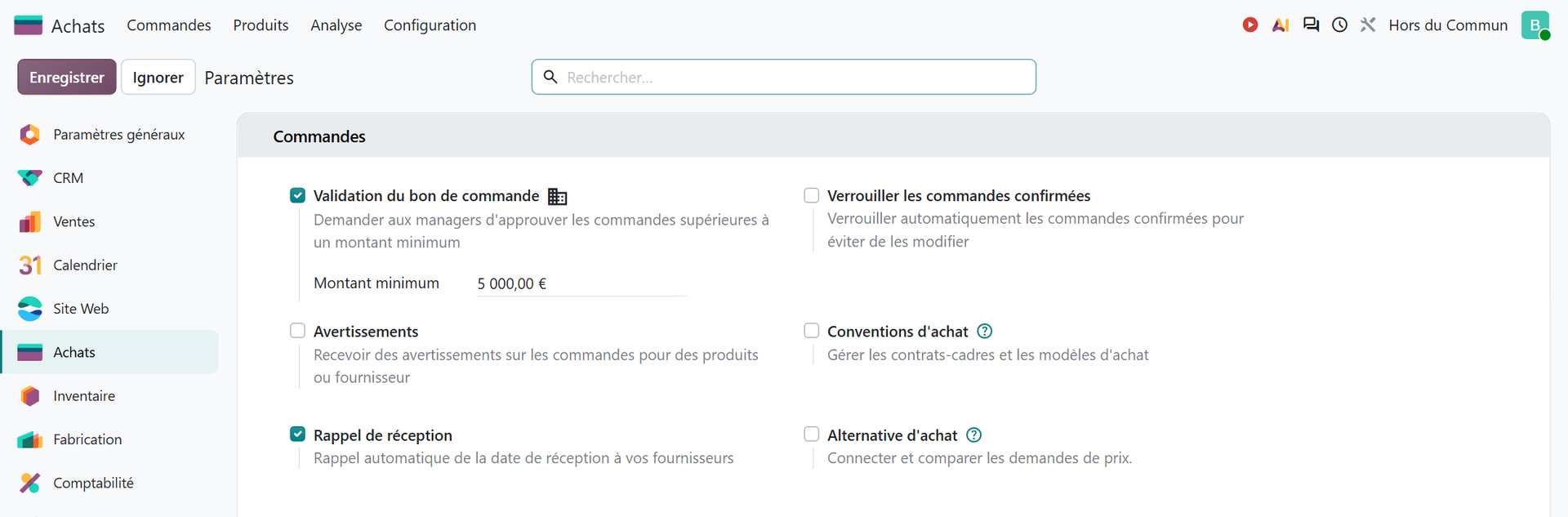
So before asking for custom development, check what the settings already offer. A common example: a business owner wants any purchase order above a certain amount to be approved by a manager. This approval flow doesn't require a single line of code. It is enabled in Purchase › Configuration › Settings, with the “Purchase Order Approval” option and its “Minimum Amount” field.
When the standard isn't enough, there are still intermediate steps before writing code. Studio also falls under the Custom plan, but the upgrade documentation states that Odoo upgrades customizations made with Studio as long as the app remains installed and its subscription active. A third-party module also requires the Custom plan: Odoo's documentation states that Odoo Online is incompatible with modules from the Odoo Apps Store. Sometimes, a simple internal rule is enough. One calculation puts most debates into perspective: how many hours does the development save each month, compared with the days it costs to build and then maintain? A feature that saves two hours a month and costs ten days of work will probably never pay for itself.
These levels of customization, the cases where custom development is justified and the questions to ask before writing code are covered on a separate page, which we invite you to read here: when should you avoid custom development in Odoo?

You when the “quick” little development to keep the old software's screen comes back on the bill with every new version of Odoo.
How do you avoid paying twice for data migration?
Data migration is the most frequently underestimated cost. The reflex is to transfer everything: fifteen years of customers, items and invoices. Yet every file migrated has to be mapped, cleaned, imported and checked. The less there is, the less the migration costs.
The right scope is limited to what must exist on go-live day: active customers and vendors, items sold or purchased, prices, then open items (opening stock, open orders, unpaid invoices, account balances). The history can remain available in the old tool, in read-only mode.
Cleaning, then, is work your teams do better than anyone, because they know the data: duplicates to merge, formats to standardize, empty fields that would block an import. Done in-house, before the project, it is time that won't show up on the integrator's bill. Done too late, it puts the whole schedule under pressure.
One last point: a poorly prepared import is expensive, because it can't be undone with a click. Odoo's documentation is explicit:
“Imports are permanent and cannot be undone.” (Official Odoo 19 documentation, Import and export data)
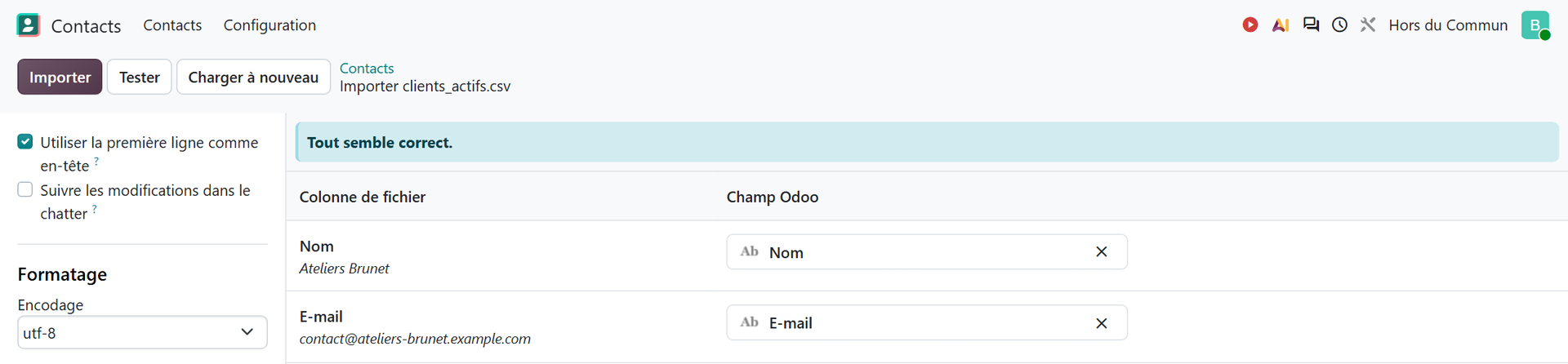
The same documentation provides the safeguard: the “Test” button, which checks that the data is valid before you click “Import.” On a file of active customers that has already been cleaned, Odoo simply replies that everything seems valid.
The complete method, from defining the data needed at go-live to checking it in business flows, is described in our guide how to migrate your data to Odoo.
Which subscription plan and how many users do you really need to pay for?
A question that often comes up: is Odoo free? The One App Free plan lets you use a single app without a license, regardless of the number of users. According to the pricing page, installing just one additional app moves you to the Standard plan. For an SME that wants to connect sales, purchasing, inventory and invoicing, free use therefore ends very quickly.
Between Standard and Custom, the rule is simple: if you need neither Studio, nor agentic AI, nor the external API, nor multiple companies in the same database, nor hosting on Odoo.sh or on your own servers, nor custom modules, the Standard plan is enough. Every development or connector you consider should be weighed with this plan change in mind.
On the user side, three points deserve attention:
- According to the pricing page, a paying user is a person who has access to Odoo's back-end interface, excluding the portal, to create, view or edit documents. Customers and vendors who view their invoices on the portal are not paying users. Make a list, by name, of the people who really need access.
- An employee recorded in the Employees app without a linked user is now billed: the pricing page lists them among Light Users. Build this into the budget from the start.
- Also according to the pricing page, the first-year discount applies for 12 months to the users listed in the initial order. It is therefore better to finalize the list of users before ordering.
Finally, Odoo's artificial intelligence features consume credits purchased separately. If you plan to use them, set aside a dedicated budget line rather than getting a surprise.
| Lever | What it saves you from paying for |
|---|---|
| Project split into phases | Configuration, testing and training for apps that aren't used yet |
| Standard configuration first | The development, its adaptation to each version and the move to the Custom plan |
| Data cleaned in-house | Redone imports and migration days billed for useless history |
| Users listed by name | Licenses opened “just in case” |
| Trained key users | Repeated support requests after go-live |
How do you keep costs from climbing after go-live?
A project can stay on budget until go-live, then exceed it in the following six months. The typical causes are human: poorly trained users who rebuild their Excel spreadsheets alongside Odoo, support requests on questions that have already been answered.
The most effective lever is to appoint a key user in each department. They take part in scoping, validate tests on real cases, receive in-depth training and become the first line of support for their colleagues. Every question they handle in-house is a question that doesn't go through an outside provider.
Second lever: the decision-maker's availability. A decision made in two days rather than two weeks is a direct saving. Blocking out a weekly slot to settle open questions costs less than any contract amendment.
Third lever, often overlooked: funding. Training costs that accompany the project may be covered by your OPCO (French training funding body), under the Qualiopi framework. Other solutions exist to fund the investment or spread it out: loans dedicated to digital transformation, leasing, public aid for industrial SMEs. Examples of these programs, their amounts and the processing time for grants are presented on a page we invite you to read here: cost and funding options for an Odoo implementation in an SME.
Finally, the phase after go-live deserves to be planned from the start, with ongoing support after go-live: it is what turns installed software into a tool people actually use.

You when phase 1 stays on budget and the CRM waits patiently for phase 2.
Which false savings end up costing the most?
Some decisions lower the initial quote and raise the final bill. The most common ones:
- Skipping scoping to “save time.” The misalignments discovered at the end of the project are exactly the ones that blow budgets.
- Reproducing the old software exactly. Every screen copied is one more development, and a heavier tool to use.
- Choosing a free third-party module without checking who maintains it. It will have to be tested, and carried over to every new version.
- Migrating everything, history included. The volume migrated multiplies cleaning and checks, for data that is rarely consulted.
- Cutting training to the bare minimum. The hours saved before go-live come back as support afterward.
The common thread is always the same: time invested in scoping, sorting requirements and preparing data avoids paying for much more of it at the end of the project. Reducing the cost of an Odoo project isn't about buying fewer days; it's about wasting fewer.
- Panorama Consulting Group, press release presenting The 2026 ERP Report, March 4, 2026: https://www.panorama-consulting.com/panorama-consulting-group-releases-latest-study-of-erp-implementation-outcomes-across-the-globe/
- Odoo, official Odoo 19 documentation, Import and export data: https://www.odoo.com/documentation/19.0/fr/applications/essentials/export_import_data.html

Article written by Billy Felicie
Odoo integration expert at Hors du Commun (Lyon). I have been helping SMEs implement their digital tools and optimize their business processes for more than 5 years.