
Yes, you can run a coworking space with Odoo: the Rental, Subscriptions, Website, eCommerce, Events and Invoicing apps cover room booking, membership plans, online sales and invoicing in a single database. The limit shows up when members and visitors book on the same website with different payment rules: the standard assumes a single type of customer, and that is when you need custom development.
Odoo has no “coworking” app. You combine standard apps, each covering one part of the business: time sold by the hour or the half-day, recurring plans, events, the invoice. The screens shown here are from Odoo 20, with fictitious data.
Which Odoo apps cover coworking space management?
A coworking space sells three things at once: time (a meeting room by the hour, a desk by the half-day), recurring plans (the dedicated desk, the business address service) and seats at events. Each need has its app.
| Coworking need | Odoo app | What it provides |
|---|---|---|
| Meeting rooms, desks by the hour or by the day | Rental | Quotes, orders, scheduling, pickup and return, invoicing |
| Monthly or yearly membership plans | Subscriptions | Recurring plans, automated invoicing, renewals |
| Member rate and visitor rate | Sales (pricelists) | One price per plan, applied according to the contact |
| Online booking and payment | Website and eCommerce | Online catalog, payment, customer portal |
| Workshops, evening events, conferences | Events | Tickets, registrations, attendee check-in |
| Invoices and payments received | Invoicing or Accounting | Invoices, payments, collection tracking |
The core piece is the Rental app. Its official documentation describes it this way:
“The Odoo Rental application provides comprehensive solutions to configure and manage rentals. Send quotations, confirm orders, schedule rentals, register products when they are picked up and returned, and invoice customers, all from a single platform.” (Official Odoo 19 documentation, Rental)
Yet a meeting room is not equipment you lend out. Odoo plans for this, according to two pages of the Rental documentation that exist only in English: a service-type rental product can be a physical asset that never leaves the stock, such as a conference room or a workstation. To track each room's availability, Rental syncs with the Planning app: each room is declared under Planning › Configuration › Materials and linked to a role, and adding the service to a rental order checks and updates its occupancy.
On the licensing side, Odoo's pricing page counts as a paying user anyone who accesses Odoo to create, view or edit documents, as well as an employee recorded in the Employees app without a linked user. It lists among free users the customers who view their invoices on the portal and the website visitors who place eCommerce orders. So a member who books through the website does not cost a license, even if they book every day.
How do you manage members and their plans with the Subscriptions app?
A coworking plan is a recurring product tied to a recurring plan. The Subscriptions app includes several recurring plans by default, including Monthly and Yearly, and each subscription generates its invoices every period, with no re-entry.
“Odoo Subscriptions is designed to manage recurring revenue through subscription-based products or services. It handles automated billing, renewal management, and customer lifecycle tracking.” (Official Odoo 19 documentation, Subscriptions)
In practice, the membership of a freelancer who takes a dedicated desk and a business address for her company fits in a single subscription quote: two lines, a Monthly plan, a start date. Once confirmed, it moves to the In Progress status.
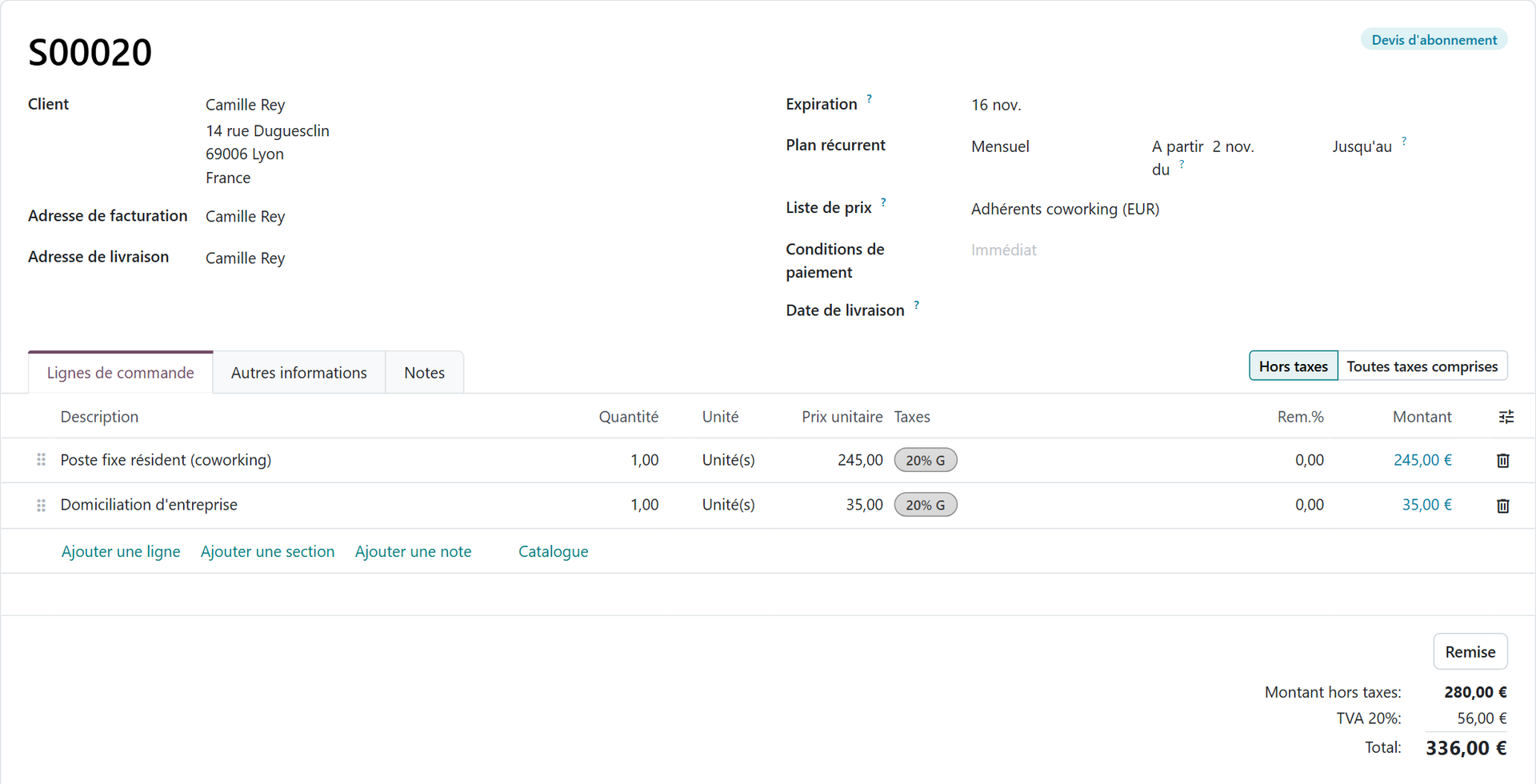
One detail in the documentation saves you from a dead end: the Days unit cannot be used as a subscription's billing period. The daily period is reserved for rentals, to avoid daily invoices. So a drop-in day or half-day is not sold as a subscription: it is a rental or a simple sale.
That leaves the price difference between a member and a visitor. It goes through a pricelist: you create a “Members” list, set the price of each service in it, and assign it to the relevant contacts. It then carries over to their quotes, like the one above.
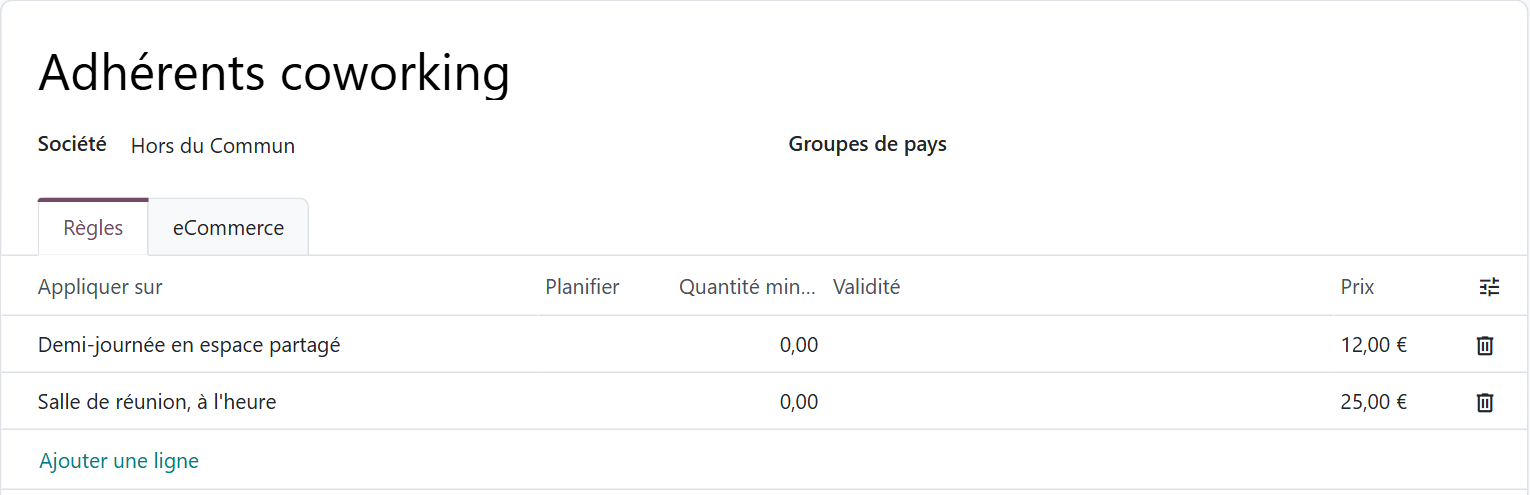
One point remains to be confirmed in a test database: the pricelist assigned to a contact does not seem to change on its own when their subscription ends. On a coworking project, switching the rate grid based on the subscription status was in fact part of the custom developments.
How does booking a room online work?
Online booking relies on eCommerce. The Rental documentation states it: the settings in the Rent Online section (minimum rental duration, days when nothing can be picked up or returned) only appear if the eCommerce module is installed, and you publish the room to the shop from the product form. The visitor books and pays on the website; the member finds their orders and invoices in their customer portal.
The website itself matters as much as the booking engine: room pages, event schedule, registrations, member area. On a dedicated page, we detail what an Odoo website connected to the CRM brings, from publishing events with registrations and ticketing to the portal where customers view quotes, invoices or subscriptions: building a website with Odoo.

You when the meeting room is still booked by phone and the schedule fits on a sticky note at the front desk.
Where does the standard stop when members and visitors book on the same website?
The difficulties concentrate where two audiences coexist: the member, whose plan covers the time slot or whose booking goes on their monthly invoice, and the visitor, who pays right away. On a coworking project, four limits of the standard came up.
- An unconfirmed quote does not block any availability. As long as the booking is not confirmed, the room stays available for sale: two customers can book the same time slot. This is structural, not a configuration flaw.
- Pickup and return are entered by hand. Logical for lent equipment, absurd for a room that nobody comes to collect or bring back.
- Payment methods are shown to everyone. Nothing lets you restrict deferred payment to members only.
- An offline payment waits for an actual payment receipt before confirming. A member's booking would therefore stay pending instead of being secured.

You when two customers show up at 2 p.m. for the same room, each with their unconfirmed quote.
These four points are things Odoo does not do out of the box, not a forgotten setting: the rental module is designed for equipment handed over in person.
What did a coworking space need us to build?
The initial requirement fit in one sentence: the member books without paying anything online, the visitor pays immediately, on the same website, with the same catalog, and without a single booking requiring manual rework.
The delivered scope includes the booking website, monthly invoicing calculated on actual use of rooms and events, online registration that varies with the participant's status, rate grids per plan, and the brand identity on the website and documents. Several pieces required custom development, to lift the limits described above and reconcile the two journeys.
- The time slot is blocked as soon as it is requested, and the start and end of the rental are marked automatically.
- Payment methods follow the profile, and a member's booking is confirmed without payment, on their monthly invoice.
- The rate grid follows the subscription status, and registration adapts to the status, individual or company.
The result: the time slot is blocked as soon as it is requested, the member never re-enters their card, and bookings no longer require any manual rework, whatever the customer's profile. The lesson goes beyond coworking: the standard assumes a single type of customer, and as soon as there are two, you have to dig into the mechanics underneath.
Does a coworking space necessarily need custom development?
Not necessarily. It all depends on the number of journeys. If all customers pay online when they book, the order is confirmed by the payment and the question of deferred payment does not arise. If all of them are members invoiced monthly, Subscriptions and Sales cover most of the need. These two cases are deductions to confirm on your own scenarios, in a test database, before deciding: blocking the time slot between the request and the confirmation still has to be checked in each of them.
Custom development is justified when both audiences share the same website and the same catalog, and bookings must stay free of manual rework. It also has a direct effect on licensing: Odoo's Standard plan runs on Odoo Online, which hosts databases without custom modules. Modules specific to your coworking space require the Custom plan, on Odoo.sh (a paid platform, on top of the licenses) or on your own servers. At the public price listed on odoo.com, the Standard plan costs €19.90 per user per month with an annual commitment the first year, then €24.90 (Custom: €35.90, then €44.90).
Before writing a line of code, each need deserves to be checked against the standard, then Odoo Studio, then third-party modules. Our page on custom development presents these four levels of adaptation, the hidden cost of a development and the questions to ask before launching it: when to adapt Odoo, and when to avoid it.
Where should you start to move your coworking space to Odoo?
The starting point is not the list of apps, it is a precise description of your customer journeys. A few questions tell you whether configuration will be enough.
- How many customer profiles make bookings: members, visitors, companies paying for their employees, internal use?
- For each profile, who pays, when, and by what means: card at booking, monthly invoice, bank transfer?
- What does each plan cover: a desk, meeting room hours, a number of half-days?
- What happens to a member's rate the day their subscription ends?
- Who does what at the front desk today, and which task should disappear?
With these answers, you test the edge cases in a test database: two simultaneous bookings for the same room, a member whose subscription expires the day before their booking, a visitor who cancels. If everything works out of the box, the project stays simple. If a case gets stuck, you know exactly which development you are buying, and why.
This reasoning applies beyond coworking, to any venue that mixes subscribers and walk-in customers: gyms, studios, shared workshops, event spaces. The difficulty rarely lies in the booking itself, but in two journeys coexisting on a single website.
- Odoo, Official Odoo 19 documentation, Rental: https://www.odoo.com/documentation/19.0/fr/applications/sales/rental.html
- Odoo, Official Odoo 19 documentation, Subscriptions: https://www.odoo.com/documentation/19.0/fr/applications/sales/subscriptions.html

Article written by Billy Felicie
Odoo integration expert at Hors du Commun (Lyon). I have been helping SMEs implement their digital tools and optimize their business processes for more than 5 years.