
Yes, in the vast majority of wholesale distribution SMEs, Odoo can replace a WMS: the Inventory app, together with the Barcode app, handles locations, receipt and delivery routes, putaway, batch or wave picking, lots, FEFO and carrier labels. A specialized WMS is only truly justified for a mechanized warehouse, industrial picking volumes or a multi-client third-party logistics business.
The question comes up as soon as a distributor compares quotes. On one side, an ERP that already manages sales, purchasing and accounting. On the other, dedicated warehouse software, often presented as essential. The right choice depends on your actual warehouse, not on the sales brochure. Here is what Odoo does out of the box, where it stops, and how to decide.
Can Odoo really replace a WMS in a wholesale distribution SME?
For an SME with 10 to 50 employees that buys, stores and resells, the answer is yes in most cases. A typical distributor has one or more warehouses, thousands of SKUs, vendor receipts, order picking and carrier shipments. All of this is a matter of configuring Odoo Inventory, with no custom development.
The real issue is not the feature list. It is warehouse discipline. A poorly used WMS will produce stock figures just as wrong as a poorly configured ERP. A well-framed Odoo, with coded locations, systematic scanning and cycle counts, gives you reliable real-time stock instead.
To sum up the decision:
| Your situation | Odoo alone | Dedicated WMS connected to Odoo |
|---|---|---|
| Distributor with one or more manual warehouses | Recommended | Rarely justified |
| Lot traceability, expiration dates, FEFO | Covered by configuration | Not needed for this reason alone |
| Conveyors, stacker cranes, picking robots | Insufficient | Worth a serious look |
| Logistics provider storing goods for several clients | Possible but limited | Often a better fit |
What do you expect from a WMS in a distribution warehouse?
A WMS (Warehouse Management System) drives the physical movements in the warehouse, location by location. An ERP knows how many units you have; a WMS knows where they are and who has to go and get them.
In a distribution business, you expect six things from it:
- receive vendor deliveries and check quantities against the purchase order;
- put each item away in the right place, based on its type, size or turnover;
- pick customer orders with as little walking as possible;
- ship: packing, carrier labels, tracking numbers;
- count inventory continuously, without closing the warehouse for a week every year;
- trace lots and serial numbers, from receipt to delivery.
Before comparing software, ask yourself which of these six functions cause you problems today. If the answer is “the stock is wrong and nobody knows where the products are,” the problem rarely comes from the lack of a WMS. It comes from the lack of locations, rules and scans.

You, when the customer is waiting for their pallet and the ERP just says “in stock,” with no aisle or rack.
What does Odoo Inventory do out of the box in the warehouse?
Everything below is described in Odoo's official documentation and is enabled through configuration, in the Inventory app settings.
Locations, routes and putaway
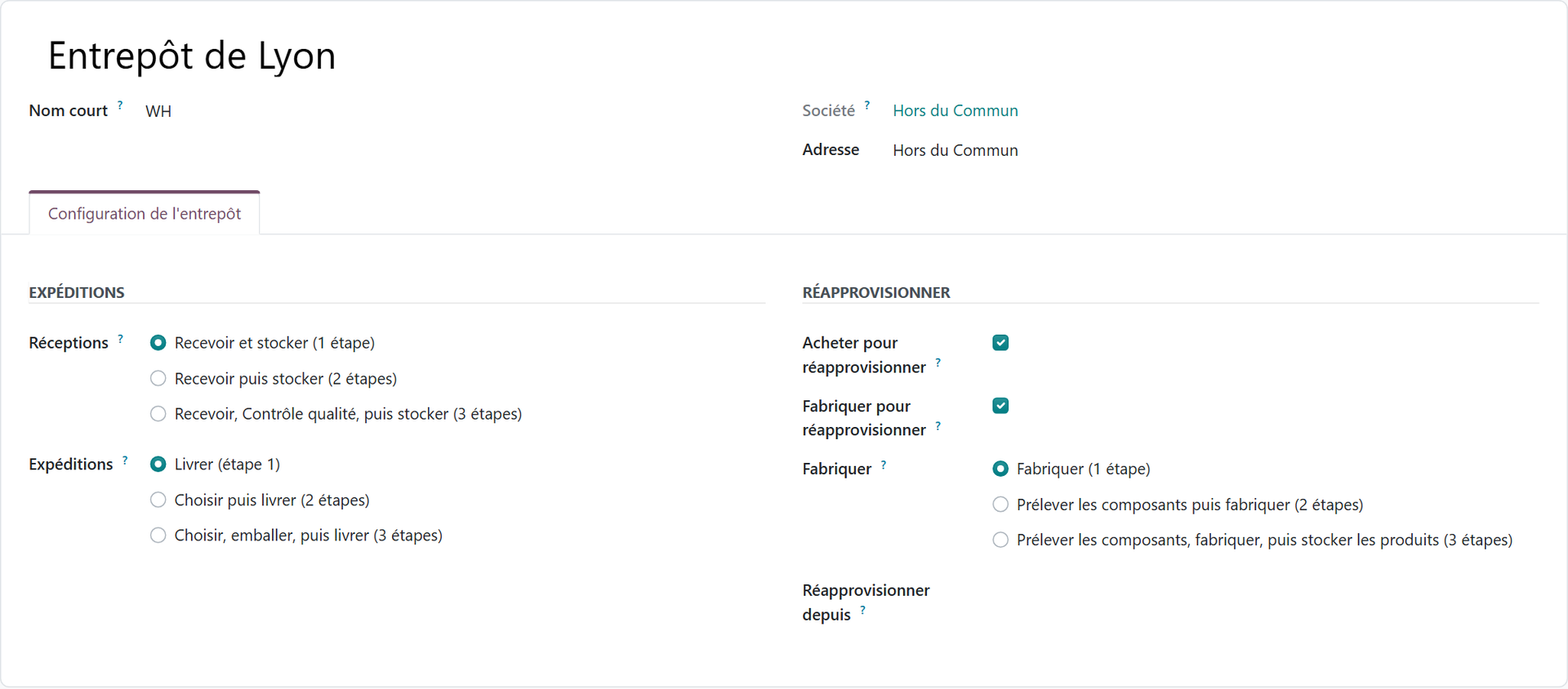
Odoo manages several warehouses, each divided into locations and sublocations: aisle, rack, level, bin. Multi-step routes structure the flows. For receipts, you choose one, two or three steps, the third adding a quality check before storage. For deliveries, the three-step version chains pick, pack, then ship. Once multi-step routes are enabled in the settings, the choice is made on the warehouse form.
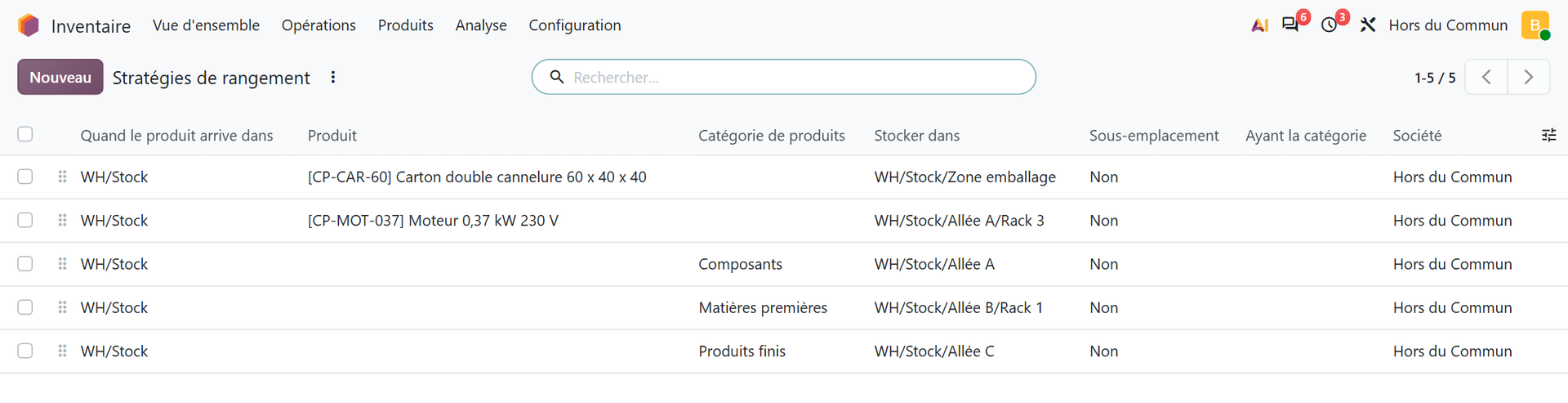
Putaway rules automatically send each product, or each product category, to the right location on arrival. In Odoo 20, the menu is called “Putaway Rules.” A product rule takes precedence over a category rule: the packing carton goes to the packing zone, the motor to rack 3 in aisle A, the other components to aisle A.
Storage categories go further by taking location capacity into account:
“Odoo then evaluates these locations based on the defined capacity and recommends the best one on the warehouse transfer form.” Official Odoo 19 documentation, “Storage categories” page.
Removal strategies and traceability
Odoo offers five removal strategies: first in, first out (FIFO, the default), last in, first out (LIFO), first expired, first out (FEFO), closest location, and least packages. They are defined per location or per product category.
Lots and serial numbers track every unit. Once expiration dates are enabled, each lot carries an expiration date, a best before date, a removal date and an alert date. For a distributor of food, cosmetics or medical products, this is the foundation of traceability.
Order picking and inventory
The batch, wave and cluster transfers setting unlocks three picking methods. Batch transfers group several orders into a single picking round. Wave transfers split orders and group them by location, category or shipping time. Cluster transfers sort items into one bin per order during the round.
On the inventory side, cycle counts are set per location, each with its own frequency: high-turnover zones are counted more often, without stopping operations. The counting method, how discrepancies are handled and the closing also require precise choices. We cover them in detail on our page dedicated to inventory management with Odoo.
Barcodes, terminals and carriers
The Barcode app handles receipts, transfers, picking and inventory adjustments by scanning. It works with USB scanners on fixed workstations, Bluetooth scanners paired with a smartphone or tablet, and mobile terminals with a built-in scanner. It reads GS1 barcodes, which is useful when your vendors already label their pallets.
Carrier connectors calculate shipping costs and generate labels. The documentation mentions DHL Express, FedEx, UPS and Sendcloud, among others. Budget-wise, Inventory and Barcode are part of the Standard and Custom plans, which include all apps. The Standard plan is listed at €19.90, then €24.90 per user per month, billed annually, on Odoo's pricing page.
Why is a single ERP an advantage for distributors?
A WMS manages the warehouse. It does not manage your purchase prices, your margins or your invoices. Yet in distribution, the warehouse is only one link in a chain that starts with the purchase order and ends in accounting.
With Odoo, this whole chain fits in a single database:
- replenishment rules trigger requests for quotation as soon as forecasted stock falls below the minimum;
- the reception report allocates incoming goods to priority customer orders;
- dropshipping has the vendor deliver directly to the customer;
- landed costs include freight, insurance and customs duties in the stock valuation;
- consignment lets you store and sell goods that still belong to the vendor.
Every physical movement updates the valuation and the accounting. There is no interface between two software packages to monitor, no stock drifting apart between the ERP and the WMS, no re-entry.
In the distribution businesses we support, from industrial parts to technical supplies, the difficulty is not driving robots. It is cleanly linking purchasing, stock and margin, which a single ERP does better than a patchwork of software. Receipts, lots, FEFO, carriers, valuation: the way we configure all of this for distributors is described on our page Odoo for wholesale distribution and logistics.
Where do Odoo's capabilities stop compared with a specialized WMS?
Odoo is not designed for everything. The documentation itself points out the limits of some methods, such as cluster picking:
“Urgent orders cannot be prioritized, and optimized batches must be created manually beforehand.” Official Odoo 19 documentation, “Cluster picking” page.
Beyond this point, several needs fall within the scope of a specialized WMS. We do not find them in the Inventory app documentation:
- controlling automated equipment (conveyors, stacker cranes, shuttles, robots), which expects real-time instructions and communicates with its own controllers;
- dynamic slotting optimization: Odoo puts items away according to the rules you define, it does not recalculate them on its own based on turnover;
- measuring picker productivity: standard times, targets, individual performance;
- task interleaving, for example a putaway and a pick in the same cart trip;
- multi-client logistics billing, for storage per pallet per day.
For a distribution SME, these needs are rare. If one of them is critical for you, there are two options: targeted custom development in Odoo, or a connected WMS. The choice depends on the cost and risk of each, not on principle.
How do you know if your warehouse needs a dedicated WMS?
Here are the signals we look for during an audit. If none of them applies to you, Odoo alone is enough.
- You are investing in mechanization: conveyor, automated storage, robots. The automation vendor often imposes its own software.
- You are a logistics provider and store goods for several clients, each with its own rules and billing.
- Individual picker productivity is your main cost lever, to the point that you want to measure it in detail.
- Your picking requires continuous prioritization, with urgent orders that must overtake rounds already started.
Conversely, these arguments do not justify a WMS: “our stock is wrong,” “we can't find the products,” “we want to scan,” “we manage lots.” All of this is solved with Odoo configuration and discipline on the floor. Buying a second piece of software to fix an organizational problem means paying twice and keeping the problem.

You, when you discover that the brand-new WMS does not fix the labels nobody was scanning.
If you keep a WMS, how do you connect it to Odoo?
Some companies already have a WMS that works, or a mechanization project that requires one. Odoo then remains the reference ERP and the WMS executes the physical movements. Three rules prevent unpleasant surprises.
- A single master for each piece of data. Products, customers, orders and valuation live in Odoo; detailed locations and picker tasks live in the WMS.
- Flows written down in black and white. Odoo sends the orders to pick and the expected receipts; the WMS sends back the quantities actually received, picked and shipped, with the lots.
- A compatible Odoo plan. On Odoo's pricing page, external API access is included in the Custom plan, listed at €35.90, then €44.90 per user per month, billed annually. Plan for it in the budget from the start.
A flow that breaks down on a Friday evening means wrong stock on Monday morning. You need to know who gets alerted and how a failed message is replayed. Exchange formats, security, incident recovery: we explain how we design these connections on the page connecting Odoo with an API.
How do you run a successful warehouse with Odoo?
At Hors du Commun, an Odoo integrator in Lyon, we have carried out more than twenty projects, mostly in companies with 10 to 50 users. In logistics, success rarely depends on the software. It depends on four steps.
- Audit the actual flows. We follow a receipt, a pick and a shipment on the floor, with the real constraints: docks, aisles, packaging, carrier schedules.
- Structure the data. Location codes, labels, packaging, product weights for carriers, counted opening stock. Clean master data secures the launch.
- Test with your terminals. Receipts, FEFO, picking, label printing: each scenario is replayed by the warehouse teams on their own hardware, before go-live.
- Start simple, then expand. First one- or two-step routes and systematic scanning; then waves, storage categories or detailed cycle counts, once the stock is reliable.
Support after go-live matters as much as configuration: the first weeks are when good or bad scanning habits take hold. And before choosing between Odoo alone and a WMS, it is better to have an outside eye look at your flows. How this study unfolds is presented on our page about how an Odoo audit works.
What should you remember before choosing between Odoo and a WMS?
For a distribution SME, Odoo replaces a WMS in most cases. Locations, routes, putaway, FEFO, lots, batch or wave picking, barcodes and carriers are covered by configuration, in the same tool as your purchasing, sales and accounting.
A dedicated WMS is justified for a mechanized warehouse, a multi-client logistics provider business or detailed productivity management. In all other cases, start by making your warehouse reliable in Odoo. If a need truly holds out, you will then know precisely what a WMS must bring you, and you will buy it for the right reasons.
- Odoo, official Odoo 19 documentation, “Storage categories”: https://www.odoo.com/documentation/19.0/fr/applications/inventory_and_mrp/inventory/shipping_receiving/daily_operations/storage_category.html
- Odoo, official Odoo 19 documentation, “Cluster picking”: https://www.odoo.com/documentation/19.0/fr/applications/inventory_and_mrp/inventory/shipping_receiving/picking_methods/cluster.html

Article written by Billy Felicie
Odoo integration expert at Hors du Commun (Lyon). I have been helping SMEs implement their digital tools and optimize their business processes for more than 5 years.